Home Interests Pop Culture

Best Procedural Drama Series From the 2000s

Dive into the past with these bingeable shows!
howchoo   (467)
September 8, 2023
52 minutes

Share

Interests
Posted in these interests:

nostalgia • 7 guides
popculture • 14 guides
television • 2 guides

The early 2000s brought about a huge variety of television, but one of the most popular genres was the procedural drama series. Ask anyone who watched cable in the early to mid 2000s, and they’ll confirm that new crime solving shows were popping up everywhere! While some lasted longer than others, there are a handful of TV series that still stick out today (and have great bingeworthy seasons)!

A procedural drama is a cross of technical detail and typical television flair. TV programs in this genre are focused on how crimes are solved, most featuring some form of law enforcement. Episodes are self-contained, meaning that viewers don’t have to have seen the previous episode to understand the current one.

I won’t deny that I’ve watched every show on this list at least once. However, it’s more than my own opinion that got them on this list in the first place, it’s the millions of viewers that tuned in each week a new episode was aired.

Take a dive into the past with the best procedural drama series from the 2000s (some of which are still on air today)!

NCIS

Creators: Donald P. Bellisario and Don McGill Years Running: 2003 – Present Stars: Mark Harmon, Sasha Alexander, Michael Weatherly, Pauley Perrette, Sean Murray, Cote de Pablo, Emily Wickersham

Naval Criminal Investigative Service (NCIS) Special Agent Leroy Jethro Gibbs leads a group of colorful personalities in investigating crimes that range from murder to espionage to terrorism, in cases that are connected to Navy and Marine Corps personnel.

Original/Current Network: CBS Number of Seasons: 19

NCIS was an unexpected success, as it wasn’t until its third season that it ranked in the Top 20. As of 2021, it is the second-longest-running scripted, non-animated U.S. prime-time TV series currently on air. What makes NCIS special isn’t it’s “catch the bad guy” setting, but the characters themselves. While they appear two-dimensional or basic early on, each episode has you learning more about them. Whether it’s a flashback, dream, conversation, or simple habits that the character shows, viewers get to explore the characters throughout the series. This is a much better strategy than one large dump of information squeezed into an episode. NCIS has a bit of everything for viewers: comedic relief, emotional backstory, and a good mystery every week. NCIS became such a hit that there are three spin-offs: NCIS: Los Angeles (2009-present), NCIS: New Orleans (2014-2021), and NCIS: Hawai’i (2021-present)!

NUMB3RS

Creators: Nicolas Falacci and Cheryl Heuton Years Running: 2005 – 2010 Stars: Rob Morrow, David Krumholtz, Judd Hirsch, Navi Rawat, Alimi Ballard, Peter MacNicol

NUMB3RS is a drama about an FBI agent who recruits his mathematical-genius brother to help the Bureau solve a wide range of challenging crimes in Los Angeles. Inspired by actual events, the series depicts how the convergence of police work and mathematics provides unexpected revelations and answers to the most perplexing criminal questions.

Original Network: CBS, ION Television Number of Seasons: 6

If you think a show including mathematics as a main plot device would be boring, you’d be wrong in the case of NUMB3RS. As with other procedural shows, authorities using a consultant in a non-law enforcement field isn’t a new concept. NUMB3RS iteration of it just includes some mathematics lessons, including real life examples and imagery. What made this show enthralling wasn’t the math, however, it was the character development and connections. Whether it was the on-again-off-again relationships or the banter between father and sons, viewers felt like a part of the group when they watched the FBI team and CalSci consultants solve crimes (and share a meal afterwards). There’s even a book, The Numbers Behind NUMB3RS: Solving Crime with Mathematics, written by Keith Devlin and Dr. Gary Lorden, a consultant to the show along with Dr. Orara, a physics consultant. The book explains some of the mathematical techniques that have been used both in actual FBI cases and in other law-enforcement departments.

Criminal Minds

Creator: Jeff Davis Years Running: 2005 – 2020 Stars: Mandy Patinkin, Thomas Gibson, Shemar Moore, Matthew Gray Gubler, A. J. Cook, Kirsten Vangsness, Paget Brewster

An elite squad of FBI profilers analyzes the country’s most-twisted criminal minds, anticipating the perpetrators’ next moves before they can strike again. Each member of the “mind hunter” team brings his or her expertise to pinpoint predators’ motivations and identify emotional triggers to stop them.

Original Network: CBS Number of Seasons: 15

Obviously a television show that has 15 seasons has to be good, right? In the case of Criminal Minds, that’s absolutely correct! Any amateur crime sleuth or person with strong intuition would love a show that’s centered on the minds of criminals. While they don’t handle the everyday perpetrator, the FBI Behavioral Analysis Unit (BAU) uses their individual skills and training to create a profile of UnSubs and help local law enforcement stop more crimes from occurring. Sprinkled within each episode are witty banter, personal conflicts, and FBI bureaucracy to help build the world around each team member. While there were quite a few cast changes throughout its running, Criminal Minds had such a cult following that it had two spin-off series and a Korean version. Just one year after the final episode aired, Paramount+ green lit a 10-episode revival of the series, plus a true-crime docuseries, The Real Criminal Minds, which features a real former FBI profiler who examines real cases and behaviors. Read more about the revival in our guide of TV Show Reboots You Need to Know About (2021)!

TV Show Reboots You Need to Know About
Time to relive all your favorite shows!

CSI: Crime Scene Investigation

Creator: Anthony E. Zuiker Years Running: 2000 – 2015 Stars: William Petersen, Marg Helgenberger, Gary Dourdan, George Eads, Jorja Fox, Paul Guilfoyle, Eric Szmanda, Robert David Hall, Louise Lombard, Wallace Langham, Liz Vassey, David Berman, Ted Danson

A dedicated group of forensic investigators at the Las Vegas Crime Lab works to solve crimes in Sin City.

Original Network: CBS Number of Seasons: 15

As the first in the CSI franchise, it’s no surprise that it was the longest running series in the CSI universe. CSI estimated a world audience over 73 million viewers! The first series inspired three spin-off series, a book series, video games, and even an exhibition at Chicago’s Museum of Science and Industry. In October 2021, a limited series sequel debuted on CBS that included new and old characters from the original CSI: Crime Scene Investigation series.

Without a Trace

Creator: Hank Steinberg Years Running: 2002 – 2009 Stars: Anthony LaPaglia, Poppy Montgomery, Marianne Jean-Baptiste, Enrique Murciano, Eric Close, Roselyn Sánchez

Without a Trace is a series focused on the Missing Persons Squad of the FBI in New York City. This special task force has the responsibility to find missing persons by applying advanced psychological profiling techniques to the evidence and decide whether the missing people have been abducted, murdered, committed suicide or simply run away.

Original Network: CBS Number of Seasons: 7

Not many police procedurals focus solely on missing persons cases. They don’t have as much shock appeal that murders or serial killers do. However, Without a Trace filled a specific and niche audience, which led it to having a decently long run on air. Each episode focused on finding one individual, as well as the personal struggles and lives of the team members. Without a Trace actually occurs within the CSI: Crime Scene Investigation universe, leading to a crossover episode in 2007 with Gil Grissom. What made this show stand out among the others were that each episode ended with information about real-life missing persons, which resulted in a kidnapped brother and sister being found in 2005.

Cold Case

Creator: Meredith Stiehm Years Running: 2003 – 2010 Stars: Kathryn Morris, Justin Chambers, Thom Barry, John Finn, Jeremy Ratchford, Danny Pino, Sarah Brown, Tracie Thoms

The Philadelphia homicide squad’s lone female detective finds her calling when she is assigned cases that have never been solved. Detective Lilly Rush combines her natural instincts with the updated technology available today to bring about justice for all the victims she can. Lilly Rush states, “”People shouldn’t be forgotten, even if they’re my kind of people. Maybe, they don’t have a lot of money, they don’t have lawyers, but they matter.”

Original Network: CBS Number of Seasons: 7

Another show set in the CSI universe, Cold Case centers on forgotten and unsolved investigations. Each episode focused on one investigation, but with a unique twist as far as crime dramas go. The show became known for its flashback sequences to the time of the murder, in chronological order, to help the audience follow the story. At the end of the episode, the confession from the killer formed a flashback scene depicting the murder and the killer being shows as their younger selves. The spirit of the victim would be seen either by Lilly, one of the detectives, or a loved one, with a song from their time period playing. This final moment was never explained away or turned Cold Case into a supernatural show, as it was simply a heartfelt and metaphorical way to show the completion of an investigation.

Psych

Creator: Steve Franks Years Running: 2006 – 2014 Stars: James Roday, Dulé Hill, Timothy Omundson, Corbin Bernsen, Maggie Lawson, Kirsten Nelson

Shawn Spencer possesses uncanny powers of observation thanks to his father, Henry, a former police officer who taught his son to remember even the smallest details of his surroundings. When Shawn is accused of committing a crime that he actually solved, he convinces the cops that he’s a psychic. With the reluctant help of best friend Gus, Shawn starts solving cases for a skeptical but increasingly impressed police force.

Original Network: USA Network Number of Seasons: 8

For those who prefer a more light-hearted show that also focuses on solving crime, Psych is the perfect fit. The show is filled with childhood flashbacks, crazy plans that don’t work, and banter between best friends. Psych is a show made to be enjoyed, which is exactly why it has such a cult following even after seven years since it ended. Since the first season, there have been three movies and six novels!

Bones

Creator: Hart Hanson Years Running: 2005 – 2017 Stars: Emily Deschanel, David Boreanaz, Michaela Conlin, Eric Millegan, T. J. Thyne, Jonathan Adams, Tamara Taylor, John Francis Daley, John Boyd

Dr Temperance Brennan, a forensic anthropologist who works at the Jeffersonian Institution, has the ability to read clues from victims’ bones. Law enforcement calls her and her team to assist with investigations when remains are so badly decomposed, burned or destroyed that standard identification methods are useless. Brennan often finds herself teamed with FBI Special Agent Seeley Booth, who has little faith in scientists solving crimes.

Original Network: Fox Number of Seasons: 12

Similar to NUMB3RSBones focuses on academics and scientists helping law enforcement solve crimes. Rather than center on the FBI, however, the show’s focal point is on the Jeffersonian Institute Lab and their scientific methods to solving crime. The series is loosely based on the life and novels of Kathy Reichs, a forensic anthropologist and author of crime novels. Bones also had a spinoff called Bones: Skeleton Crew, as well as a novel related to the series and an official guide.

Veronica Mars

Creator: Rob Thomas Years Running: 2004 – 2007, 2019 Stars: Kristen Bell, Percy Daggs III, Teddy Dunn, Jason Dohring, Francis Capra, Enrico Colantoni, Ryan Hansen, Tessa Thompson, Julie Gonzalo, Tina Majorino

Veronica Mars used to be the popular girl with the cool friends and the jock boyfriend. After a series of personal and family traumas made her an outcast, she helps her private investigator father dig into the lives of the rich and famous in the messed-up town of Neptune, California.

Original Network: UPN (which merged into The CW) Number of Seasons: 4

Veronica Mars rose in fans and fame mainly because of the snarky and sarcastic attitude the main character held towards everyone. Veronica Mars as a character was enthralling to viewers with her hard exterior but soft inside. How she handled the world around her that constantly pushed her down, related to the young adults growing up at the same time. Even after 12 years since the series finale, Hulu released an eight episode revival which received mediocre review but satisfied the need of fans for more Veronica Mars content.

Castle

Creator: Andrew W. Marlowe Years Running: 2009 – 2016 Stars: Nathan Fillion, Stana Katic, Susan Sullivan, Ruben Santiago-Hudson, Molly Quinn, Jon Huertas, Tamala Jones, Seamus Dever, Penny Johnson Jerald Castle follows the lives of Richard Castle, a best-selling mystery novelist, and Kate Beckett, a homicide detective, as they solve various unusual crimes in New York City. While initially against the partnership, Detective Beckett eventually grows to accept his help. Eventually, the two become friends and then lovers, with the overarching plot of the series focused on the romance between the two lead characters and their ongoing investigation of the murder of Beckett’s mother.

Original Network: ABC Number of Seasons: 8

Once again, Nathan Fillion creates an infuriating yet lovable character on the screen. Castle plot focuses mainly on solving crimes, but looking back, it also has elements of a romantic comedy. Breaking up the seriousness of crimes committed is banter between characters, weird situations, and underlying attraction. The recurring plot line of the unsolved murder of Beckett’s mother leads to a dangerous conspiracy. Even the side characters within the show get featured backstories in some episodes. Castle as a show became so popular that they published a series of ten novels that Richard Castle writes within the series, Heat WaveNaked Heat, and Heat Rises. A series of graphic novels based on Castle’s previous novel character Derrick Storm were published by Marvel Comics.

Leverage

Creators: John Rogers and Chris Downey Years Running: 2008 – 2012 Stars: Timothy Hutton, Gina Bellman, Christian Kane, Beth Riesgraf, Aldis Hodge

Former insurance investigator Nate Ford and his band of cohorts act as modern-day Robin Hoods, pulling elaborate scams targeted against the greedy and the corrupt. After his former employer refused to pay for treatment that could have saved his son, Nate began his con business.

Original Network: TNT Number of Seasons: 5

Because Leverage didn’t focus on law enforcement or traditional character archetypes, it filled a viewer niche. The characters are the main focus and motivation of the show, and if they hadn’t cast such great actors, Leverage wouldn’t have succeeded so well. The backstories of the clients plus the main characters themselves builds a world of intrigue, emotion, and family. Even after nearly a decade, the fan base for Leverage exists strong enough for the release of Leverage: Redemption, a sequel series with most of the main cast returning.

In Plain Sight

Creator: David Maples Years Running: 2008 – 2012 Stars: Mary McCormack, Fred Weller, Nichole Hiltz, Todd Williams, Lesley Ann Warren, Paul Ben-Victor, Cristián de la Fuente, Rachel Boston

In Plain Sight revolves around Mary Shannon, a formidable U.S. Marshal whose job is to ensure the safety of people in the Federal Witness Relocation Program as they attempt to start new lives in the Southwest. Her fellow marshal, Marshall Mann, while a great coworker, can’t help with her high-maintenance mother, Jinx, and sister, Brandi.

Original Network: USA Number of Seasons: 5

Many shows after and before In Plain Sight seem to glamorize the Witness Protection Program (and even ridicule U.S. Marshals). This show does an amazing job at showing how hard balancing protecting witnesses, maintaining personal relationships, and problematic family is. That’s probably why In Plain Sight continued to have five seasons with consistent viewership. While most viewers couldn’t relate to being a U.S. Marshal, they could relate to the struggle that is achieving a work-life balance.

24

Creators: Joel Surnow and Robert Cochran Years Running: 2001 – 2010 Stars: Kiefer Sutherland, Mary Lynn Rajskub, Carlos Bernard, Dennis Haysbert, Elisha Cuthbert, Kim Raver, James Morrison, Reiko Aylesworth

Counterterrorism agent Jack Bauer fights the bad guys of the world, a day at a time. With each week’s episode unfolding in real time, 24 covers a single day in the life of Bauer each season. Jack deals with assassination attempts, nuclear attacks, bioterrorism, cyberwarfare, and more.

Original Network: Fox Number of Seasons: 9

The concept of having each season cover the time of one day may seem outlandish, but it’s what made 24 so popular. The original eight season series led to a limited time series, multiple web series, a book series, graphic novels, video games, and much more. At its conclusion, 24 became the longest-running U.S. espionage or counterterrorism-themed television drama.

The Closer

Creators: James Duff, Michael M. Robin, and Greer Shephard Years Running: 2005 – 2012 Stars: Kyra Sedgwick, J. K. Simmons, Corey Reynolds, Robert Gossett, G. W. Bailey, Tony Denison, Jon Tenney, Michael Paul Chan, Raymond Cruz, Gina Ravera, Phillip P. Keene, Mary McDonnell

Police detective Brenda Johnson, moves from Atlanta to Los Angeles to lead a squad that handles sensitive, high-profile homicides. Although she clashes with some colleagues, her skills as a CIA-trained interrogator prove invaluable in obtaining confessions. Brenda has a reputation as a closer – an interrogator who not only solves cases, but also obtains confessions that lead to convictions.

Original Network: TNT Number of Seasons: 7

With seven seasons under its belt, The Closer was the top-rated premiere of any original scripted series on cable. As with other successful drama series, viewership was consistent throughout its entire run. However, The Closer is most noted for its cultural impact. It’s main character Brenda Johnson is credited for breaking the stereotypes of the time for women leaders in a male-dominated field. She retained her femininity, keeps composure, and handle misogyny along the way. It’s also credited by More Magazine Entertainment Director Kathy Heintzelman for redefining viewer habits as it continued to air seasons in counterbalance to the traditional network schedule.

Monk

Creator: Andy Breckman Years Running: 2002 – 2009 Stars: Tony Shalhoub, Bitty Schram, Jason Gray-Stanford, Ted Levine, Traylor Howard

After the unsolved murder of his wife, Adrian Monk develops obsessive-compulsive disorder, which includes his terror of germs and contamination. His condition costs him his job as a prominent homicide detective in the San Francisco Police Department, but he continues to solve crimes with the help of his assistant and his former boss.

Original Network: USA Network Number of Seasons: 8

While it’s mainly a typical police procedural, Monk explores characters through dramatic (and sometimes comical) means. For four years, Monk held the record for the most watched scripted drama series in cable TV history. The successful series prompted an online series focused on Monk’s childhood, a 7-minute scripted short on Peacock during the COVID-19 pandemic, a behind-the-scenes podcast, and a novel series!

The Mentalist

Creator: Bruno Heller Years Running: 2008 – 2015 Stars: Simon Baker, Robin Tunney, Tim Kang, Owain Yeoman, Amanda Righetti, Rockmond Dunbar, Emily Swallow, Joe Adler, Josie Loren

Patrick Jane, a famous “psychic” outs himself as a fake, and starts working as a consultant for the California Bureau of Investigation, so he can find “Red John”, the madman who killed his wife and daughter.

Original Network: CBS Number of Seasons: 7

Just like Sherlock Holmes, Patrick Jane has a heightened sense of observation that helped him through his life. It’s the similarities between the two characters, perhaps, that led the series through seven successful seasons. What captured audiences was certainly the main acting of Simon Baker, but also the cat and mouse chase between the main character and the serial killer Red John.

Fringe

Creator: J. J. Abrams, Alex Kurtzman, and Roberto Orci Years Running: 2008 – 2013 Stars: Anna Torv, Joshua Jackson, John Noble, Jasika Nicole, Lance Reddick

FBI Special Agent Olivia Dunham is assigned to the bureau’s Fringe Division, which investigates unusual crimes and occurrences. Assisting Olivia in her investigations are once-institutionalised scientist Dr Walter Bishop, his jack-of-all-trades son, Peter, and FBI Junior Agent Astrid Farnsworth. As the team investigates cases of science gone awry, they discover connections to their own past and to a parallel universe.

Original Network: Fox Number of Seasons: 5

Similar to The X-Files and The Twilight ZoneFringe was a unique blend of science and fantasy. It explored not just standard science, but mythology, parallel universes, and even alternate timelines. Fringe might not have been incredibly successful at its conclusion, but it did develop a cult following. The series inspired two comic book series, an alternate reality game, and three novels.

Medium

Creator: Glenn Gordon Caron Years Running: 2005 – 2011 Stars: Patricia Arquette, Miguel Sandoval, Sofia Vassilieva, Feodor Lark, Madison and Miranda Carabello, Jake Weber, David Cubitt

Housewife and mother Allison DuBois uses her psychic visions about dead people and the violence surrounding them to work as a part-time consultant with the local district attorney’s office. Her husband, Joe, a science engineer, goes from being a skeptic to a bemused believer as Allison’s gifts help solve crimes across the country.

Original Network: NBC and CBS Number of Seasons: 7

While there’s plenty of skepticism around Allison DuBois, the medium that the series is based on, Medium was a successful series with a loyal following. Cases spawn across different departments of law enforcement, creating a good variety of crimes and working dynamics. Those looking for a unique take of crime solving can look no further than Medium!

Law & Order: Special Victims Unit

Creator: Dick Wolf Years Running: 1999 – Present Stars: Christopher Meloni, Mariska Hargitay, Richard Belzer, Dann Florek, Stephanie March, Ice-T, BD Wong, Diane Neal, Tamara Tunie, Octavio Pisano

The detectives part of the NYPD’s Special Victims Unit investigate crimes of sexual nature. While the focus of the other shows in the Law & Order franchise largely deal with murder cases, the SVU detectives frequently deal with crimes in which the victim survives and assists authorities in the investigation.

Original Network: NBC Number of Seasons: 23

While nearly every series in the Law & Order franchise is successful, there’s something special about SVU that has caused a cult following. Mariska Hargitay was the first regular cast member on any Law & Order series to win an Emmy Award when she won the Primetime Emmy Award for Outstanding Lead Actress in a Drama Series in 2006. After 23 seasons (and a 24th in the works), SVU is still a beloved series and noted for being a positive influence on the discourse around sexual and domestic abuse.

JAG

Creator: Donald P. Bellisario Years Running: 1995 – 2005 Stars: David James Elliott, Catherine Bell, Patrick Labyorteaux, John M. Jackson, Scott Lawrence, Zoe McLellan, Tracey Needham

Harmon “Harm” Rabb Jr. is a former pilot turned lawyer working for the military’s JAG (Judge Advocate General) division, the elite legal wing of officers that prosecutes and defends those accused of military-related crimes. He works closely with Lt. Col. Sarah MacKenzie to uncover the truth.

Original Network: NBC, USA Network, and CBS Number of Seasons: 10

The premise of JAG might seem boring at first, however, further investigation reveals that being a special agent of the Naval Criminal Investigative Service is a multirole position. They could alternate between being a defense attorney, prosecutor, and field investigator; which inevitably made the storyline of JAG much more interesting to watch. While the show didn’t make it past the mid-2000s, the show’s creator Donald Bellisario to create an even more popular spin-off, NCIS!

NEXT UP

30 of the Rarest Board Games

30 rare board games that every collector wants!
howchoo   (467)
September 29, 2023

Board games may not be the first thing on your mind when you think of collectibles, and yet there is a deep and not-so-hidden world of board game hoarding, collecting, and trading as complex as that found within any other area of interest — perhaps deeper! There is a huge range of wonderful old games

Continue Reading

howchoo

 467 guides

Introducing Howchoo, an enigmatic author whose unique pen name reflects their boundless curiosity and limitless creativity. Mysterious and multifaceted, Howchoo has emerged as a captivating storyteller, leaving readers mesmerized by the uncharted realms they craft with their words. With an insatiable appetite for knowledge and a love for exploration, Howchoo’s writing transcends conventional genres, blurring the lines between fantasy, science fiction, and the surreal. Their narratives are a kaleidoscope of ideas, weaving together intricate plots, unforgettable characters, and thought-provoking themes that challenge the boundaries of imagination.

Home Interests MacOS

How to disable Chrome tab sharing (Handoff) in MacOS

How to disable Chrome tab sharing handoff in MacOS
howchoo   (467)
September 7, 2023
2 minutes

Share

Interests
Posted in these interests:

Mac

mac • 24 guides
osx • 6 guides
macos • 20 guides

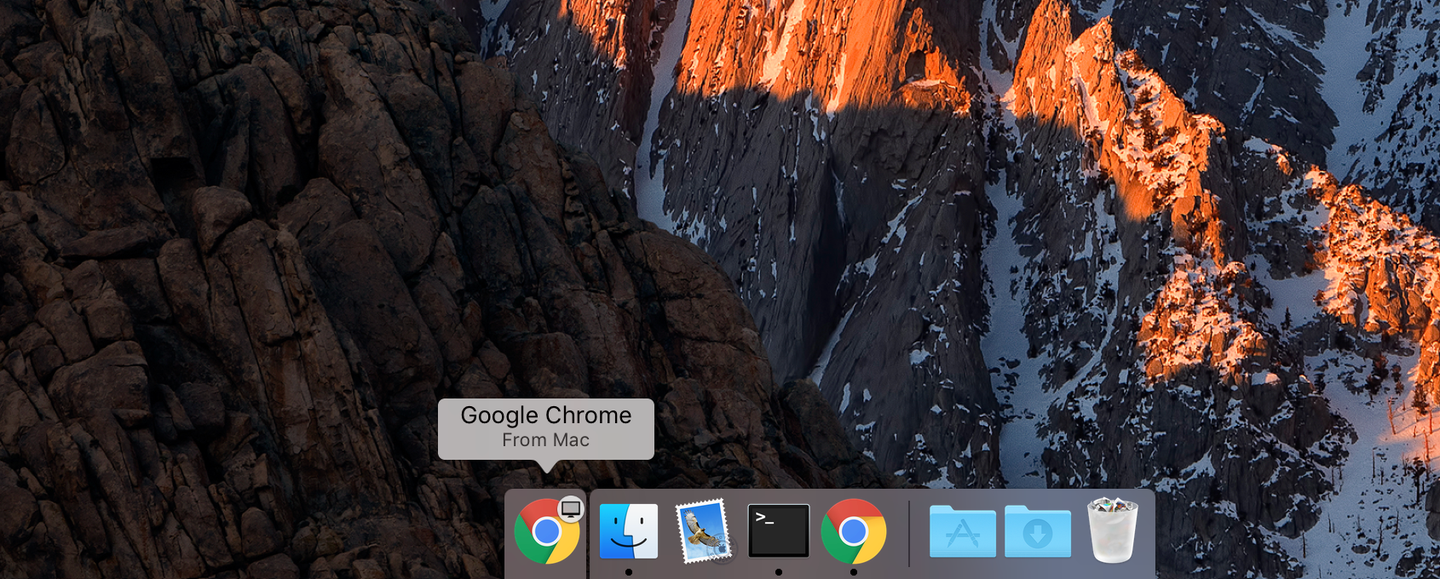
By default, macOS and OSX will offer to share your Chrome tabs between your Mac and iOS devices via iCloud sharing. This short guide will show you how to disable the Google Chrome dock sharing icon and Handoff functionality in macOS and OSX.

Once you are done disabling this Handoff feature, check out our guide on how to create tab groups in google chrome with the new tab groups feature.

1 – Open System Preferences

open system references

Click the Apple icon in the top left of your screen and select System Preferences.

🛈 You can also press CMD-SPACEBAR and type System Preferences.

2 – Go to General

go to general

Click General to access the General Preferences pane.

3 – Uncheck the tab sharing option

Uncheck the tab sharing option

Uncheck the Allow Handoff between this Mac and your iCloud devices option. You’re all done!

NEXT UP

How to Enable the “Popping” Sound When Adjusting the Volume on Your Mac

howchoo
howchoo   (467)
December 13, 2023

Starting with MacOS Sierra and High Sierra, your Mac will no longer play a “pop” sound when you adjust your volume. If you prefer to have this sound when you adjust volume up and down (as I do), this guide will teach you how to reenable it. 1 – Open Sound System Preferences Navigate to System

Continue Reading

howchoo

 467 guides

Introducing Howchoo, an enigmatic author whose unique pen name reflects their boundless curiosity and limitless creativity. Mysterious and multifaceted, Howchoo has emerged as a captivating storyteller, leaving readers mesmerized by the uncharted realms they craft with their words. With an insatiable appetite for knowledge and a love for exploration, Howchoo’s writing transcends conventional genres, blurring the lines between fantasy, science fiction, and the surreal. Their narratives are a kaleidoscope of ideas, weaving together intricate plots, unforgettable characters, and thought-provoking themes that challenge the boundaries of imagination.

Home Interests Furby

How to disassemble Furby

close-up of disassembled furby
howchoo (467)
September 6, 2023
6 minutes

Share

You’ll Need 3
What you’ll need
Interests
Furby x 1
Howchoo is reader-supported. As an Amazon Associate, we may earn a small affiliate commission at no cost to you when you buy through our links.
Posted in these interests:
furby • 1 guides
teardown • 1 guides
This short teardown guide will teach you how to disassemble Furby. Perhaps you need to do this to fix your Furby, or to turn Furby into an Amazon Echo — whatever the reason, this guide will get you going.
I turned a Furby into an Amazon Echo. Introducing: Furlexa I’m sorry.
The Furby I’m disassembling is an original Furby (circa 1998), but the instructions for newer Furbies will be similar.

1 – Skin Furby alive

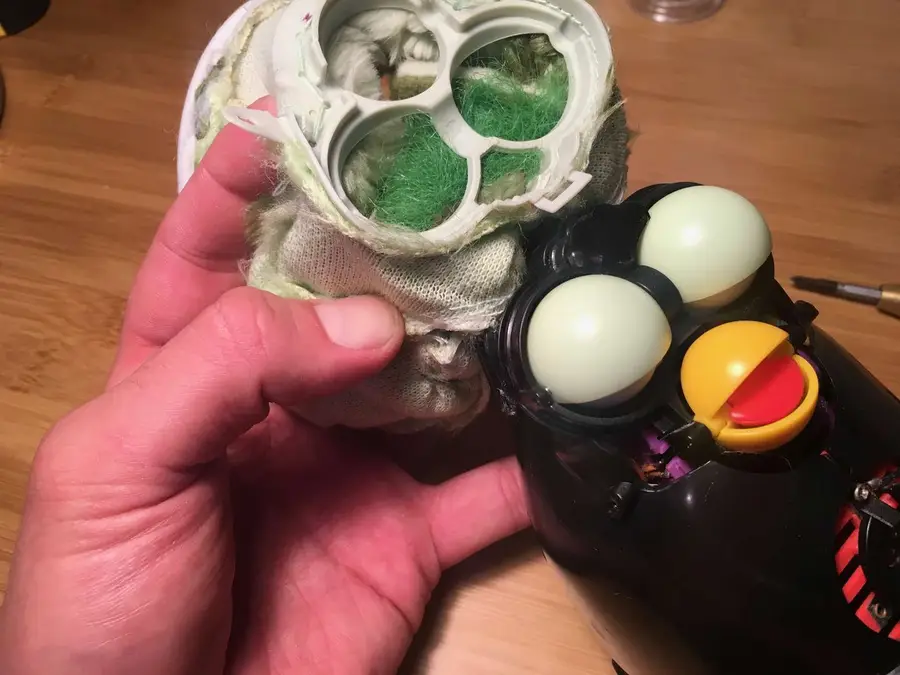
This sad but crucial step is an easy one. We need to carefully remove Furby’s fur so that we can access his insides and start transplanting Alexa. Before you start, be sure to remove Furby’s batteries. Furby’s fur is primarily held on by a small plastic zip tie at his base. Locate the head of the zip tie and snip it off with some wire cutters. We’ll replace this later with a new one. You may need to cut some of the fabric away to expose the head of the zip tie. Carefully roll Furby’s skin upwards until you reach the faceplate.

🛈 I just realized that the “Fur” in “Furby” comes from the word fur. That only took 20 years.

2 – Remove Furby’s faceplate

Before you can finish removing Furby’s fur, you need to remove his faceplate. Remove the two small screws on either side of his head. There is a small amount of very weak glue securing his fur on the outside of his eyes. Simply pull his fur gently to remove it from this glue. Finally, there is a small open hook at the top of the faceplate. Unclasp this hook.


3 – Free Furby’s ears

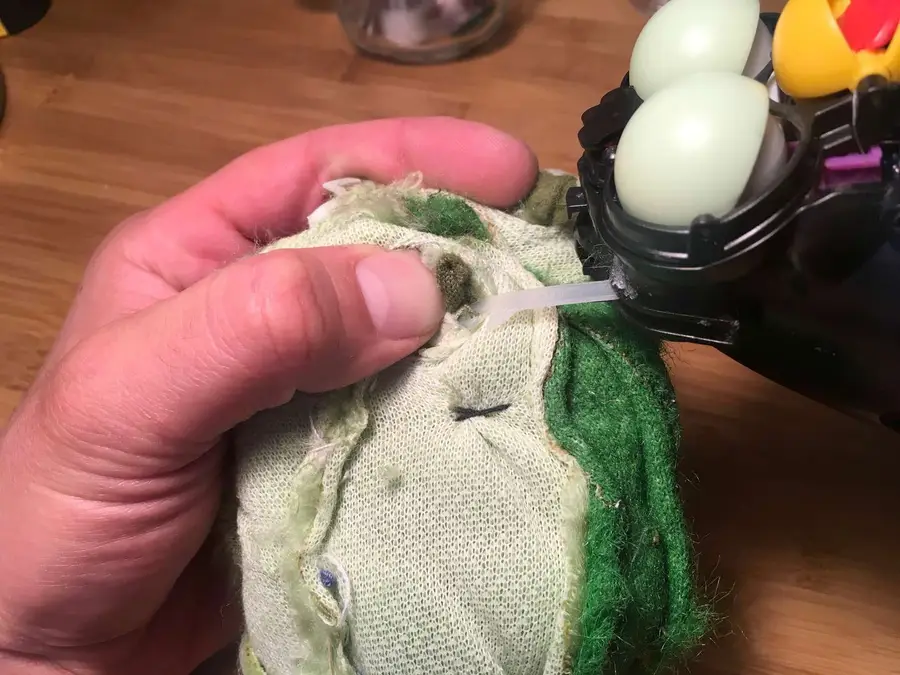
The last things holding Furby’s fur in place are his ears. His ears are plastic and have loops at the end; his fur is bound to these loops with thread. Snip this thread and remove his fur fully.

4 – Remove Furby’s carapace

Like a large insect, Furby has a hard exoskeleton. Remove the four screws that hold it in place — one on his head, one on his lower back and two on his sides. Separate the two halves and slide out the small microphone that’s embedded in his side.

5 – Remove Furby’s speaker

If you wish to remove Furby’s speaker to replace it, simply remove the red front speaker grille assembly by removing its two screws and disconnect the speaker’s white connector.
🛈 Furby’s speaker is 32 ohm and 0.25 watts and has a diameter of 40mm, in case you find that interesting.

6 – Now Furby is terrifying

Don’t look him in the eyes.

howchoo

 467 guides
Introducing Howchoo, an enigmatic author whose unique pen name reflects their boundless curiosity and limitless creativity. Mysterious and multifaceted, Howchoo has emerged as a captivating storyteller, leaving readers mesmerized by the uncharted realms they craft with their words. With an insatiable appetite for knowledge and a love for exploration, Howchoo’s writing transcends conventional genres, blurring the lines between fantasy, science fiction, and the surreal. Their narratives are a kaleidoscope of ideas, weaving together intricate plots, unforgettable characters, and thought-provoking themes that challenge the boundaries of imagination.
Home Interests Minecraft

How to Change Game Version for Minecraft: Java Edition

Some maps require a specific Minecraft version to run. Luckily, changing this is easy!
howchoo   (467)
August 31, 2023
4 minutes

Share

Interests
Posted in these interests:
READY PLAYER 1
gaming • 85 guides
Minecraft is an epic sandbox video game developed by Swedish game developer Mojang Studios.
minecraft • 66 guides
popculture • 14 guides
technology • 20 guides

Minecraft will automatically set itself to the current version for ease of use, but sometimes you need to revert, especially if your favorite map was created with an earlier version. Luckily, it’s easy to change your Minecraft version with a simple launcher configuration. Let’s walk through that, now.

WARNING You absolutely should back up your worlds before changing the game version. If you access one of your current worlds with an older version of the game, you can permanently damage that world! Make sure to keep a copy of your game files safe and separate when rolling back versions.

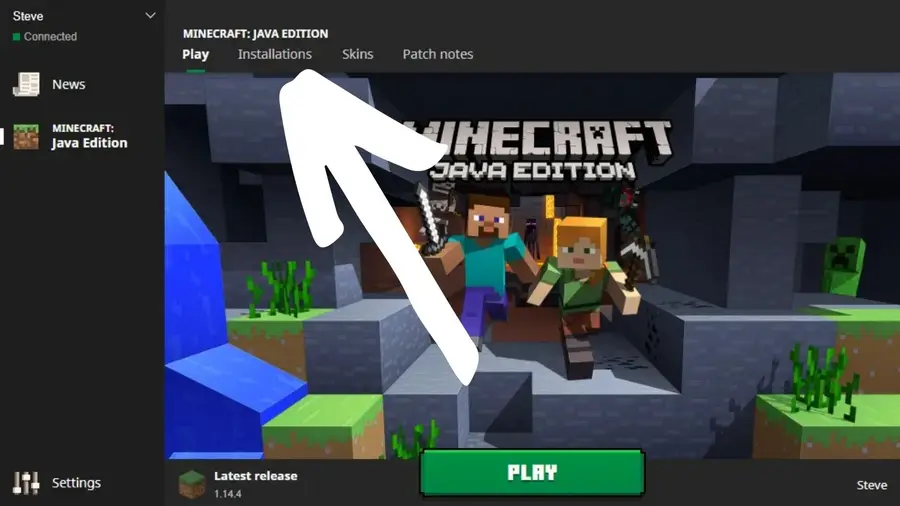
1 – Installations

Installations

Click Installations on the launcher start page, and then click New.

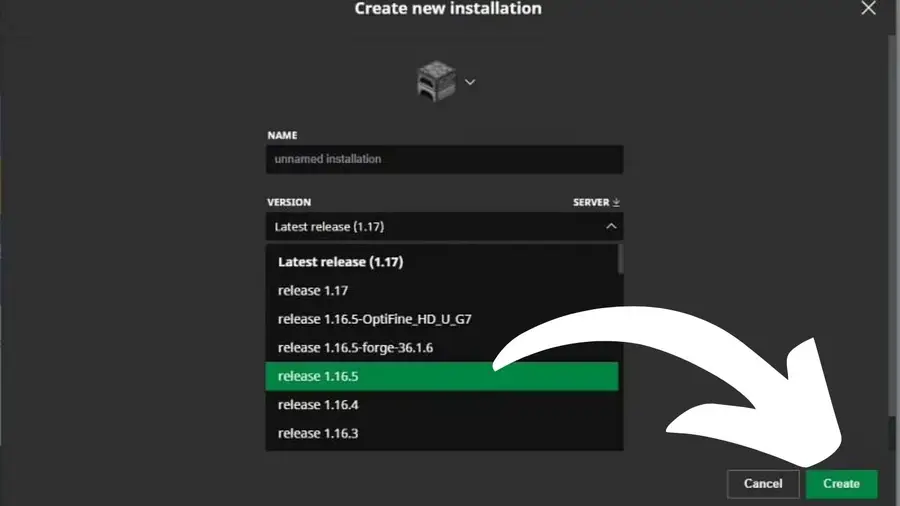
2 – Create new installation

Create new installation

In the Create new installation box, select a name for the installation and choose the game version from the VERSION list.

3 – Finish creation

Finish creation

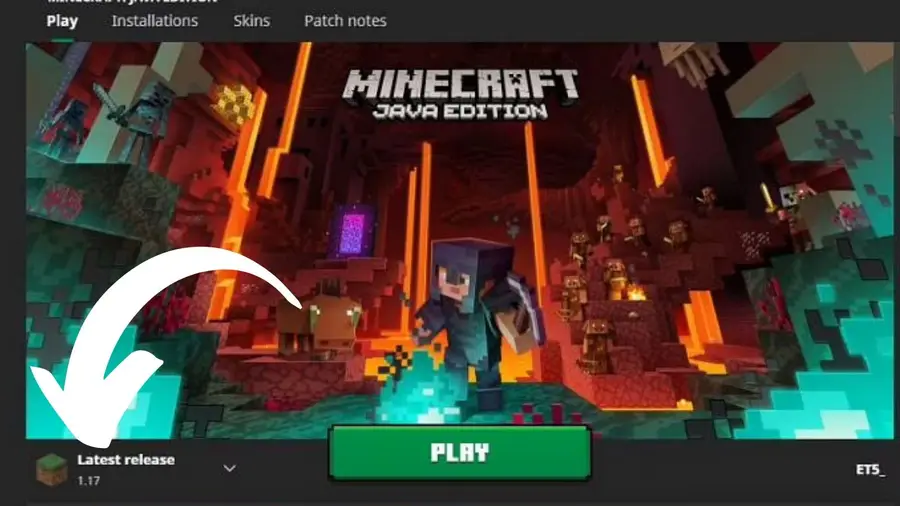
Click Create to save the change, and then click Play on the top menu.

4 – Find saved installation and change version

Find saved installation and change version

On the launcher landing page, find your saved installation in the list and click it to change to that version of the game.

If you’re interested in exploring Minecraft‘s snapshot versions, check out this guide!

How To Install a Snapshot Version of Minecraft
Play a new version before its even released!

NEXT UP

Top 10 Enchantments in Minecraft

howchoo   (467)
March 25, 2024

The longer you play Minecraft, the more you realize that early-game tools just won’t cut it. Exploring the enchantment feature of Minecraft can be exciting, but also intimidating. Rather than worry about researching enchantments, below are the best enchantments in Minecraft! To learn how to enchant items, check out this guide! In this guide, you’ll see

Continue Reading

howchoo

 467 guides

Introducing Howchoo, an enigmatic author whose unique pen name reflects their boundless curiosity and limitless creativity. Mysterious and multifaceted, Howchoo has emerged as a captivating storyteller, leaving readers mesmerized by the uncharted realms they craft with their words. With an insatiable appetite for knowledge and a love for exploration, Howchoo’s writing transcends conventional genres, blurring the lines between fantasy, science fiction, and the surreal. Their narratives are a kaleidoscope of ideas, weaving together intricate plots, unforgettable characters, and thought-provoking themes that challenge the boundaries of imagination.

Home Interests Slack

How to Create a Poll in Slack

Slack polls are great ways to find a consensus quickly.
howchoo   (467)
August 25, 2023
8 minutes

Share

You’ll Need 1

What you’ll need
Interests
Slack x 1
Howchoo is reader-supported. As an Amazon Associate, we may earn a small affiliate commission at no cost to you when you buy through our links.
Posted in these interests:
remotework • 3 guides
slack • 5 guides

We love using Slack as our remote work space at Howchoo. There are so many features and tools that can be integrated into Slack work spaces and items. Creating a quick and simple poll has to be among the most useful app integrations we’ve discovered in Slack.

If you need to quickly gauge the consensus of your team on a particular item or topic, then making a Slack poll is what you’ll need to do. And there’s no need to go outside of Slack and waste time creating a complex poll when just a simple Slack poll will do.

Here’s how to create a simple poll in Slack using the aptly named “Simple Poll” app. If you’re feeling extra fancy, you can even set up a reminder in Slack to help nudge people to take your poll by a certain time.

1 – Get the “Simple Poll” app

Simple Poll is an app for Slack that allows you to create polls to share in your Slack channels and workspaces. The free version, referred to as the Hobby version, is all you need to make multi-question polls for your team. If you want to make more complex written surveys, then you’ll need to upgrade to their premium version.

In Slack:

  • Click the Add apps button on the bottom-left side of the window.
  • Search for “Simple Poll”.
  • Select the app that appears at the top called “Simple Poll”. (See image above.)

You should get redirected to the installation page where you can add “Simple Poll” to your Slack workspace.

Simple Poll asks you for your email and name when you add the app to your Slack workspace. Be sure to uncheck the box “Recieve promotional emails…,” if you don’t want to be contacted by Simple Poll.

2 – Create a poll in Simple Poll

Now, you’ll head into the Simple Poll app in Slack to create your poll.

  • Click the Simple Poll icon in your Apps at the bottom-left of your Slack window.
  • Select Create a poll in the top toolbar.
  • Choose the options for your poll.

Poll Options

Channel to post the poll in

Select the channel in which you want the poll to appear. Note: you will need to add the Simple Poll app to that channel prior to creating the poll.

To add it to the channel, – Open up the desired Slack channel. – Click Add an app at the top of the channel page. – Select Simple Poll to add it.

Question or topic

Type the question as you would like to appear to your respondents.

Option 1, Option 2, Add another option

Set the list of answers from which your respondents can choose. Make sure to click Add another option, if you want to create a poll with multiple questions.

Make poll anonymous

You can choose to make the poll anonymous. This is particularly useful if the question is such that someone might not feel comfortable attaching their name to the answer.

3 – Run the created poll

Once you’ve set all the poll questions and parameters:

  • Click Continue.
  • Click Create Poll.

The poll should automatically appear in the set Slack channel and will be viewable by the members of the channel. You’ll see little numbers appear next to the answers chosen by the respondents as they answer.

Now, all you have to do is wait for people to respond to the poll in the Slack channel. While you’re waiting why not check on that Slack to-do list you made.

NEXT UP

How to Set Up Recurring Reminders in Slack

howchoo
howchoo   (467)
September 14, 2023

This short guide will teach you how to set up recurring reminders in Slack, sending a notification to you or your team every week, month, 13th, or whatever interval you choose. 1 – Open the channel you’d like to post in Open the channel where you’d like the reminder to occur. You can post reminders

Continue Reading

howchoo

 467 guides

Introducing Howchoo, an enigmatic author whose unique pen name reflects their boundless curiosity and limitless creativity. Mysterious and multifaceted, Howchoo has emerged as a captivating storyteller, leaving readers mesmerized by the uncharted realms they craft with their words. With an insatiable appetite for knowledge and a love for exploration, Howchoo’s writing transcends conventional genres, blurring the lines between fantasy, science fiction, and the surreal. Their narratives are a kaleidoscope of ideas, weaving together intricate plots, unforgettable characters, and thought-provoking themes that challenge the boundaries of imagination.

Home Interests Guides

How To Fix “This Message Has Not Been Downloaded From the Server” Error on Your iPhone

Get rid of the annoying error with our helpful and quick tips.
howchoo   (467)
August 25, 2023
19 minutes

Share

Interests
Posted in these interests:
guides • 10 guides

Have you ever opened your email app on your iPhone and run into a gloomy “this message has not been downloaded from the server” pop-up message?

Have you squinted at the message, wondering what it could possibly mean but having no idea what to do about it?

If you’ve found yourself in a scenario like that, lucky for you, you’ve landed in the perfect place. This article will explain why that message pops up and how to fix it. Keep reading to avoid confusion later on when you receive that daunting message.

What Does “This Message has Not Been Downloaded From the Server” Mean?

Technology evolves daily, and while that is a good thing in some regards, sometimes older technology needs a bit to catch up with newer technological advances.

One example of this is when an iPhone presents a message that says this message has not been downloaded from the server.

This can happen on the mail app when you try to open the icon and check your messages. This message might appear only when you click on a specific email, or it might occur when you open the mail icon itself. So, why does this happen?

Why Could This Message has Not Been Downloaded From the Server Pop Up?

There are a few reasons why this cryptic message might arise when checking your mail inbox. a. There is a glitch in the software, either on the iPhone’s end or the app’s end, preventing the email from downloading in full. b. During the downloading process, the email was interrupted and unable to download the email. c. Your phone doesn’t have sufficient storage.

So, how do you fix these issues? Keep reading!

How to Fix This Message has Not Been Downloaded From the Server Message

Now that you know a few reasons to explain why you receive this message, here are a few solutions to solve the issue.

Restart your device

Sometimes all you need to fix an issue is the traditional, classic method of restarting your device. When a phone gets overloaded with information, it might put less effort into some apps and more effort into other apps. So, to get around this issue, you can try to restart the phone.

To do this, you will need to hold the power button on the right side of the phone, near the middle of the phone, and the left volume up button for about five seconds. Push these buttons down together and wait for a power-off icon to appear on the top of the screen.

Slide the icon to the right and wait for the phone to power off. Let it rest for a few moments before turning it back on.

To restart or turn on an iPhone, hold down the right side button and wait for the white apple to appear in the middle of the screen. Once the phone is on, circle back to the mail icon to see if the messages download to the server. If they do, great! You’ve fixed the issue. If they do not and you still receive the cannot download to the server message, try any of the following methods.

Re-download or update the mail app

To re-download the mail app, you will need to delete it from the home screen. To do so, hold down the icon for about five seconds until all of the apps on the screen start shaking and have x’s on the top of the icons. Push the x and confirm the deletion of the app.

Deleting the app will delete the data off the phone, but it won’t interfere with any messages you’ve received to your email account.

Once you’ve deleted the app, visit the app store, type in mail, and re-download the app. Install the app and wait for it to finalize on your iPhone. Once the download is complete, log into your account and see if the messages download to the server.

By updating the mail app, you can solve all sorts of bug issues and glitches within the app. To update the mail app, you will need to open the app store icon on your home screen; it is a blue and white icon that forms an A with white shapes. At the top right side of the screen, you will see a profile icon.

Click on that and scroll down to the apps that have available updates. If the mail icon has an available update, click to update it and wait for the process to complete. Once it completes the update, return to the mail icon and try to download the messages.

Log out and delete your actual mail account

This can solve the issue as well. To do this, open up your settings icon and toggle over to passwords and accounts. Scroll down to the email account correlated to the messages unavailable for download and select that account.

You need to click delete account and confirm the deletion. To add the account back to your iPhone, just click the add account icon, input your information and confirm the addition of the new account.

Update your iPhone

Updating an iPhone can solve a multitude of issues. Since Apple puts out software updates faster than it puts out devices, sometimes the devices struggle to keep up with the machinery.

So, to best solve these issues, you need to update your iPhone every time an update comes out. Just like updating the mail app, updating your iPhone has the potential to solve issues and glitches within the software.

So, to update your iPhone, visit the settings icon and click the general button. Underneath the general button, scroll down to software update and click on it. A few options pop up underneath this button.

You can turn on automatic updates that will update your phone each time a new update comes out without you having to put in any work, or you can download and install the newest update. But, when you download the newest update and opt out of automatic updates, you will have to update your phone’s software manually each time a new update comes out.

Make sure your phone is plugged into a power source when undergoing an update, and give it time after the update completes before you use it again. If the emails were not downloading due to an internal issue on the iPhone’s side of things, this could very well solve the issue.

Check the Connection

One huge factor covering a lot of technical issues is the network connection. Whether you connect to the internet via wifi or a cellular tower, your phone will run into some kind of connection issue at some point.

To start, you can turn your wifi signal off and back on. If you scroll down from the top right side of your iPhone, you will see a few options on the left side of the screen. Turn off the wifi icon or the horizontal white lines on top of each other highlighted in blue.

Try to download the messages with the wifi off and if it doesn’t work, turn the wifi back on and vice versa. To check your cellular data connection, drag down the same screen with the wifi, but find the green cellular tower icon next to the airplane mode icon. Click it off and wait for a few moments before toggling it back on.

Sometimes a phone needs to be disconnected from its server for a few moments to reconfigure. Speaking of airplane mode, another way to attempt to solve the issue is to turn airplane mode on and off.

Airplane mode is designed to use on airplanes; you can still use downloaded apps and music on your phone in airplane mode, just nothing that uses data because that interferes with the airplane’s machinery.

Sometimes turning airplane mode on can help a phone reset itself. To turn on airplane mode, drag down the top right screen and click on the airplane icon. If it is highlighted in orange, it is on. If it is gray, it is not on.

You can also reset your network carrier settings by visiting the settings icon. Open the settings icon and toggle to the general icon. Click reset. This will prompt you to a page asking if you want to reset your network settings.

Click reset network settings, input your password information, and wait for the phone to reset itself. Just remember to have your digital data backed up to another account or to a cloud account because resetting the network settings erases everything from passwords to apps.

If none of these methods work, you can contact your service provider or visit an Apple Store or Genius Bar for more information.

NEXT UP

How to Change the Windows 11 Start Menu and Button

howchoo   (467)
December 13, 2023

As with every update, Microsoft has changed Windows 11 to look different than its predecessors, and while the update looks modern and clean there are some interesting changes. Arguably the most jarring of all the changes is the one made to the Windows 11 Start Menu, which looks completely different. Instead of a clean, easy-to-navigate

Continue Reading

howchoo

 467 guides

Introducing Howchoo, an enigmatic author whose unique pen name reflects their boundless curiosity and limitless creativity. Mysterious and multifaceted, Howchoo has emerged as a captivating storyteller, leaving readers mesmerized by the uncharted realms they craft with their words. With an insatiable appetite for knowledge and a love for exploration, Howchoo’s writing transcends conventional genres, blurring the lines between fantasy, science fiction, and the surreal. Their narratives are a kaleidoscope of ideas, weaving together intricate plots, unforgettable characters, and thought-provoking themes that challenge the boundaries of imagination.

Home Interests Networking

How to Access Your Router Remotely – A Helpful Guide

Helpful tips to help you remote access your router.
howchoo   (467)
August 25, 2023
27 minutes

Share

Interests
Posted in these interests:
internet • 36 guides
networking • 8 guides
router • 32 guides

Today, managing your router is an easy process. In fact, you do not even have to be connected to your home network to manage your router.

With remote access, you can access your router’s features and settings, no matter where you are. If you are wondering how to remotely access your router, keep reading our guide as we take you through the steps.

We will also explain the drawbacks and what you need to know.

1 – What is Remote Access For Your Router?

Essentially, remote access lets you log into your router no matter where you are, as long as you have an internet connection. After you gain remote access, you can do anything you can usually do when you log into your router on your home network.

This includes accessing and making changes to your router’s security and other setup options.

Like anything else, there are certain drawbacks to allowing remote access to your router.

When you enable remote access, you could put your data at risk because now, just like you, anyone else with an internet connection can access your router remotely if they already have some information about your router.

Just like you, they can also see your security settings, change them and even access your network. This is why it is crucial to understand the risks so you can be prepared.

2 – How Remote Access Works

Remote access is established with a combination of network, software, and hardware connectivity.

Years ago, people used traditional remote access before the internet became available to most people.

Back then, this was accomplished using terminal emulation software. The software controlled access over a hardware modem that was connected to a telephone network.

However, with technological advancements today, remote access is accomplished by:

  • Hardware: Connecting hosts via a hard-wired network interface or WiFi network interface.
  • Software: Using a VPN which is a more secure option.
  • Network: By connecting through the internet.

How to Choose the Best Wi-Fi Channel for Your Router

3 – How to Access Your Router Remotely

Step 1: Enable Remote Sharing

Source

Your first step in the process is to enable remote sharing on the device itself. This is only possible by checking that your router can accept the remote connection. First, navigate to your router’s IP address in your web browser.

How to Find Your Router’s IP Address
Find the IP address you need to access your router.

If you have forgotten or do not know what your router’s IP address is, check for more information on the device. The IP address should be indicated in the format of 192.168.1.1 or 192.168.0.1, although there will be different numbers depending on your location.

Once your router and browser have been linked, you will be required to enter a user ID and a password. This gives you access to configuration settings.

After logging in, go to the “Remote Management” preferences inside your router’s control panel. The set of features might have been named “Remote Access” but take note that the naming might vary from one device to another. They are mostly located in Advanced Settings.

This is only the setup process and, thus, the initial first step to setting up your router’s remote access. Once done, click on the required button to allow remote access and then begin with the step-by-step process to create a dynamic DNS.

If you have these popular router brands, here is how you can quickly find the Remote Access settings.

Netgear

  1. Log in to your admin console on your router.
  2. Go to Advanced and choose Advanced Setup.
  3. Select Remote Management.
  4. You will see that Turn Remote Management On is checked. Proceed to uncheck it.
  5. Click on Apply to save your settings.
  6. Now, check the box next to Turn Remote Management On.
  7. Look for Allow Remote Access By Section. Proceed to enter the external IP addresses that you want to use to access your router remotely.
  8. Select only one of these options:
  9. Only This Computer – Allow access from a single IP address on the Internet. Enter the IP address.
  10. IP Address Range – Allow access from a range of IP addresses on the Internet. Enter a beginning IP address and an ending IP address to define the allowed page.
  11. Everyone – Allow access from any IP address on the Internet.
  12. Enter the port number you want to use to access the web management interface. Take note that usual web browser access utilizes the standard HTTP service port 80.
  13. For greater security, enter a custom port number from 1024 to 65535 for the remote web management interface, but do not use the number of any common service port.
  14. Click Apply to save your settings.

DLink

  1. First, log in to the admin console.
  2. Navigate to Tools.
  3. Choose Administration.
  4. Uncheck Enable Remote Management.
  5. In the textbox, you need to delete the Remote Admin Port.
  6. Remember to click on Save Settings.
  7. Now, check the box next to Enable Remote Management.
  8. Key in the port in Remote Admin Port. If you want to, you can leave the default port set to 8080.
  9. Click on Save Settings.

Step 2: Establish Dynamic DNS

Source

A dynamic DNS ensures that your remote access connections can seamlessly integrate with your personal router. In addition, a properly set up dynamic DNS ensures that wherever you are, your remote connection can be firmly established.

It will also allow you to access your website if you have one or your server without worrying about changes to your IP address from any location in the world. There are various dynamic DNS providers in the market today, some of which offer these services for free. For example, there is a free-to-use dynamic DNS and Managed DNS service provider known as NoIP.

Once your dynamic DNS is established, you will need to add a new hostname and a new sub-domain. Save this information or record it somewhere since the next step will be to return to your router’s control panel and copy your new DNS and hostname into the DNS settings panel.

Once this process is complete, your router should be accessible remotely. All you need to do is to type in your new domain name and then the remote port number.

4 – Securing Your Router Access Remotely

A router plays a very important role in your home or business. Not only does a router establish a stronger and safer connection, but it also inspects all the traffic and data that is incoming and outgoing.

In this way, it serves as a guard shielding your data so that no harmful data can get through, and at the same time, none of your private information can go out.

To secure your remote access, follow these steps that will help reduce your risk.

Change Your Admin Password

A router usually has a default password that is set for you to use. If you would like to block any access to your router, use WPA2 security. But, for you to do this, you will need each of the new devices to enter a password to connect.

If possible, try changing the WiFi password as regularly as you can. After changing the password, try reconnecting all your devices connected to the router to re-establish the connection.

How to Find Your Wi-Fi Password
Log in to your wireless network ASAP.

Ensure that the Firmware is up-to-date

Similar to phones, routers have firmware that needs to be updated. This firmware is what controls the router’s actions while providing instructions that enable a device’s hardware startup and communication with other devices.

This allows the device to perform basic input/output tasks and sets the security level of the network.

Some modern routers have a feature that allows them to update themselves in the background whenever there’s an internet connection. However, even if your router does not automatically update itself, you should still check that the firmware is up to date.

Check whether you have the latest security patches and bug fixes. This confirms that your router is protected against any security flaws.

New features that are added onto a firmware after an upgrade usually provide an enhanced user experience. Furthermore, a firmware update optimizes the overall performance of the firmware or device driver, thus enhancing the performance of the processor.

Utilize a Guest Network

You can use a guest network to broadcast if you have one. This creates a barrier or protective shield in case someone attempts to access your network without your knowledge.

Consider Your Data’s Security

Any data stored in any device should be kept secure at all times. Most modern routers that have been recently launched a couple of years back have excellent built-in security features.

Manufacturers that make routers have technologically advanced router security and reliability and release new products that are more user-friendly than earlier ones. Now all you need to do is ensure that key security settings are set.

5 – Why Access Your Router Remotely?

You might not want to access your router remotely and might be comfortable working with it as it has been set up. However, some circumstances might force you to change the settings and access it remotely. These include:

Check If Someone Else Is Using Your WiFi

When you gain remote access to your router, you will be able to see who is using your WiFi.

You can even check if your kids back at home are doing their homework or just playing games and watching irrelevant videos or accessing what they should not on their computer.

With remote access, you can even change parental control settings if your router brand has that feature.

Remove Access For Unwanted Leechers

Remote access lets you see what your children are doing online, but it also allows you to find out if your neighbors are leeching on your WiFi without you knowing. When you gain remote access to your router, you can easily remove or even block users who have been accessing your router.

Change your settings and get rid of the guest network so you do not have any leechers taking advantage of your Internet connection. This way, you can be more assured that your private data does not get hacked too.

Convenience

With remote access, you can check on any router issues. Perhaps you are the only person in your family who is familiar with routers and technology in general.

If you happen to be away from home and someone in your family needs you to check up on an issue, you will be able to do it remotely.

It could also be your parents who are experiencing challenges connecting to the internet. If you do not live with them but need to fix the internet for them, remotely accessing their router will help. Overall, with remote router access, you can fix issues and even carry out speed tests.

Access Files From A Hard Drive

You may have connected an external hard drive to your router. When you access your router remotely, you can also access this hard drive.

This makes it so convenient to view your files remotely without having to log in to your computer.

6 – Should You Remotely Access Your Router with Desktop Apps Like Teamviewer?

You can access your router with apps like TeamViewer. But the challenge is that you need to keep the computer you have installed it on turned on all the time.

This is not always practical, especially if you are rarely in one place and are on the move for more than a couple of days. Once you turn off your computer, or if the computer is removed from the network, you will lose access.

This is why it is more convenient to access your router directly since it stays on all the time and is connected, whether you are at home or not. All you need is a web browser to access your router from any location, and you also do not need to install any additional software.

7 – Conclusion

You might not know this, but once you gain remote access to your router, you do not have to go through all the steps again to prepare the DNS and enable remote sharing. Once you have that all set up, you can access your router from anywhere.

However, as a note of caution, just remember that if you do change your router password, the DNS and remote sharing preparation may be reset as well. Overall, it is not too complicated to gain remote access to your router so follow our steps closely, and you will be able to do so.

NEXT UP

How to Change Your Frontier WiFi Password

howchoo
howchoo   (467)
November 25, 2023

There are a few reasons you might want to update or reset your WiFi password: making your network more secure, and making your password easier to remember and type. Improved network security You can add an extra layer of security to your network by changing the WiFi password. As long as your new password is

Continue Reading

howchoo

 467 guides

Introducing Howchoo, an enigmatic author whose unique pen name reflects their boundless curiosity and limitless creativity. Mysterious and multifaceted, Howchoo has emerged as a captivating storyteller, leaving readers mesmerized by the uncharted realms they craft with their words. With an insatiable appetite for knowledge and a love for exploration, Howchoo’s writing transcends conventional genres, blurring the lines between fantasy, science fiction, and the surreal. Their narratives are a kaleidoscope of ideas, weaving together intricate plots, unforgettable characters, and thought-provoking themes that challenge the boundaries of imagination.

Home Interests Obsidian

How to Sync your Obsidian Vault for Free!

Obsidian is one of the best note tools, and syncing for free makes it better!
howchoo (467)
August 25, 2023
11 minutes

Share

Interests
Posted in these interests:
apps • 1 guides
obsidian • 1 guides
technology • 20 guides
zettelkasten • 1 guides
I am a huge fan of Obisdian, the free and open-source tool for all your note-taking needs. Obsidian is one of the best tools for knowledge workers, writers, and educators, and I personally use it daily to manage my volunteering across half a dozen different organizations, as well as my personal learning. Like other similar note-taking tools, it features a simple and powerful design that makes storing your ideas inside your digital “second brain” a breeze. But syncing through Obsidian’s official live sync is expensive. I highly recommend it if you can afford the $10/month charge, as the company deserves your support, but if you, like me, find that the $100/year isn’t doable, try this free method for securely syncing all your Obsidian notes, across all your vaults, for free!

1 – SyncThing

SyncThing is a free and open-source peer-to-peer syncing app, designed to quickly and securely transfer data between your devices. It can sync across multiple devices almost instantly, and can handle syncing between multiple types of devices, including those with different operating systems (Windows to iOS, etc.). Your data is safe and secure with this type of file syncing, and it’s impossible to beat the free price tag! You need to navigate to the official SyncThing GitHub to download SyncThing. Just follow the instructions on their GitHub page and download the correct installer for your device! Since I use Windows, I’ll show you how to install the official windows app “SyncTrayzor”, but SyncThing-MacOS will feature much the same steps.

2 – Download SyncTrayzor

Download SyncTrayzor from the list on the GitHub page.

3 – Run the SyncTrayzor .exe file

Find your downloads section and double-click your new SyncTrayzor extension (or just click “run” from the download button on your browser).

4 – SyncTrayzor control panel

Once you have SyncTrayzor installed and opened, you’ll start in the main control panel screen. This is where you’ll be able to see which folders are shared, which are actively syncing, and which devices you have connected.

5 – Check the SyncThing settings

Let’s make sure that your settings are correct.
  • First go to “File”, then click “Settings”.
  • On the SyncTrayzor tab, at the bottom, you’ll find two setting checkboxes:
  • “Automatically start on login”, and “Start minimized”.
  • Make sure both are checked.

6 – Download SyncThing onto your phone

This app can also be found on F-Droid and through the AuroraStore privacy-focused version of the Google app store.

7 – Prepare to add a new device to SyncTrayzor

On your SyncTrayzor application on your PC, click the “Action” tab, and then click “Show ID” to bring up a unique QR code that you can use to link your phone to SyncTrayzor.

8 – Add your device

On the mobile app, find the devices tab, then press the “+” sign to add a new device. Now, simply scan the QR code from the SyncTrayzor app on your PC. Back on the SyncTrayzor app on your PC, you should see a new notification pop up at the top of the SyncTrayzor control panel. Click “Add Device”. Now, under “Remote Devices” in the SyncTrayzor window, you will see your phone!

9 – Sync your Obsidian vault

  • On your computer, open the folder location of your obsidian vault.
  • Right-click on the folder. Select “copy as path”. If you’re on Windows 10, you may need to first click “Show more options” to see the full context menu.
  • Return to the SyncTrazor app and click on “Add folder”.
  • Paste the folder path and remove the quotation marks (“…”) from the ends of the folder path link.
  • Add a unique identifier to the “Label” section, such as “Obsidian”.

10 – Enable file versioning and set up on mobile

  • Click on the “Sharing” tab in the SyncTrayzor window for your folder.
  • Under “File Versioning” click the “Trash Can File Versioning” checkbox.
  • Click “Save”.
  • On your mobile device, a new notification should appear letting you know that a folder wants to be shared.
  • Tap on this notification and choose the folder on your phone that you want to use as your Obsidian Vault. Make sure “Watch for Changes” is selected.
  • Tap “Create”.
Your new synced Obsidian folder will be created, syncing everything between your phone and PC! The file versioning will ensure that if there are glitches between the devices, previous iterations of your important files will be saved. It is important to note that I encountered some errors when I had both the Obsidian program on my laptop and the app on my phone running at the same time. The file that would sync would be whichever was the last to close. If I closed my PC app first and then my mobile app, the data on the mobile app would sync to both devices. Versioning captured changes, however, and made sure I didn’t lose anything.
NEXT UP

How to Set Up Quick Connect on a Synology NAS

Get Synology’s powerful Quickconnect running in minutes on your NAS!
howchoo (467)
November 24, 2023
Synology is one of the most popular creators of Network Attached Storage devices on the market today, and for great reason — they’re really good at what they do. They consistently make devices that stand the test of time and feature top-notch software that makes the process of running a home server as easy as
Continue Reading

howchoo

 467 guides
Introducing Howchoo, an enigmatic author whose unique pen name reflects their boundless curiosity and limitless creativity. Mysterious and multifaceted, Howchoo has emerged as a captivating storyteller, leaving readers mesmerized by the uncharted realms they craft with their words. With an insatiable appetite for knowledge and a love for exploration, Howchoo’s writing transcends conventional genres, blurring the lines between fantasy, science fiction, and the surreal. Their narratives are a kaleidoscope of ideas, weaving together intricate plots, unforgettable characters, and thought-provoking themes that challenge the boundaries of imagination.
Home Interests DIY

How to Soften Paintbrushes (and keep them good as new!)

The softer the bristle, the better the painting
howchoo (467)
August 25, 2023
12 minutes

Share

You’ll Need 5
What you’ll need
Interests
Pot x 1
Howchoo is reader-supported. As an Amazon Associate, we may earn a small affiliate commission at no cost to you when you buy through our links.
Posted in these interests:

Art

art • 2 guides

DIY

diy • 17 guides
If you’re a painter, you’ve likely dealt with dried paint left on the bristles on your brush. Which means you’ve also probably wondered: how do I soften my paintbrush? When left unchecked, dried paint can wreak havoc on the integrity of the brush itself, affecting how well the brush paints, your artistic ability and your art, too. In addition, hardened bristles aren’t malleable, making them impossible to use, which is especially painful if you’ve sunk a good amount of money into your brushes. Removing dried paint might be an art in itself, but what about restoring those dried bristles to their soft fresh-from-the-package state of being? That’s where the true art happens. Here’s everything you need to know about removing dried paint, and how to soften your paintbrushes.

1 – Remove as much paint as you can

Before you work to soften the hardened bristles of your paint-encrusted brush, you’re going to have to remove as much extra paint as you can.

How to remove water-based paint

  • Soak your brush in warm water.
  • Put dish soap directly on the wet bristles.
  • Massage the soap gently into the bristles.
  • Run bristles beneath warm water, massaging the soap and paint until the water runs clear.

How to remove oil-based paint

  • Soak the end of your brush in paint thinner or turpentine.
  • Work the paint thinner/turpentine through the bristles by massaging the liquid into the brush.
  • Continue working with your fingers until the bristles are cleaner.
  • Rinse with warm water and dish soap to remove the painter thinner/turpentine.
Now that your bristles are relatively clean, you’re ready to soften them up! There are several ways you can do this, but we’ll focus on the top 3 easiest methods: The moisturizer, the vinegar, and the fabric softener methods.

2 – The moisturizer method

Using moisturizer to soften your dried paintbrushes is a great way to accomplish your goal easily because you don’t have to create your own mixture. Here’s how to use moisturizer to soften your paint bristles. You can use any lightweight moisturizer or lotion that doesn’t leave behind a greasy residue. Residue can cause buildup in your bristles, negatively impacting your ability to paint in the longrun. Tip: Look for any moisturizer or lotion that has oil-free written on the packaging.

How to soften your brushes

  • Squirt a peasize amount of moisturizer into the palm of your hand.
  • Run the bristles of your brush in a back and forth motion over the moisturizer.
  • Take care to work as much moisturizer into the bristles as you can, using your fingertips if necessary.
  • Continue to work in the moisturizer for a minute or until you feel confident as much of the bristles as possible are coated.
  • Use a clean paper towel to wipe off any excess moisturizer by applying medium to firm pressure on the ferrule and working your way to the tip of your brush.
  • Repeat until the moisturizer is gone.
  • Rinse and dry as normal.

Why the moisturizer method works

Moisturizer loosens the dried paint from the bristle, making it easier to slide it off when you run your paper towel over it.

3 – The vinegar method

Certainly the smelliest method for how to soften your paintbrushes, vinegar is a good option if you want to avoid using harsh chemicals.

How to prepare your vinegar

  • Pour a cup into a pot and place the pot on your stovetop.
  • Heat your vinegar on high heat until small bubbles start to form on the bottom of the pan (just shy of boiling).

How to soften your brushes

  • Pour your heated vinegar into a glass.
  • Submerge your bristles up to the ferrule.
  • Let your brushes sit for 20 minutes.
  • Check to see if your bristles are soft. If they’re not yet, submerge them once more for 10 more minutes.
  • Rinse with warm water and let them dry as normal.

Why the vinegar method works

Vinegar is a unique substance that is known for many things. Not only is it edible, it’s also a disinfectant, too and can be used to strip build-up from surfaces (and bristles!).

4 – The fabric softener method

How to make your fabric softener mixture

  • You can use the fabric softener of your choice, but I like to use unscented softeners.
  • If you’re softening a few brushes: mix 1 tablespoon of fabric softener with 1 cup of water.
  • If you’re softening a dozen brushes: mix 1/4 cup of fabric softener with 4 cups of water.
  • Make sure you’re using a hard bowl to combine your softener with your water. This will make it easier to work the mixture into your bristles.

How to soften your brushes

  • Submerge one brush at a time up to the ferrule.
  • Swirl the bristles through your mixture.
  • Gently press your bristles against the bottom of your bowl, moving the brush in circular or back and forth motions.
  • Repeat until the excess paint dislodges from the bristles and falls to the bottom of your bowl.
  • Once the bristles are clean and soft to the touch, you can set them aside to dry as you normally would.

Why the fabric softener method works

Fabric softener works to coat the individual fibers of whatever it comes in contact with, either clothes, towels, or the bristles of your paintbrush. It also decreases the amount of surface tension between the liquid and your brush, making it easier for the water to penetrate all those nooks and crannies between the bristles once you work your brush against the base of your bowl. There you have it! 3 ways to soften your paintbrushes, keeping them as good as new for as long as possible.
NEXT UP

How to Make Whiskey Simple Syrup

No whisk, no reward.
howchoo (467)
November 20, 2023
When I was first offered a beverage flavored with whiskey simple syrup, I was in a coffee shop in San Jose, California. I wasn’t even really interested in drinking coffee. It was later in the day; I was already feeling a little tired; I figured coffee was the last thing I needed. But when the
Continue Reading

howchoo

 467 guides
Introducing Howchoo, an enigmatic author whose unique pen name reflects their boundless curiosity and limitless creativity. Mysterious and multifaceted, Howchoo has emerged as a captivating storyteller, leaving readers mesmerized by the uncharted realms they craft with their words. With an insatiable appetite for knowledge and a love for exploration, Howchoo’s writing transcends conventional genres, blurring the lines between fantasy, science fiction, and the surreal. Their narratives are a kaleidoscope of ideas, weaving together intricate plots, unforgettable characters, and thought-provoking themes that challenge the boundaries of imagination.
Home Interests Computers

How to Diagnose a PSU (Without Any Tools)

howchoo   (467)
August 25, 2023
4 minutes

Share

Interests
Posted in these interests:
computers • 2 guides

PC

pc • 3 guides

Being able to test your PSU without tools like a multimeter or other voltage reader really saved my butt and I wanted to pass on the knowledge.

And while you don’t need a multimeter for this guide, but they’re nice to have handy. Check out our best multimeter guide to learn more.

The Best Multimeters for Beginners and Pros (2022)
We present you with our guide to the best multimeter in five categories.


1 – Unplug the computer from the wall

2 – Take your computer’s case cover off

If you’re not used to this, don’t worry. Its not a big deal at all.

3 – Remove the main connector from the motherboard

This is slightly scarier but only very slightly. There is usually a small clasp on one side that you have to hold open while removing this from your motherboard.

4 – Plug in a case fan or a hard drive

Some PSU’s require at least a small load for this test to work.

5 – Bend the paperclip into a U shape

6 – Bridge the paperclip between the green wire and a ground (usually black) wire

If your PSU is a corsair like mine, then any black wire is a ground wire. This is not dangerous at all, its just basically telling the PSU to power up as soon as its turned on.

🛈 Sorry about the thumb in the way!!!

7 – ATX power cable pinout diagram

Note the small connector tab on the right of the diagram for proper orientation.

The attached ATX pinout diagram identifies the ground pins you can use. This is for the common 24-pin ATX power connector.

8 – Plug in and power on the PSU

If the PSU fan powers on and starts spinning, then your PSU is most likely good! In my case, my PSU didn’t budge so I know its busted and I’ll be ordering a replacement.

NEXT UP

How to Use a GameCube Controller on PC

Nothing beats the original GameCube controller.
howchoo   (467)
September 20, 2023

If you’re a fan of the original Nintendo GameCube, you’re not alone. But sometimes emulating GameCube games just isn’t the same if the controller doesn’t hit right. And by that we mean—you need the original hardware to make the experience. If you want to use the original GameCube controller on a PC, all you need

Continue Reading

howchoo

 467 guides

Introducing Howchoo, an enigmatic author whose unique pen name reflects their boundless curiosity and limitless creativity. Mysterious and multifaceted, Howchoo has emerged as a captivating storyteller, leaving readers mesmerized by the uncharted realms they craft with their words. With an insatiable appetite for knowledge and a love for exploration, Howchoo’s writing transcends conventional genres, blurring the lines between fantasy, science fiction, and the surreal. Their narratives are a kaleidoscope of ideas, weaving together intricate plots, unforgettable characters, and thought-provoking themes that challenge the boundaries of imagination.