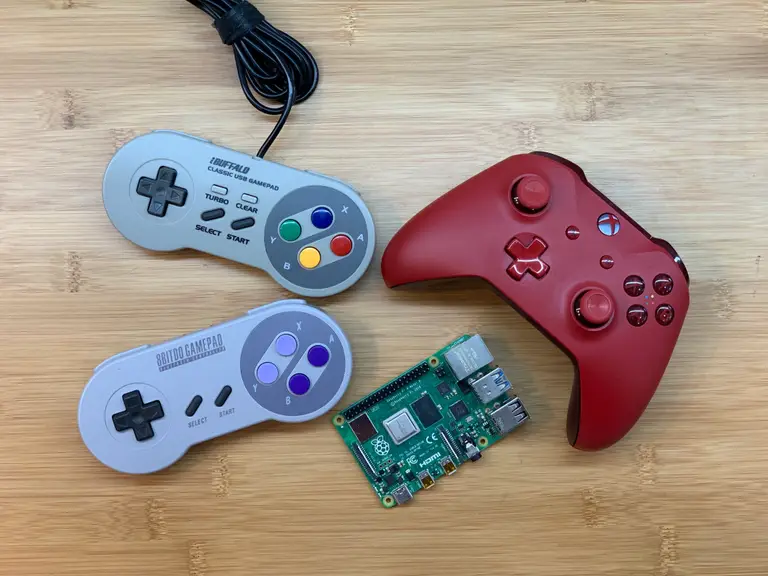
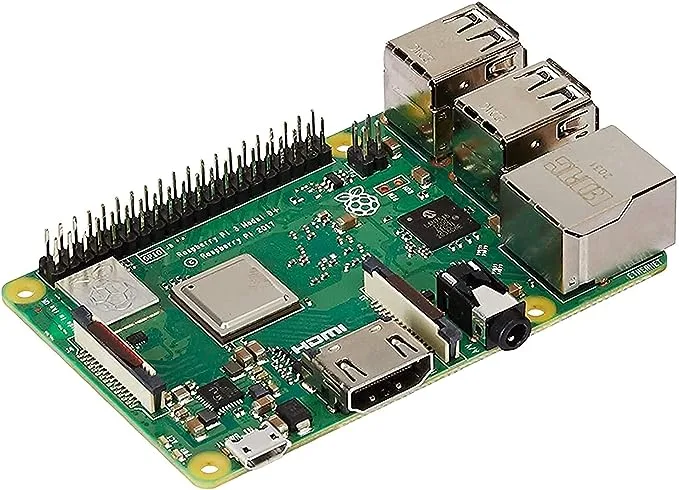
The Raspberry Pi works with many controllers—Xbox controllers are no exception. From wireless Xbox 360 controllers to Bluetooth Xbox One controllers, if you’ve got an Xbox controller it will most likely work with a Raspberry Pi.
This guide focuses on how to set up an Xbox controller with Raspberry Pi OS. RetroPie is a little bit different—most of these steps will work, but be sure to check out our Ultimate RetroPie Controller Guide for details on setting up a controller with RetroPie.
1 – Install or update to the latest version of Raspberry Pi OS
Before we begin, be sure you’ve got the latest version of Raspberry Pi OS installed on your Pi. Visit our guide on how to update Raspberry Pi OS for details on this process.
Xpad drivers are included with the latest version of Raspberry Pi OS—so this step is technically optional. We still recommend installing it in case you come across an application built around the old xboxdrv driver.
Run the following command to install it:
sudo apt-get install xboxdrv
3 – Connect a wireless Xbox controller
Wireless Xbox controllers use a USB wireless adapter. Connect the USB adapter to the Raspberry Pi. It should recognize and respond to the input as a normal USB controller.
4 – Connect an Xbox controller via USB cable
If you’re using a wired USB controller, plug the controller into a USB port on the Raspberry Pi. The Pi should detect the controller as a usable device.
5 – Connect a controller with Bluetooth
To connect an Xbox controller using Bluetooth, you’ll need a terminal window. Open one on Raspberry Pi OS or remote into the Pi using a terminal application of your choice.
1. Disable Enhanced Re-Transmission Mode (ERTM)
If ERTM is enabled, the controller won’t pair with the Pi. To disable the ERTM, run the following command:
echo 'options bluetooth disable_ertm=Y' | sudo tee -a /etc/modprobe.d/bluetooth.conf
Restart the Pi.
2. Start Bluetooth Tools
After the Pi reboots, start Bluetooth Tools with the following command:
sudo bluetoothctl
3. Search for the Xbox controller
Now we need to search for the Xbox controller. Don’t put the controller into pairing mode just yet. We have a few settings to adjust first. Enable agent with the following commands:
agent on
default-agent
Next, we’ll start scanning for available Bluetooth devices. Run this command to start scanning:
scan on
4. Connect to the Xbox controller
Put the Xbox controller into Pairing mode. It should appear in the list of devices with a unique MAC address and the words “wireless controller” at the end. Take note of the MAC address, we’ll need it to connect the controller. In the terminal window, enter the following command, replacing MAC_ADDRESS with the Xbox controller MAC address.
connect MAC_ADDRESS
After connecting the controller, make sure it’s listed as a trusted device with this command—again replacing MAC_ADDRESS with the one for the Xbox.
trust MAC_ADDRESS
Close the bluetoothctl application by typing quit
5. Test the connection
We’ll use the joystick toolset to make sure everything is working. Install it with this command:
sudo apt-get install joystick
When it finishes installing, run this command to start the test:
sudo jstest /dev/input/js0
You will see a screen of numbers. If everything is working properly, pressing buttons on the controller will cause them to change.
6 – Use an Xbox controller to replace mouse functions
Now that your controller is connected, you may want to use it in place of a mouse. Run the following command in a terminal window to enable this feature:
If you need a specific mouse button, check the chart below for a corresponding button on the Xbox controller. It also includes a few keyboard functions.
The longer you play Minecraft, the more you realize that early-game tools just won’t cut it. Exploring the enchantment feature of Minecraft can be exciting, but also intimidating. Rather than worry about researching enchantments, below are the best enchantments in Minecraft! To learn how to enchant items, check out this guide! In this guide, you’ll see
Introducing Howchoo, an enigmatic author whose unique pen name reflects their boundless curiosity and limitless creativity. Mysterious and multifaceted, Howchoo has emerged as a captivating storyteller, leaving readers mesmerized by the uncharted realms they craft with their words.
With an insatiable appetite for knowledge and a love for exploration, Howchoo’s writing transcends conventional genres, blurring the lines between fantasy, science fiction, and the surreal. Their narratives are a kaleidoscope of ideas, weaving together intricate plots, unforgettable characters, and thought-provoking themes that challenge the boundaries of imagination.
You can check your bill balance any time you’d like — without sitting through annoying voice recording prompts. Your bill balance, bill due date and most recent bill payment information will appear on your screen — even better than receiving it via text message.
1 – Dial #225# and press the Call button
I know what you’re thinking! You are making a call. But read on..
2 – Your bill information will appear on-screen
You will see a loading screen while T-Mobile is processing your information. After a few seconds, your requested information will appear.
NEXT UP
Call forwarding is the process of directing phone calls from one number to another. Verizon allows its customers to enable call forwarding at no additional charge. Your typical call rates will still apply. This process works for all Verizon customers regardless of your carrier—including Samsung, Apple, LG, Lenovo, and more. Note: International numbers can not
Introducing Howchoo, an enigmatic author whose unique pen name reflects their boundless curiosity and limitless creativity. Mysterious and multifaceted, Howchoo has emerged as a captivating storyteller, leaving readers mesmerized by the uncharted realms they craft with their words.
With an insatiable appetite for knowledge and a love for exploration, Howchoo’s writing transcends conventional genres, blurring the lines between fantasy, science fiction, and the surreal. Their narratives are a kaleidoscope of ideas, weaving together intricate plots, unforgettable characters, and thought-provoking themes that challenge the boundaries of imagination.
This guide will cover the basics of how to use three common regex functions in Python – findall, search, and match. These three are similar, but they each have different a different purpose. This guide will not cover how to compose a regular expression so it assumes you are already somewhat familiar.
1 – re.match
The match function is used for finding matches at the beginning of a string only.
import re
re.match(r'hello', 'hello world')
#
But keep in mind this only looks for matches at the beginning of the string.
re.match(r'world', 'hello world')
# None
Even if you’re dealing with a multiline string and include a “^” to try to search at the beginning and use the re.MULTILINE flag, it will still only search the beginning of the string.
A great use case for re.match is testing a single pattern like a phone number or zip code. It’s a good way to tell if your test string matches a desired pattern. This is a quick example of testing to make sure a string matches a desired phone number format.
if re.match(r'(d{3})-(d{3})-(d{4})', '925-783-3005'):
    print "phone number is good"
If the string matches, a match object will be returned; otherwise it will return None.
This function is very much like match except it looks throughout the entire string and returns the first match. Taking our example from above:
import re
re.search(r'world', 'hello world')
#
When using match this would return None, but using search we get our match object. This function is especially useful for determining if a pattern exists in a string. For instance, you might want to see if a line contains the word sandwich.
line = "I love to each sandwiches for lunch."
if re.search(r'sandwich', line):
    #
    print "Found a sandwich"
Or maybe you want to take a block of text and find out if any of the lines begin with a number:
text = """
1. ricochet robots
2. settlers of catan
3. acquire
"""
match = re.search(r'd+.', text, re.MULTILINE)
match.group()
# '1.'
Again, this is very valuable for searching through an entire block of text to look for a match. If you’re looking to find multiple occurrences of a pattern in a string, you should look at step 3 – findall.
3 – re.findall
Findall does what you would expect – it finds all occurrences of a pattern in a string. This is different from the previous two functions in that it doesn’t return a match object. It simply returns a list of matches.
Using our board game example from above:
text = """
1. ricochet robots
2. settlers of catan
3. acquire
"""
re.findall(r'd+.', text, re.MULTILINE)
# ['1.', '2.', '3.']
As you can see, this returns a list of matches. If you don’t use parentheses to capture any groups or if you only capture one group, the result will be a list of strings. If you capture more than one group, the result will be a list of tuples.
text = """
1. ricochet robots
2. settlers of catan
3. acquire
"""
re.findall(r'^(d+).(.*)$', text, re.MULTILINE)
# [('1', ' ricochet robots'), ('2', ' settlers of catan'), ('3', ' acquire')]
In this case, we’re capturing the number and the name of the game in two different groups.
When learning object oriented programming in Python, there can be a few gotchas when it comes to distinguishing between class and instance variables. In this guide I’ll explain the difference between class and instance variables and provide examples demonstrating various use cases. 1 – Class vs. instance variables First, a quick review if you’re new
Introducing Howchoo, an enigmatic author whose unique pen name reflects their boundless curiosity and limitless creativity. Mysterious and multifaceted, Howchoo has emerged as a captivating storyteller, leaving readers mesmerized by the uncharted realms they craft with their words.
With an insatiable appetite for knowledge and a love for exploration, Howchoo’s writing transcends conventional genres, blurring the lines between fantasy, science fiction, and the surreal. Their narratives are a kaleidoscope of ideas, weaving together intricate plots, unforgettable characters, and thought-provoking themes that challenge the boundaries of imagination.
The early 2000s brought about a huge variety of television, but one of the most popular genres was the procedural drama series. Ask anyone who watched cable in the early to mid 2000s, and they’ll confirm that new crime solving shows were popping up everywhere! While some lasted longer than others, there are a handful of TV series that still stick out today (and have great bingeworthy seasons)!
A procedural drama is a cross of technical detail and typical television flair. TV programs in this genre are focused on how crimes are solved, most featuring some form of law enforcement. Episodes are self-contained, meaning that viewers don’t have to have seen the previous episode to understand the current one.
I won’t deny that I’ve watched every show on this list at least once. However, it’s more than my own opinion that got them on this list in the first place, it’s the millions of viewers that tuned in each week a new episode was aired.
Take a dive into the past with the best procedural drama series from the 2000s (some of which are still on air today)!
NCIS
Creators: Donald P. Bellisario and Don McGill Years Running: 2003 – Present Stars: Mark Harmon, Sasha Alexander, Michael Weatherly, Pauley Perrette, Sean Murray, Cote de Pablo, Emily Wickersham
Naval Criminal Investigative Service (NCIS) Special Agent Leroy Jethro Gibbs leads a group of colorful personalities in investigating crimes that range from murder to espionage to terrorism, in cases that are connected to Navy and Marine Corps personnel.
Original/Current Network: CBS Number of Seasons: 19
NCIS was an unexpected success, as it wasn’t until its third season that it ranked in the Top 20. As of 2021, it is the second-longest-running scripted, non-animated U.S. prime-time TV series currently on air. What makes NCIS special isn’t it’s “catch the bad guy” setting, but the characters themselves. While they appear two-dimensional or basic early on, each episode has you learning more about them. Whether it’s a flashback, dream, conversation, or simple habits that the character shows, viewers get to explore the characters throughout the series. This is a much better strategy than one large dump of information squeezed into an episode. NCIS has a bit of everything for viewers: comedic relief, emotional backstory, and a good mystery every week. NCIS became such a hit that there are three spin-offs: NCIS: Los Angeles (2009-present), NCIS: New Orleans (2014-2021), and NCIS: Hawai’i (2021-present)!
NUMB3RS
Creators: Nicolas Falacci and Cheryl Heuton Years Running: 2005 – 2010 Stars: Rob Morrow, David Krumholtz, Judd Hirsch, Navi Rawat, Alimi Ballard, Peter MacNicol
NUMB3RS is a drama about an FBI agent who recruits his mathematical-genius brother to help the Bureau solve a wide range of challenging crimes in Los Angeles. Inspired by actual events, the series depicts how the convergence of police work and mathematics provides unexpected revelations and answers to the most perplexing criminal questions.
Original Network: CBS, ION Television Number of Seasons: 6
If you think a show including mathematics as a main plot device would be boring, you’d be wrong in the case of NUMB3RS. As with other procedural shows, authorities using a consultant in a non-law enforcement field isn’t a new concept. NUMB3RS iteration of it just includes some mathematics lessons, including real life examples and imagery. What made this show enthralling wasn’t the math, however, it was the character development and connections. Whether it was the on-again-off-again relationships or the banter between father and sons, viewers felt like a part of the group when they watched the FBI team and CalSci consultants solve crimes (and share a meal afterwards). There’s even a book, The Numbers Behind NUMB3RS: Solving Crime with Mathematics, written by Keith Devlin and Dr. Gary Lorden, a consultant to the show along with Dr. Orara, a physics consultant. The book explains some of the mathematical techniques that have been used both in actual FBI cases and in other law-enforcement departments.
Criminal Minds
Creator: Jeff Davis Years Running: 2005 – 2020 Stars: Mandy Patinkin, Thomas Gibson, Shemar Moore, Matthew Gray Gubler, A. J. Cook, Kirsten Vangsness, Paget Brewster
An elite squad of FBI profilers analyzes the country’s most-twisted criminal minds, anticipating the perpetrators’ next moves before they can strike again. Each member of the “mind hunter” team brings his or her expertise to pinpoint predators’ motivations and identify emotional triggers to stop them.
Original Network: CBS Number of Seasons: 15
Obviously a television show that has 15 seasons has to be good, right? In the case of Criminal Minds, that’s absolutely correct! Any amateur crime sleuth or person with strong intuition would love a show that’s centered on the minds of criminals. While they don’t handle the everyday perpetrator, the FBI Behavioral Analysis Unit (BAU) uses their individual skills and training to create a profile of UnSubs and help local law enforcement stop more crimes from occurring. Sprinkled within each episode are witty banter, personal conflicts, and FBI bureaucracy to help build the world around each team member. While there were quite a few cast changes throughout its running, Criminal Minds had such a cult following that it had two spin-off series and a Korean version. Just one year after the final episode aired, Paramount+ green lit a 10-episode revival of the series, plus a true-crime docuseries, The Real Criminal Minds, which features a real former FBI profiler who examines real cases and behaviors. Read more about the revival in our guide of TV Show Reboots You Need to Know About (2021)!
Creator: Anthony E. Zuiker Years Running: 2000 – 2015 Stars: William Petersen, Marg Helgenberger, Gary Dourdan, George Eads, Jorja Fox, Paul Guilfoyle, Eric Szmanda, Robert David Hall, Louise Lombard, Wallace Langham, Liz Vassey, David Berman, Ted Danson
A dedicated group of forensic investigators at the Las Vegas Crime Lab works to solve crimes in Sin City.
Original Network: CBS Number of Seasons: 15
As the first in the CSI franchise, it’s no surprise that it was the longest running series in the CSI universe. CSI estimated a world audience over 73 million viewers! The first series inspired three spin-off series, a book series, video games, and even an exhibition at Chicago’s Museum of Science and Industry. In October 2021, a limited series sequel debuted on CBS that included new and old characters from the original CSI: Crime Scene Investigation series.
Without a Trace
Creator: Hank Steinberg Years Running: 2002 – 2009 Stars: Anthony LaPaglia, Poppy Montgomery, Marianne Jean-Baptiste, Enrique Murciano, Eric Close, Roselyn Sánchez
Without a Trace is a series focused on the Missing Persons Squad of the FBI in New York City. This special task force has the responsibility to find missing persons by applying advanced psychological profiling techniques to the evidence and decide whether the missing people have been abducted, murdered, committed suicide or simply run away.
Original Network: CBS Number of Seasons: 7
Not many police procedurals focus solely on missing persons cases. They don’t have as much shock appeal that murders or serial killers do. However, Without a Trace filled a specific and niche audience, which led it to having a decently long run on air. Each episode focused on finding one individual, as well as the personal struggles and lives of the team members. Without a Trace actually occurs within the CSI: Crime Scene Investigation universe, leading to a crossover episode in 2007 with Gil Grissom. What made this show stand out among the others were that each episode ended with information about real-life missing persons, which resulted in a kidnapped brother and sister being found in 2005.
Cold Case
Creator: Meredith Stiehm Years Running: 2003 – 2010 Stars: Kathryn Morris, Justin Chambers, Thom Barry, John Finn, Jeremy Ratchford, Danny Pino, Sarah Brown, Tracie Thoms
The Philadelphia homicide squad’s lone female detective finds her calling when she is assigned cases that have never been solved. Detective Lilly Rush combines her natural instincts with the updated technology available today to bring about justice for all the victims she can. Lilly Rush states, “”People shouldn’t be forgotten, even if they’re my kind of people. Maybe, they don’t have a lot of money, they don’t have lawyers, but they matter.”
Original Network: CBS Number of Seasons: 7
Another show set in the CSI universe, Cold Case centers on forgotten and unsolved investigations. Each episode focused on one investigation, but with a unique twist as far as crime dramas go. The show became known for its flashback sequences to the time of the murder, in chronological order, to help the audience follow the story. At the end of the episode, the confession from the killer formed a flashback scene depicting the murder and the killer being shows as their younger selves. The spirit of the victim would be seen either by Lilly, one of the detectives, or a loved one, with a song from their time period playing. This final moment was never explained away or turned Cold Case into a supernatural show, as it was simply a heartfelt and metaphorical way to show the completion of an investigation.
Psych
Creator: Steve Franks Years Running: 2006 – 2014 Stars: James Roday, Dulé Hill, Timothy Omundson, Corbin Bernsen, Maggie Lawson, Kirsten Nelson
Shawn Spencer possesses uncanny powers of observation thanks to his father, Henry, a former police officer who taught his son to remember even the smallest details of his surroundings. When Shawn is accused of committing a crime that he actually solved, he convinces the cops that he’s a psychic. With the reluctant help of best friend Gus, Shawn starts solving cases for a skeptical but increasingly impressed police force.
Original Network: USA Network Number of Seasons: 8
For those who prefer a more light-hearted show that also focuses on solving crime, Psych is the perfect fit. The show is filled with childhood flashbacks, crazy plans that don’t work, and banter between best friends. Psych is a show made to be enjoyed, which is exactly why it has such a cult following even after seven years since it ended. Since the first season, there have been three movies and six novels!
Bones
Creator: Hart Hanson Years Running: 2005 – 2017 Stars: Emily Deschanel, David Boreanaz, Michaela Conlin, Eric Millegan, T. J. Thyne, Jonathan Adams, Tamara Taylor, John Francis Daley, John Boyd
Dr Temperance Brennan, a forensic anthropologist who works at the Jeffersonian Institution, has the ability to read clues from victims’ bones. Law enforcement calls her and her team to assist with investigations when remains are so badly decomposed, burned or destroyed that standard identification methods are useless. Brennan often finds herself teamed with FBI Special Agent Seeley Booth, who has little faith in scientists solving crimes.
Original Network: Fox Number of Seasons: 12
Similar to NUMB3RS, Bones focuses on academics and scientists helping law enforcement solve crimes. Rather than center on the FBI, however, the show’s focal point is on the Jeffersonian Institute Lab and their scientific methods to solving crime. The series is loosely based on the life and novels of Kathy Reichs, a forensic anthropologist and author of crime novels. Bones also had a spinoff called Bones: Skeleton Crew, as well as a novel related to the series and an official guide.
Veronica Mars
Creator: Rob Thomas Years Running: 2004 – 2007, 2019 Stars: Kristen Bell, Percy Daggs III, Teddy Dunn, Jason Dohring, Francis Capra, Enrico Colantoni, Ryan Hansen, Tessa Thompson, Julie Gonzalo, Tina Majorino
Veronica Mars used to be the popular girl with the cool friends and the jock boyfriend. After a series of personal and family traumas made her an outcast, she helps her private investigator father dig into the lives of the rich and famous in the messed-up town of Neptune, California.
Original Network: UPN (which merged into The CW) Number of Seasons: 4
Veronica Mars rose in fans and fame mainly because of the snarky and sarcastic attitude the main character held towards everyone. Veronica Mars as a character was enthralling to viewers with her hard exterior but soft inside. How she handled the world around her that constantly pushed her down, related to the young adults growing up at the same time. Even after 12 years since the series finale, Hulu released an eight episode revival which received mediocre review but satisfied the need of fans for more Veronica Mars content.
Castle
Creator: Andrew W. Marlowe Years Running: 2009 – 2016 Stars: Nathan Fillion, Stana Katic, Susan Sullivan, Ruben Santiago-Hudson, Molly Quinn, Jon Huertas, Tamala Jones, Seamus Dever, Penny Johnson Jerald Castle follows the lives of Richard Castle, a best-selling mystery novelist, and Kate Beckett, a homicide detective, as they solve various unusual crimes in New York City. While initially against the partnership, Detective Beckett eventually grows to accept his help. Eventually, the two become friends and then lovers, with the overarching plot of the series focused on the romance between the two lead characters and their ongoing investigation of the murder of Beckett’s mother.
Original Network: ABC Number of Seasons: 8
Once again, Nathan Fillion creates an infuriating yet lovable character on the screen. Castle plot focuses mainly on solving crimes, but looking back, it also has elements of a romantic comedy. Breaking up the seriousness of crimes committed is banter between characters, weird situations, and underlying attraction. The recurring plot line of the unsolved murder of Beckett’s mother leads to a dangerous conspiracy. Even the side characters within the show get featured backstories in some episodes. Castle as a show became so popular that they published a series of ten novels that Richard Castle writes within the series, Heat Wave, Naked Heat, and Heat Rises. A series of graphic novels based on Castle’s previous novel character Derrick Storm were published by Marvel Comics.
Leverage
Creators: John Rogers and Chris Downey Years Running: 2008 – 2012 Stars: Timothy Hutton, Gina Bellman, Christian Kane, Beth Riesgraf, Aldis Hodge
Former insurance investigator Nate Ford and his band of cohorts act as modern-day Robin Hoods, pulling elaborate scams targeted against the greedy and the corrupt. After his former employer refused to pay for treatment that could have saved his son, Nate began his con business.
Original Network: TNT Number of Seasons: 5
Because Leverage didn’t focus on law enforcement or traditional character archetypes, it filled a viewer niche. The characters are the main focus and motivation of the show, and if they hadn’t cast such great actors, Leverage wouldn’t have succeeded so well. The backstories of the clients plus the main characters themselves builds a world of intrigue, emotion, and family. Even after nearly a decade, the fan base for Leverage exists strong enough for the release of Leverage: Redemption, a sequel series with most of the main cast returning.
In Plain Sight
Creator: David Maples Years Running: 2008 – 2012 Stars: Mary McCormack, Fred Weller, Nichole Hiltz, Todd Williams, Lesley Ann Warren, Paul Ben-Victor, Cristián de la Fuente, Rachel Boston
In Plain Sight revolves around Mary Shannon, a formidable U.S. Marshal whose job is to ensure the safety of people in the Federal Witness Relocation Program as they attempt to start new lives in the Southwest. Her fellow marshal, Marshall Mann, while a great coworker, can’t help with her high-maintenance mother, Jinx, and sister, Brandi.
Original Network: USA Number of Seasons: 5
Many shows after and before In Plain Sight seem to glamorize the Witness Protection Program (and even ridicule U.S. Marshals). This show does an amazing job at showing how hard balancing protecting witnesses, maintaining personal relationships, and problematic family is. That’s probably why In Plain Sight continued to have five seasons with consistent viewership. While most viewers couldn’t relate to being a U.S. Marshal, they could relate to the struggle that is achieving a work-life balance.
24
Creators: Joel Surnow and Robert Cochran Years Running: 2001 – 2010 Stars: Kiefer Sutherland, Mary Lynn Rajskub, Carlos Bernard, Dennis Haysbert, Elisha Cuthbert, Kim Raver, James Morrison, Reiko Aylesworth
Counterterrorism agent Jack Bauer fights the bad guys of the world, a day at a time. With each week’s episode unfolding in real time, 24 covers a single day in the life of Bauer each season. Jack deals with assassination attempts, nuclear attacks, bioterrorism, cyberwarfare, and more.
Original Network: Fox Number of Seasons: 9
The concept of having each season cover the time of one day may seem outlandish, but it’s what made 24 so popular. The original eight season series led to a limited time series, multiple web series, a book series, graphic novels, video games, and much more. At its conclusion, 24 became the longest-running U.S. espionage or counterterrorism-themed television drama.
The Closer
Creators: James Duff, Michael M. Robin, and Greer Shephard Years Running: 2005 – 2012 Stars: Kyra Sedgwick, J. K. Simmons, Corey Reynolds, Robert Gossett, G. W. Bailey, Tony Denison, Jon Tenney, Michael Paul Chan, Raymond Cruz, Gina Ravera, Phillip P. Keene, Mary McDonnell
Police detective Brenda Johnson, moves from Atlanta to Los Angeles to lead a squad that handles sensitive, high-profile homicides. Although she clashes with some colleagues, her skills as a CIA-trained interrogator prove invaluable in obtaining confessions. Brenda has a reputation as a closer – an interrogator who not only solves cases, but also obtains confessions that lead to convictions.
Original Network: TNT Number of Seasons: 7
With seven seasons under its belt, The Closer was the top-rated premiere of any original scripted series on cable. As with other successful drama series, viewership was consistent throughout its entire run. However, The Closer is most noted for its cultural impact. It’s main character Brenda Johnson is credited for breaking the stereotypes of the time for women leaders in a male-dominated field. She retained her femininity, keeps composure, and handle misogyny along the way. It’s also credited by More Magazine Entertainment Director Kathy Heintzelman for redefining viewer habits as it continued to air seasons in counterbalance to the traditional network schedule.
Monk
Creator: Andy Breckman Years Running: 2002 – 2009 Stars: Tony Shalhoub, Bitty Schram, Jason Gray-Stanford, Ted Levine, Traylor Howard
After the unsolved murder of his wife, Adrian Monk develops obsessive-compulsive disorder, which includes his terror of germs and contamination. His condition costs him his job as a prominent homicide detective in the San Francisco Police Department, but he continues to solve crimes with the help of his assistant and his former boss.
Original Network: USA Network Number of Seasons: 8
While it’s mainly a typical police procedural, Monk explores characters through dramatic (and sometimes comical) means. For four years, Monk held the record for the most watched scripted drama series in cable TV history. The successful series prompted an online series focused on Monk’s childhood, a 7-minute scripted short on Peacock during the COVID-19 pandemic, a behind-the-scenes podcast, and a novel series!
The Mentalist
Creator: Bruno Heller Years Running: 2008 – 2015 Stars: Simon Baker, Robin Tunney, Tim Kang, Owain Yeoman, Amanda Righetti, Rockmond Dunbar, Emily Swallow, Joe Adler, Josie Loren
Patrick Jane, a famous “psychic” outs himself as a fake, and starts working as a consultant for the California Bureau of Investigation, so he can find “Red John”, the madman who killed his wife and daughter.
Original Network: CBS Number of Seasons: 7
Just like Sherlock Holmes, Patrick Jane has a heightened sense of observation that helped him through his life. It’s the similarities between the two characters, perhaps, that led the series through seven successful seasons. What captured audiences was certainly the main acting of Simon Baker, but also the cat and mouse chase between the main character and the serial killer Red John.
Fringe
Creator: J. J. Abrams, Alex Kurtzman, and Roberto Orci Years Running: 2008 – 2013 Stars: Anna Torv, Joshua Jackson, John Noble, Jasika Nicole, Lance Reddick
FBI Special Agent Olivia Dunham is assigned to the bureau’s Fringe Division, which investigates unusual crimes and occurrences. Assisting Olivia in her investigations are once-institutionalised scientist Dr Walter Bishop, his jack-of-all-trades son, Peter, and FBI Junior Agent Astrid Farnsworth. As the team investigates cases of science gone awry, they discover connections to their own past and to a parallel universe.
Original Network: Fox Number of Seasons: 5
Similar to The X-Files and The Twilight Zone, Fringe was a unique blend of science and fantasy. It explored not just standard science, but mythology, parallel universes, and even alternate timelines. Fringe might not have been incredibly successful at its conclusion, but it did develop a cult following. The series inspired two comic book series, an alternate reality game, and three novels.
Medium
Creator: Glenn Gordon Caron Years Running: 2005 – 2011 Stars: Patricia Arquette, Miguel Sandoval, Sofia Vassilieva, Feodor Lark, Madison and Miranda Carabello, Jake Weber, David Cubitt
Housewife and mother Allison DuBois uses her psychic visions about dead people and the violence surrounding them to work as a part-time consultant with the local district attorney’s office. Her husband, Joe, a science engineer, goes from being a skeptic to a bemused believer as Allison’s gifts help solve crimes across the country.
Original Network: NBC and CBS Number of Seasons: 7
While there’s plenty of skepticism around Allison DuBois, the medium that the series is based on, Medium was a successful series with a loyal following. Cases spawn across different departments of law enforcement, creating a good variety of crimes and working dynamics. Those looking for a unique take of crime solving can look no further than Medium!
Law & Order: Special Victims Unit
Creator: Dick Wolf Years Running: 1999 – Present Stars: Christopher Meloni, Mariska Hargitay, Richard Belzer, Dann Florek, Stephanie March, Ice-T, BD Wong, Diane Neal, Tamara Tunie, Octavio Pisano
The detectives part of the NYPD’s Special Victims Unit investigate crimes of sexual nature. While the focus of the other shows in the Law & Order franchise largely deal with murder cases, the SVU detectives frequently deal with crimes in which the victim survives and assists authorities in the investigation.
Original Network: NBC Number of Seasons: 23
While nearly every series in the Law & Order franchise is successful, there’s something special about SVU that has caused a cult following. Mariska Hargitay was the first regular cast member on any Law & Order series to win an Emmy Award when she won the Primetime Emmy Award for Outstanding Lead Actress in a Drama Series in 2006. After 23 seasons (and a 24th in the works), SVU is still a beloved series and noted for being a positive influence on the discourse around sexual and domestic abuse.
JAG
Creator: Donald P. Bellisario Years Running: 1995 – 2005 Stars: David James Elliott, Catherine Bell, Patrick Labyorteaux, John M. Jackson, Scott Lawrence, Zoe McLellan, Tracey Needham
Harmon “Harm” Rabb Jr. is a former pilot turned lawyer working for the military’s JAG (Judge Advocate General) division, the elite legal wing of officers that prosecutes and defends those accused of military-related crimes. He works closely with Lt. Col. Sarah MacKenzie to uncover the truth.
Original Network: NBC, USA Network, and CBS Number of Seasons: 10
The premise of JAG might seem boring at first, however, further investigation reveals that being a special agent of the Naval Criminal Investigative Service is a multirole position. They could alternate between being a defense attorney, prosecutor, and field investigator; which inevitably made the storyline of JAG much more interesting to watch. While the show didn’t make it past the mid-2000s, the show’s creator Donald Bellisario to create an even more popular spin-off, NCIS!
Board games may not be the first thing on your mind when you think of collectibles, and yet there is a deep and not-so-hidden world of board game hoarding, collecting, and trading as complex as that found within any other area of interest — perhaps deeper! There is a huge range of wonderful old games
Introducing Howchoo, an enigmatic author whose unique pen name reflects their boundless curiosity and limitless creativity. Mysterious and multifaceted, Howchoo has emerged as a captivating storyteller, leaving readers mesmerized by the uncharted realms they craft with their words.
With an insatiable appetite for knowledge and a love for exploration, Howchoo’s writing transcends conventional genres, blurring the lines between fantasy, science fiction, and the surreal. Their narratives are a kaleidoscope of ideas, weaving together intricate plots, unforgettable characters, and thought-provoking themes that challenge the boundaries of imagination.
You know how much we disabling distractions like the start screen in Adobe Illustrator. Unlike other menu bar items, when you right-click on the Adobe Creative Cloud icon, you are not given the option to quit the application. Even unchecking “always look for updates” will not remove this.
This means that Creative Cloud is always running in the background, constantly checking for updates. Closing this will likely have a noticeable effect on the speed of your computer, particularly an older computer.
This guide will teach you how to disable and remove the annoying Adobe Creative Cloud updater from the menu bar in macOS.
1 – Click the Creative Cloud icon in the menu bar
Clicking the Creative Cloud icon will open Creative Cloud. (Yes, unfortunately, you have to do this.)
2 – Quit Creative Cloud
You have two ways to quit Adobe Creative Cloud:
Press Cmd + Q.
or
Go to “Creative Cloud” > Quit Creative Cloud.
Now you should no longer see the Adobe CC icon in your menu bar.
NEXT UP
How to Enable the “Popping” Sound When Adjusting the Volume on Your Mac
Starting with MacOS Sierra and High Sierra, your Mac will no longer play a “pop” sound when you adjust your volume. If you prefer to have this sound when you adjust volume up and down (as I do), this guide will teach you how to reenable it. 1 – Open Sound System Preferences Navigate to System
Introducing Howchoo, an enigmatic author whose unique pen name reflects their boundless curiosity and limitless creativity. Mysterious and multifaceted, Howchoo has emerged as a captivating storyteller, leaving readers mesmerized by the uncharted realms they craft with their words.
With an insatiable appetite for knowledge and a love for exploration, Howchoo’s writing transcends conventional genres, blurring the lines between fantasy, science fiction, and the surreal. Their narratives are a kaleidoscope of ideas, weaving together intricate plots, unforgettable characters, and thought-provoking themes that challenge the boundaries of imagination.
When you’ve got so many Raspberry Pi’s laying around, it’s easy to forget which version of Raspberry Pi OS (formerly Raspbian) you’re running. In this guide, I’ll show you how to find which version of Raspberry Pi OS is running on your Raspberry Pi.
Note: If you’re not using Raspberry Pi OS, visit this guide to check your Linux version (and distribution).
1 – Open a shell on your Pi
To begin, let’s open a shell on your Raspberry Pi. You do this via SSH or using Terminal from your Raspberry Pi Desktop.
2 – Find operating system details in /etc/os-release
If you’ve got a shell open on your Pi, you can run the following:
cat /etc/os-release
This will print relevant operating system details, including the version and name of the release.
There are several ways to go about running a Minecraft server on the Raspberry Pi. In this guide, I’ll cover how to install Nukkit—a cross-platform Minecraft server that’s super easy to set up on the Raspberry Pi. This server should work with PCs, consoles, and tablets running Minecraft 1.14. I’ll be using a Raspberry Pi
Introducing Howchoo, an enigmatic author whose unique pen name reflects their boundless curiosity and limitless creativity. Mysterious and multifaceted, Howchoo has emerged as a captivating storyteller, leaving readers mesmerized by the uncharted realms they craft with their words.
With an insatiable appetite for knowledge and a love for exploration, Howchoo’s writing transcends conventional genres, blurring the lines between fantasy, science fiction, and the surreal. Their narratives are a kaleidoscope of ideas, weaving together intricate plots, unforgettable characters, and thought-provoking themes that challenge the boundaries of imagination.
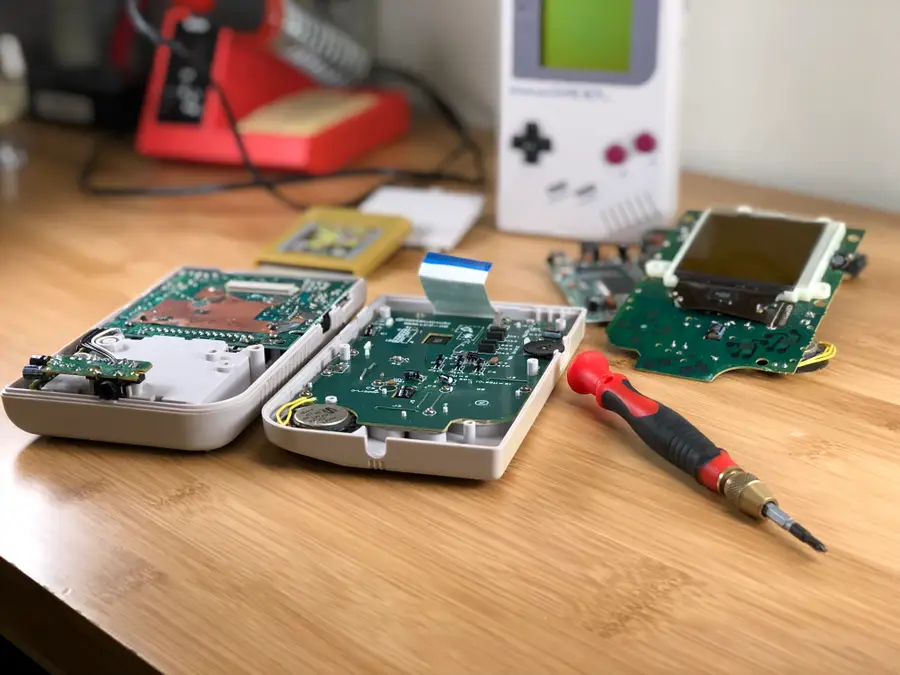
Installing a Game Boy backlight is arguably one of the coolest mods today. Such a minor detail would have made a tremendous difference back in 1989. However, Game Boys werenât exactly designed with a backlight in mind.
This mod requires a significant amount of power, affecting other areas of the device. One of the most noticeable impacts is a consistent whine from the speaker.
Thankfully, this issue is anything but detrimental. With a little bit of work, we can let more power through and cease this incessant whining!
1 – Examine the Game Boy
Itâs always best to start with a thorough examination of the Game Boy. Weâre looking for any missing pieces like link port covers, screws or battery covers. The Game Boy shell is held together using six screwsâmost of them tri-wing, but the earliest models use Phillips number 1 screws.
Because these devices are almost 30 years old, itâs not uncommon to find battery acid damage. When stored improperly, battery acid can leak into the Game Boy and affect the components inside. If your device has any signs of battery acid damage, donât worry! We wrote a guide on cleaning Game Boy battery corrosion.
Using an appropriate screwdriver, remove all of the screws used to hold the shell together. You will need to remove the battery cover to remove every screw.
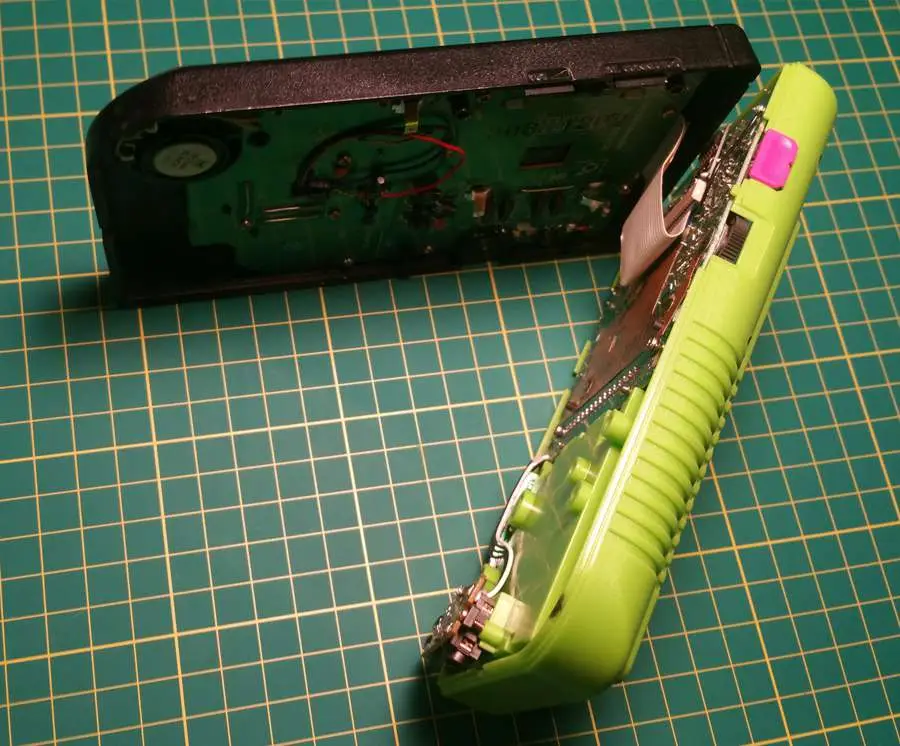
The Game Boy is comprised of two halves. These halves are held together by a very sensitive ribbon cable. This cable is responsible for feeding information to the LCD display. Exercise extreme caution when handling this cable!
Gently unplug the ribbon cable from itâs slot. The Game Boy should now be separated into two halves.
3 – Remove the back motherboard
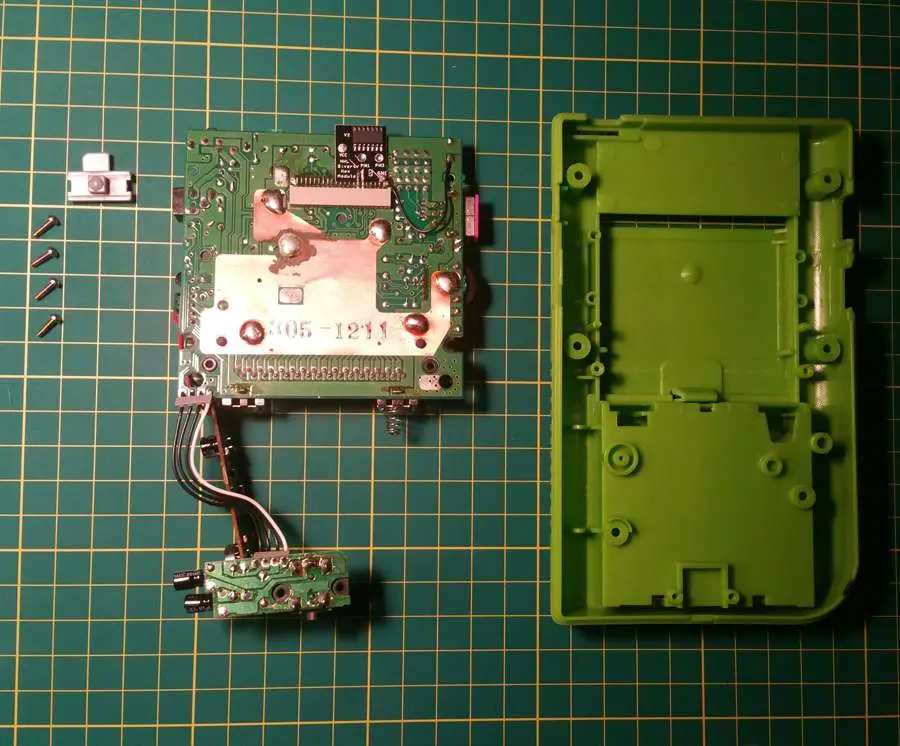
Using a Phillips number 1 screwdriver, remove the screws used to hold the back motherboard into place. There will be four screws total.
When the screws are removed, gently pull the motherboard from the back shell. Be mindful of the power switch in the upper left hand corner and set it aside during this step.
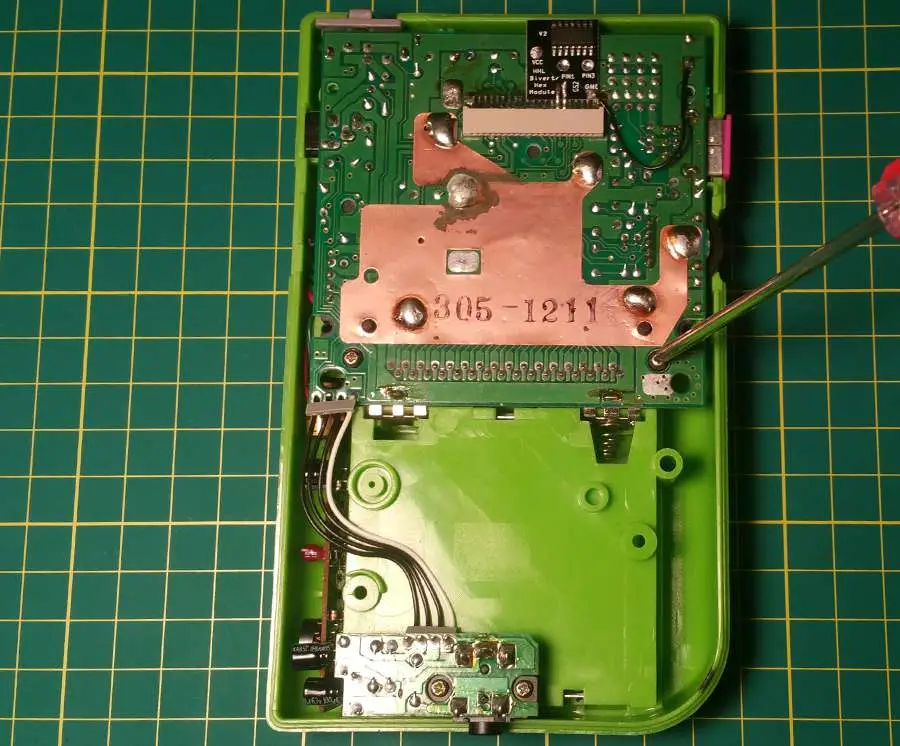
4 – Solder capacitor into place
The capacitor weâre installing will allow more power to reach the CPU. Itâs this little change that makes a big difference in the quality of sound output.
The capacitor will need to be soldered onto the small motherboard attached on the side near the bottom. Please reference the picture above to ensure the component is properly soldered.
The anode (positive leg on the capacitor) will need to be soldered to the top contact, highlighted above. The cathode (negative leg on the capacitor) will need to be soldered to the second contact, also highlighted above.
I recommend placing the capacitor before bending the legs into place. After all, you want to make sure the Gameboy fits together!
For a professional finish, add some liquid electrical tape.
5 – Attach the back motherboard
Place the back motherboard into the Game Boy shell. Don’t forget the power button placement in the upper left hand corner.
Using a Phillips number 1 screwdriver, screw the back motherboard into place. You will need four screws to mount the board to the shell.
6 – Close the Game Boy
The Game Boy will need to be reconnected before we screw it back together. Be extra careful when handling the ribbon cable and plug it into the port.
Using an appropriate screwdriver, likely tri-wing, screw the Game Boy shell together. There will be six screws used during this step.
7 – Time for a test
Itâs time to pop in a fresh set of batteries and crank it up! If everything worked, you should have a beautifully bright screen with a clean, crisp sound to accompany your adventures.
Something Not Right?
The Game Boy has no power – Double check the battery installation. Keep an eye out for corrosion or battery acid damage.
The speaker is still whining – Open the Game Boy once more and double check the capacitor installation.
NEXT UP
RetroPie scrapers: what they are and how to use them
You’ve put so much work into setting up RetroPie or EmulationStation. You load it up with legally obtained ROMs only to find that custom theme you installedâyou remember, the one from my RetroPie themes guideâhas a big blank spot for box art! The Best RetroPie Themes (And How to Install Them)You deserve some personal flair! RetroPie: Build Your
Introducing Howchoo, an enigmatic author whose unique pen name reflects their boundless curiosity and limitless creativity. Mysterious and multifaceted, Howchoo has emerged as a captivating storyteller, leaving readers mesmerized by the uncharted realms they craft with their words.
With an insatiable appetite for knowledge and a love for exploration, Howchoo’s writing transcends conventional genres, blurring the lines between fantasy, science fiction, and the surreal. Their narratives are a kaleidoscope of ideas, weaving together intricate plots, unforgettable characters, and thought-provoking themes that challenge the boundaries of imagination.
There’s nothing like a fire pit to bring friends together! I decided to make a budget-conscious fire pit and was able to accomplish the feat for about 75 bucks. Here’s my build guide. It took about an hour total, not counting sourcing and buying the materials.
You basically have two options when you want to build a stone fire pit that will last a reasonable amount of time:
Use fire brick (which is expensive).
Use a fire ring insert and surround it by cheap pavers.
Just use cheap pavers, but the heat will eventually make them crumble and/or explode.
To save some money, I chose the second option. I was able to pick up a 36″ fire pit insert on Amazon for $35 on sale (this is the ring I used). I tried to find a solid one without a pattern, but those were far more expensive. I figure the small gaps in the ring won’t harm the pavers too much. They also sell them at Home Depot and Lowes, but they were out of stock when I went. From what I’ve read, a good fire pit size is generally 36-44″.
The insert arrived in four pieces and I assembled it using the included hardware.
Next, I used high-temp BBQ grill paint to paint the fire ring. This is the BBQ paint I used. This isn’t strictly necessary but I know it will extend the life of the fire pit. I don’t quite trust the coating they put on these guys, let alone the cheap hardware they included. The can was $5, totally worth extending the life of the fire pit by a few years.
Choosing the location was a fun one — I decided on a spot where the grass doesn’t grow well. I live in Tampa, where the water table is super low, so it’s a challenge to keep grass healthy here. The fire pit did a good job of masking that fact. 🙂
Using my shovel, I chopped around and marked where I would remove the grass. I had to be careful here not to scrape off the paint, which had dried but not fully cured yet.
Note: the spider webs are from a Halloween party I was having. 😉
Removing all the grass inside of the fire pit..
Next, I moved the fire ring and removed the grass directly surrounding it — this is so that I could compact the ground and so that my pavers would lay flat. Since I didn’t have a soil compaction tool, I just smashed the shovel (and used my own weight) to compress the soil. This is important to keep the fire pit from shifting over time.
I picked up some cheap retaining wall blocks from Home Depot. Pavers also work well, but since these are literally made to be used as a wall, they stack nicely. The fire pit is 36″ in diameter, so its circumference is about 113″. Each block is about 9″ long on the short end, so I needed 13 bricks for each “level”. I decided on two levels, so this is 26 blocks total. Each block weighs 22 pounds, so my Subaru was not too happy about 600 pounds being loaded into its rear. Anyways, as always, it made the trip without incident and I began the process of carrying them back and forth into the back yard. The blocks were $1.25 each, so the lot cost me a little over $30.
This is the easy part — since I decided not to use any mortar, the process of stacking them into a wall was easy and satisfying. I left a small gap between the ring and wall to allow for better air flow.
Layer one complete!
Adding the second layer.. I overlapped the blocks for greater structural integrity.
Walls are complete! The fire pit insert is 9″ high and each block is only 4″ high, so as you can see in this photo the lip of the insert protrudes an inch above the blocks. This didn’t look too great so later I used a rubber mallet to pound the insert into the dirt an inch. This was a pain in the ass but was totally worth it.
I added gravel to the bottom of the fire pit to keep it from getting muddy. This will allow for it to drain a bit. It’s important to use the right kind of gravel — some gravel (like river rocks) retain a lot of moisture and thus will explode when heated. Granite is a safe type of gravel to use and it’s not too expensive — about $4 for this bag.
Spreading the gravel with a rake..
All done!
Action shot with a sweet bench that was carved from a tree trunk.
It does a good job of hiding how dead my grass is in that area. Also, Sydney likes it.
Here’s a terrible photo of it in action at night. I’ll try to get a better one next time and add it. If you want to build your own similar fire pit and have any questions, post below and I’ll be sure to help you out!
NEXT UP
How to Clean Vibram Five Finger Toe Shoes Without Ruining Them
Vibram Five Finger shoes are awesome pieces of running gear. But you can also use them for hiking and looking weird around town. Unfortunately, toe shoes start to smell if you don’t wear socks with them every time you wear them. While Vibram claims that the shoes are machine washable, you will ruin them if you wash
Introducing Howchoo, an enigmatic author whose unique pen name reflects their boundless curiosity and limitless creativity. Mysterious and multifaceted, Howchoo has emerged as a captivating storyteller, leaving readers mesmerized by the uncharted realms they craft with their words.
With an insatiable appetite for knowledge and a love for exploration, Howchoo’s writing transcends conventional genres, blurring the lines between fantasy, science fiction, and the surreal. Their narratives are a kaleidoscope of ideas, weaving together intricate plots, unforgettable characters, and thought-provoking themes that challenge the boundaries of imagination.
Vundle, Pathogen, Vim-plug, VAM, and the others can be great time savers but sometimes you just have to do something yourself so you can understand what exactly the time saving software is doing for you in the background. For myself, I got sick of not understanding what these were doing to my system. I realized I did not know the fundamentals of vim plugins so I set out to learn.
This is a step by step guide to teach you how to install a basic vim plugin without the help of any fancy manager.
1 – Create or find your .vim directory
Usually, you will have a .vim directory in your home folder. This is where you should put plugins and syntax files for vim. This is just a convention, however, so feel free to put them wherever you want.
2 – Create a ‘bundle’ directory inside the .vim folder.
This is another convention.
3 – Copy your plugin to this directory
If its hosted on Git, this is the place to do the following:
git clone
If its not, that’s ok too. However you’ve obtained it, it will work as long as it follows vim’s conventions of file and directory naming. If its just a single file with a .vim filetype, I recommend creating a directory here and putting the file inside.
4 – Set your vim runtimepath
Now that your plugin is where we want it, we need to tell vim where to find it every time you start it up. Your runtimepath is where vim looks for scripts, syntax files, plugins and other things to include in your vim environment. Inside vim, you can find your runtimepath with the following command:
:set runtimepath?
To update your runtimepath and load your new plugin, we’re going to edit your .vimrc which should be located in your home folder. The syntax to add a directory to your runtime path looks like this:
set runtimepath^=~/.vim/bundle/ctrlp.vim
5 – Reload your vimrc
You can call the following command:
:source ~/.vimrc
or just close and restart vim.
6 – Disclaimer
If you see errors while starting up vim or your plugin just doesn’t work, something went wrong. Sometimes vim plugins have dependencies or other installation steps so your mileage may vary.
If you feel differently about this process or have any strong opinions whatsoever, please comment and maybe we’ll all learn something!
NEXT UP
Make YouTube Video Embeds Responsive Using Pure HTML and CSS
Surprisingly, normal YouTube embeds are not automatically sized to the browser window as it is resized. Luckily, you can make YouTube videos responsive and mobile-friendly with some simple HTML and CSS. 1 – The HTML Wrap your embed code in a unique video wrapper (the class name is arbitrary). I chose to use embed-youtube as the selector.
Introducing Howchoo, an enigmatic author whose unique pen name reflects their boundless curiosity and limitless creativity. Mysterious and multifaceted, Howchoo has emerged as a captivating storyteller, leaving readers mesmerized by the uncharted realms they craft with their words.
With an insatiable appetite for knowledge and a love for exploration, Howchoo’s writing transcends conventional genres, blurring the lines between fantasy, science fiction, and the surreal. Their narratives are a kaleidoscope of ideas, weaving together intricate plots, unforgettable characters, and thought-provoking themes that challenge the boundaries of imagination.
Waiting for the bass to drop? Wait no longer! Today we’re making our own Raspberry Pi-powered synth controlled with a MIDI keyboard. This project will allow us to create our own sounds and play them by pressing keys on our keyboard. I’ll be using a Yamaha keyboard with a USB MIDI port to interface with a Raspberry Pi 3 B+, but this project should work with any Raspberry Pi and keyboard with MIDI output.
Short demo video
We’ll build our synth system using a program called Pure Data (abbreviated as PD). PD was created by Miller Puckette in the late 90’s. The tool is used professionally and even runs on different operating systems, making it ideal for our project. PD uses files known as patches, which can be created on one machine and easily transferred to a different one. Follow along as we install, configure, and use Pure Data on the Raspberry Pi to work with a MIDI keyboard.
PD can be used for a lot of different projects. Today we’re using it to make a MIDI controlled synthesizer, but it’s scope of capabilities is much more broad. You can create a vocoder, autotune incoming audio streams, and even use it to make pedal boards for electric guitars.
1 – Install and update Raspberry Pi OS
Let’s get started with a fresh OS. For this project, I’m running Stretch. The latest version is called Raspberry Pi OS but all of the tools we use in this project may not work with it. Check out our guide on installing Raspbian Stretch to do what I did.
Usually, it’s just a matter of running the following code:
sudo apt-get update && sudo apt-get upgrade --yes
Follow the update with a nice reboot.
2 – Install Pure Data
Pure Data is an awesome piece of open source software. You can find all sorts of expansions and add ons to really make the most of your synth projects. But today, we’ll keep things simple by using vanilla PD. To install the basic PD package, run the following code:
sudo apt-get install puredata
Follow the prompts to ensure the package installs. As a general rule of thumb, I restart my Raspberry Pi after a new software install.
3 – Install ALSA tools and aconnectGUI
We need to install sound tools to connect our MIDI keyboard to Pure Data. ALSA tools has everything we need to create the connection. AconnectGUI will provide us with a pretty user interface to work with. If you don’t want to use the GUI, the operations can be performed via command line.
Run the following to install both ALSA tools and aconnectGUI.
Follow the prompts to complete the installation and restart the Raspberry Pi.
4 – Open Pure Data
I’m running Pure Data on a Raspberry Pi with a screen. It is possible to run PD headless, you can find a complete list of Pure Data command line functions here. There are a few ways to launch Pure Data. It can be found under the start menu folder Sound & Video.
However, I’ll be launching PD via command line so it starts with admin privileges. I’m also including the tag -alsamidi so Pure Data launches with ALSA set as default. Run the following to launch Pure Data from a terminal.
sudo pd -alsamidi
5 – Adjust MIDI settings
Next we need to open virtual ports within Pure Data. We’ll use these ports to connect our MIDI keyboard. ALSA should be set as default if you opened PD via terminal in the last step. To be sure, Open Media from the top PD window menu. ALSA-MIDI should be selected. If it’s not, left click to select it.
Open Media once again and choose MIDI settings... from the drop down menu. A small window will appear with text fields next to In Ports: and Out Ports:. These text fields each need to be set to 1. Click OK. This will activate the Pure Data MIDI ports we need.
6 – Connect keyboard to Pure Data
Plug your MIDI Keyboard into a USB port on the Raspberry Pi and turn the keyboard on. I will be using the aconnectGUI to complete the connection. You can find aconnect GUI under the start menu Sound & Video folder. The application will say ALSA Sequencer at the top of the window.
There are two buttons at the top of the window: scissors and a cable. Click the cable button to enable the connection mode. Locate your MIDI keyboard in the list then drag and drop the arrows to connect it to the Pure Data ports we opened.
7 – Open a patch (or create your own!)
Now it’s time for the fun part! Pure Data uses files called patches. Starting your PD synthesizer journey only takes an afternoon. I found several useful resources along my way and want to pass them off to you to help you get started.
If you’re ready to jam now, download this MIDI patch I created and start playing immediately. Note: Patch files are built on existing patch files. The github link contains a zipped folder with 8 patch files. To launch the MIDI control module, unzip the folder and open MIDI_synth.pd.
This patch was made with the help of LWM Music tutorials on LWM Music. Dr. Lawrence W. Moore has a series of videos available on YouTube as well. The series is very well paced and thoroughly covers the basics of Pure Data. If you’re looking to build a solid foundation, this is a great place to start.
I recommend looking into different PD functions to implement them into your own patches. Additive Synthesis, for example, is a way of combining two waveforms to create unique wave patterns.
Congratulations! Your Raspberry Pi is now a funky fresh MIDI controlled synthesizer machine.
There are several ways to go about running a Minecraft server on the Raspberry Pi. In this guide, I’ll cover how to install Nukkit—a cross-platform Minecraft server that’s super easy to set up on the Raspberry Pi. This server should work with PCs, consoles, and tablets running Minecraft 1.14. I’ll be using a Raspberry Pi
Introducing Howchoo, an enigmatic author whose unique pen name reflects their boundless curiosity and limitless creativity. Mysterious and multifaceted, Howchoo has emerged as a captivating storyteller, leaving readers mesmerized by the uncharted realms they craft with their words.
With an insatiable appetite for knowledge and a love for exploration, Howchoo’s writing transcends conventional genres, blurring the lines between fantasy, science fiction, and the surreal. Their narratives are a kaleidoscope of ideas, weaving together intricate plots, unforgettable characters, and thought-provoking themes that challenge the boundaries of imagination.