Home Interests YouTube

The 30 Most Viewed YouTube Videos of All Time (2021)

Welcome to the billion views club.
howchoo   (467)
September 29, 2023
48 minutes

Share

Interests
Posted in these interests:
music • 4 guides
youtube • 2 guides

Did you know that the number of views on the most-viewed YouTube video is higher than the number of people on the entire globe?! Yup. We’re talking in the billions…and then some.

While YouTube formed YouTube Music, due to music videos and music playlists’ popularity, people still tend to head over to YouTube to listen to their favorite song. Lots of people! So it makes sense that the top viewed videos on YouTube are mostly music videos that people probably put on repeat until they have the song memorized.

With that said, there are definitely some surprises here! So strap in and get ready to find out which YouTube videos people can’t get enough of.

Can you guess what the most-watched video is?

30 – Blank Space

YouTube

Uploader: Taylor Swift

Views: 2.7 billion

It’s no surprise this video makes it onto our list due to the incredible cinematography work by famed music video director Joseph Kahn. Swift plays the role of a slightly mad, rich woman who lives in a mansion and seems to be just a bit…spoiled. Her love interest shows affection but finally cannot deal with the madness that is her life. But just as quickly as the one boyfriend leaves, another approaches and offers her his love.

Did you know?

Director, Joseph Kahn, drew inspiration from the symmetrical framing style of Stanley Kubrik, used in the film A Clockwork Orange. Both the film and this video feature characters who are slightly mad, so that makes a lot of sense!

29 – Waka Waka (This Time for Africa)

YouTube

Uploader: Shakira

Views: 2.7 billion

This version of Waka Waka features the South African band Freshlyground. The video combines footage from the FIFA World Cup, along with Shakira dancing with children. The song was the official song of the 2010 FIFA World Cup, which was played in South Africa. The song’s popularity certainly didn’t end with the World Cup, however, and the video continues to get millions of views each year. If your a soccer fan, then you’ll appreciate the many clips of some of the most memorable soccer moments in history.

Did you know?

The video and song generated lots of criticism as the official song for the FIFA World Cup in South African because many felt that a South African artist should have been chosen.

28 – Wheels on the Bus

YouTube

Uploader: Cocomelon – Nursery Rhymes

Views: 2.8 billion

Get used to the sound of the voices in this animated music video because they’ll be on our list a few times. The video is basically an animated take of the song The Wheels on Bus. It’s a cute video featuring kids, some colorful animals, and, of course, a bus driver who sings along with the song, while demonstrating each of the things that the bus can do. We’re imagining kids playing this song over and over and over. So if you have a kid, then you’ve probably heard this rendition quite a few times.

Did you know?

Wheels on the Bus was written by American, Verna Hills in 1939. Its melody is based on another popular children’s song—Here We Go Round the Mulberry Bush.

27 – Perfect

YouTube

Uploader: Ed Sheeran

Views: 2.8 billion

This is the first of Sheeran’s multiple appearances on our list. The song has to the best high school prom finisher ever written. It praises young love and encourages blossoming young lovers to give love a try. The video tells the story of Sheeran meeting a young love interest at a train station and enjoying a snowy mountain landscape as they explore their blossoming love. It’s a very sweet video and one that gives us hope in love again.

Did you know?

Andrea Bocelli sang Perfect in an orchestral version called The Perfect Symphony in 2017.

26 – Mi Gente

YouTube

Uploader: J Balvin

Views: 2.8 billion

Mi Gente is a remix of Willy William’s song “Voodoo Song.” The song mentions a love of people from all over the world, and that’s just what the director attempted to showcase in this colorful video. The video features dancers from all over the globe. They dance in front of a backdrop of bright colors. There are many cameo appearances in the video, including Italian millionaire Gianluca Vacchi.

Did you know?

Mi Gente regularly finds itself on the greatest songs of the decade (2010s) list and was even remixed by Beyoncé.

25 – Hello

YouTube

Uploader: Adele

Views: 2.8 billion

The first whole minute of the music video for Hello by Adele has no actual music. Instead, the video showcases a rustic landscape, as the video’s main character returns to an old home. The premise of the video is the main character talking to an earlier version of herself. It’s a rare video, too, in that the entire video is in sepia-tone and not color. Both the excellent cinematography and the song’s popularity push this one well over 2 billion views.

Did you know?

This is the first music video ever shot in an IMAX format.

24 – Let Her Go

YouTube

Uploader: Passenger

Views: 2.9 billion

It’s a classic music video from singer-songwriter Passenger that makes it onto our list. The video combines some staged performances of the song Let Her Go with backstage footage and live footage from concerts. It’s the song’s greatness that gives it such replay value, however, which is certainly why this has made it onto the list. The video does a great job of showcasing some of the band’s talents and the camaraderie amongst them.

Did you know?

Passenger and his record label never expected the song to do so well. It did so well, in fact, that Budweiser even used it in a Super Bowl commercial.

23 – Girls Like You

YouTube

Uploader: Maroon 5

Views: 3 billion

This video has lots of star power! In addition to having Cardi B serve as a co-artist, there are lots of celebrity women who make appearances, dancing alongside Levine. Here’s the complete list of celebrities that make cameos: Camila Cabello, Phoebe Robinson, Aly Raisman, Sarah Silverman, Gal Gadot, Lilly Singh, Amani al-Khatahtbeh, Trace Lysette, Tiffany Haddish, Angy Rivera, Franchesca Ramsey, Millie Bobby Brown, Ellen DeGeneres, Jennifer Lopez, Chloe Kim, Alex Morgan, Mary J. Blige, Beanie Feldstein, Jackie Fielder, Danica Patrick, Ilhan Omar, Elizabeth Banks, Ashley Graham, and Rita Ora, with Levine’s wife Behati Prinsloo and their daughter Dusty Rose.

Did you know?

There are multiple alternative videos for the song. In one, the video follows Levine’s career in music until he finally meets his wife.

22 – Bailando

YouTube

Uploader: Enrique Iglesias

Views: 3 billion

An original version of this song served as the theme song of the soap opera Reina de Corazones. So, needless to say, that the song’s popularity in Spanish-speaking countries is pretty massive, which is just one reason this video made it onto our list. The video is filmed in Santo Domingo, Dominican Republic, and showcases some of the city’s beauty. The video also highlights the city’s many faces as they watch the dancers perform in the street.

Did you know?

Like many other songs on the list, Bailando also faced controversy over “borrowing” some elements from another composer. Peruvian singer and composer Sergio Pelo D’ambrosio Robles sued the label over copying his compositions but later withdrew.

21 – Lean On

YouTube

Uploader: Major Lazer

Views: 3 billion

Much like the next video on our list, Lean On‘s setting is somewhere not in the Western hemisphere—namely, India. The song is an electronic, dance-pop song with some traditional Indian elements. The video showcases some spectacular spots in India, as well as traditional Indian dancing and garb. It’s a well-choreographed, bright video, which is why it’s made into the billion-views club.

Did you know?

Major Lazer was inspired to make the video after touring throughout India and enjoying the culture and the people.

20 – Dark Horse

YouTube

Uploader: Katy Perry

Views: 3 billion

This video wasn’t without controversy. The Egyptian theme employed by the director had many up in arms because of the sensitivity of the cultural references involved. But as a sheer artistic music video, it’s quite stunning. It also carries on Perry’s tradition of using foreign landscapes and themes for her work. The location of Memphis, Egypt also holds special significance for her co-artist, Juicy J. This won’t be the last time you’ll see a video of Perry’s on the list. Can you guess what her most popular video is?

Did you know?

This was the first video by a female to reach 1 billion views on both YouTube and Vevo.

19 – Faded

YouTube

Uploader: Alan Walker

Views: 3 billion

There’s something romantic about an abandoned city and something magically eerie too. The basic premise from this video by Alan Walker is that a lone survivor wanders an empty city. Set to the backdrop of the beautiful electronic music, the video is certainly compelling, if only to see what the world might look like when there’s no one left.

Did you know?

The video is filmed in Estonia and uses many iconic locations. We’re assuming they had to clear everyone and everything before they could film.

18 – Shake It Off

YouTube

Uploader: Taylor Swift

Views: 3 billion

Released in 2014, Shake It Off solidified Taylor Swift’s rise to pop stardom. It’s hard to remember being anywhere without hearing this song playing in the background. The video features a group of contemporary dancers who perform in as many styles as they can squeeze into this four-minute video. There’s everything from gymnastics to cheerleading to contemporary ballet. It’s a fun video that highlights Swift’s dancing repertoire, which she employs at her sold-out concerts as well.

Did you know?

The song faced multiple lawsuits from various artists who claimed that the song could not exist without references to the lyrics “Haters gonna hate; players gonna play.”

17 – Thinking Out Loud

YouTube

Uploader: Ed Sheeran

Views: 3.2 billion

This is Mr. Sheeran’s second appearance on the list (but not the last). This time Sheeran and a dancer perform a beautiful contemporary dance piece to his song, Thinking Out Loud. In that sense, the video is fairly simple in its concept. It’s the beauty of the ballroom set and Sheeran’s surprisingly amazing dancing that really make this video something special. We also imagine this is the song of choice at countless weddings across the globe.

Did you know?

The dancer that Sheeran performs with is Brittany Cherry, a contestant from the televised American dance competition, So You Think You Can Dance.

16 – Dame Tu Cosita

YouTube

Uploader: Ultra Music

Views: 3.2 billion

We’re not sure where to begin with this strange video. It appears to be a green, alien-like creature dancing to the song Dame Tu Cosita on Mars. The alien creature does a lot of thrusting as he struts back and forth. The song itself is also fairly simple. Our guess is that this video and song have found their way into a lot of dance parties. Props if you can memorize and perform the entire alien dance from the song!

Did you know?

“Dame tu cosita” translates to “Give me your little thing.” We’re not going to discuss the meaning behind that one, however.

15 – Counting Stars

YouTube

Uploader: OneRepublic

Views: 3.2 billion

The symbolism in the music video by OneRepublic includes the crumbling of a foundation, an alligator stalking, a preacher who drives away the devil, and even water that washes away everything. It’s a fairly poetic montage that features the band playing in a basement underneath the preacher, who is preaching to a small group upstairs. Eventually, the two video narratives begin to blend with the upstairs group dancing to the music in the basement.

Did you know?

Writer, Ryan Tedder, originally intended the song to be recorded by Beyoncé, while he was staying with her and Jay-Z. But he didn’t think she would like it enough, so he recorded himself on the Native album.

14 – Roar

YouTube

Uploader: Katy Perry

Views: 3.3 billion

This music video of Roar by Katy Perry is one of those videos that’s essentially an entire movie script built into a short video. Perry crash lands in the jungle and begins by hiding behind a male tour guide. He gets attacked by a tiger, and she’s left on her own. She deals with her fear of the jungle and its creatures—eventually conquering both. Heck, she even gives a crocodile a toothbrushing! Oh, and you’re going to hear her roar!

Did you know?

The video was heavily criticized by PETA, who objected to the use of animals for entertainment purposes.

13 – Sorry

YouTube

Uploader: Justin Bieber

Views: 3.4 billion

If you’re looking for a dance video—meaning a video that’s all dancing—then Justin Bieber’s video for the song Sorry is just what you need. A dancing troupe wearing bright colors dances across a white backdrop in an impressively choreographed routine that will leave you longing for 2015 all over again.

Did you know?

Bieber admits now that this song was written about and for his former lover, Selena Gomez. We’re guessing the apology didn’t work.

12 – Sugar

YouTube

Uploader: Maroon 5

Views: 3.4 billion

This is as heartwarming as it gets. The band Maroon 5 takes off on the road to make surprise appearances at various weddings. The wedding parties are obviously surprised to see the backdrop reveal the band, as this was part-staged and part-reality. It’s nice to see that artists haven’t run out of ideas for music videos and are still finding ways to surprise a viewer. This video‘s rewatchability is to keep seeing the smiles on the faces of newlyweds!

Did you know?

The grooms were told about the wedding crashing, and many were reluctant about the whole thing. Once they found out the band was Maroon 5, however, they all agreed!

11 – Phonics Song with TWO Words

YouTube

Uploader: ChuChu TV Nursery Rhymes & Kids Songs

Views: 3.7 billion

Though this is a video meant to teach kids the alphabet and pronunciation, the melody is actually fairly complex and haunting. The video begins with the letter A and gives basic examples of each letter in the alphabet. It also reinforces the pronunciation of each syllable, and this would be a great video to have a kid memorize at an early developmental age.

Did you know?

Phonics can be any method for teaching children how to pronounce words. It’s often criticized as an alternative to real reading.

10 – Bath Song

YouTube

Uploader: CoComelon Nursery Rhymes

Views: 3.8 billion

This video has all the tell-tale markers of a viral kid’s video. It’s basically a blend of the Baby Shark video and the Johny Johny Yes Papa video, which will appear later on our list—and those two videos have lots of views! The melody is from the song The Itsy Bitsy Spider and depicts two children washing up in the bathtub. They get into some mischief but really make it fun for any kid to want to take a bath (which seems like a great thing).

Did you know?

The Itsy Bitsy Spider, which is the melody for this song, is included in the Roud Folk Song Index. This index includes more than 25,000 traditional folk songs.

9 – Learning Colors – Colorful Eggs on a Farm

YouTube

Uploader: Мирошка ТВ

Views: 3.8 billion

Set to the tune of Old MacDonald Had a Farm, this simple animation teaches children six basic colors: black, brown, pink, white, red, blue. The audio is in Russian, so this would be a great video for anyone trying to teach their kids Russian. There are English subtitles, so it’s still a good video for English speakers. The video shows the eggs getting filled with various colors and reinforces what each color is. What probably pushes this video in terms of views is the unique animations of the eggs.

Did you know?

The earliest example of egg coloring was found with a Slavic girl’s remains, dating back to the 5th century. The egg was not associated with Easter.

8 – Gangnam Style

YouTube

Uploader: Psy

Views: 4 billion

The mid-2010s will be forever marked by this song and particularly the style of dance it inspired. There were countless TikTok and YouTube videos made with people doing their own take on the Gangnam Style dance craze. The video itself is pretty funny and features the singer and dancers performing cheeky acts while singing the song. The South Korean artist, Psy, certainly has a sense of humor, as evidenced by this hilarious video!

Did you know?

Gangnam Style is a reference to the Gangnam District in Seoul, South Korea. It’s a trendy area and the video sort of mocks the posers who claim to be “Gangnam.”

7 – Uptown Funk

YouTube

Uploader: Mark Ronson

Views: 4.1 billion

Who would have thought that a throwback video to the early ’80s era of boogie and funk would have been so popular with the YouTube listening audience? But this hit video celebrating fun and partying became an instant hit and features Bruno Mars, who co-wrote the song with Ronson. It wasn’t without controversy, however, as the label was sued multiple times for copyright infringement, causing the performers to make multiple changes to the lyrics and tune.

Did you know?

This song was so frustrating for Ronson and Mars that they almost scrapped the whole thing entirely. They just couldn’t quite get the chorus the way they wanted it. Lucky for the world, however, they stuck with it.

6 – Masha and the Bear

YouTube

Uploader: Get Movies

Views: 4.4 billion

Of all the videos on the list, this Russian-made cartoon has to have the best animation. The story tells of a bear and a little girl named Masha. While the bear tries to beat himself at a game of checkers, Masha makes his life hell. First, she wants to play, so the bear gives her some hockey equipment that she uses against him. Next, she makes some porridge…a lot of porridge. In the end, she does clean up the house but refuses to eat all of that “cruel gruel” she just made. This would be a great video for kids wanting to learn Russian.

Did you know?

Masha and the Bear is actually a television series, created by Oleg Kuzovkov, for Russian television. It’s so popular that it’s been broadcast on almost every streaming service throughout Europe and the US.

5 – See You Again

YouTube

Uploader: Wiz Khalifa

Views: 5 billion

Featured on the Furious 7 soundtrack, the video for See You Again has Charlie Puth singing the iconic “See You Again” chorus and Wiz Khalifa performing the rap. The video, as expected, highlights lots of sports cars and muscle cars as a backdrop to the performers. The video also features clips from the movie, with Vin Diesel and Paul Walker—who passed away before the video was released, giving the song a hauntingly meaningful quality.

Did you know?

The song and video were commissioned for Paul Walker, the famous actor of the Furious films, who died in a car accident on November 30, 2013.

4 – Johny Johny Yes Papa

YouTube

Uploader: LooLoo Kids

Views: 5 billion

Set to a revamped version of the melody of Twinkle, Twinkle, Little Star, this Youtube hit tells the story of a little baby who tries to sneak sugar from a kitchen cabinet. His grandfather catches him, and the baby lies that he wasn’t taking sugar. Eventually, the baby sneaks some sugar while the grandfather falls asleep. Pretty simple, huh? Well, more than 5 billion views show that even a simple story like this will entertain kids over and over again. There’s even a 60-minute version of the song for those who want to listen to the song on repeat.

Did you know?

This video makes it onto another exceptional list. This also happens to be one of the top ten most disliked videos on YouTube, as well. Love it or hate it; people sure do keep watching it!

3 – Shape of You

YouTube

Uploader: Ed Sheeran

Views: 5.2 billion

You’ve already seen Mr. Sheeran on this list a few times, but his smash hit, Shape of You, puts him at #3 on the most-watched YouTube videos list. If you don’t know the song, then you must have been living on another planet for the past few years. The basic premise of the song is that the singer enjoys meeting women while a bit tipsy at the bar. The video, on the other hand, details a much richer narrative of two young lovers meeting at a boxing club and falling in love.

Did you know?

This was the fastest music video to reach 1 billion views on YouTube.

2 – Despacito

YouTube

Uploader: Luis Fonsi

Views: 7.2 billion

With more than 400 million Spanish-speaking people globally, many of YouTube’s most subscribed channels and played videos are from Spanish-speaking artists and performers. Despacito, featuring Luis Fonsi and Daddy Yankee, is a rhythmic tune that’s probably a staple of just about every dance party for the past couple of years. As one YouTube commenter notes: When a teacher asks how many people live on Earth, the student can simply say, “Despacito.”

Did you know?

In 2018, Fonsi’s YouTube channel was hacked, and the video was removed for a few hours before his channel could be restored.

1 – Baby Shark Dance

YouTube

Uploader: Pinkfong Kids’ Songs & Stories

Views: 8.2 billion

More and more children are watching YouTube videos today than ever before. In fact, around 80% of parents say their kids watch YouTube videos regularly. So it’s little surprise that a children’s music video topped the list!

If you have a kid, then you know the “Baby Shark Dance” song. You know it really well because you’ve likely heard it over and over, which is exactly the reason this cute (though annoying) little song tops the charts. The video features two children singing about a family of sharks from which they are then chased and escape. Oh yeah…doo doo doo doo doo doo.

Did you know?

The origins of the song are somewhat in dispute. There’s an earlier YouTube version by Johnny Only who assumed it was a traditional campfire song, but it may actually have an owner. Of course, once something gets big enough, there’s usually someone claiming they did it first.

NEXT UP

How to Use Plex to Easily Create Playlists for PlexAmp

PlexAmp rocks but doesn’t easily create playlists. Luckily, there’s an easy workaround.
howchoo   (467)
September 29, 2023

I love Plex, the self-hosting solution for movies, TV shows, music, and even audiobooks (though this last is still only partly supported). I usually try to go more towards the FOSS (or at least Open Source) end of the market, but, while Jellyfin and Kodi are friggen awesome, their development lags way behind Plex and even Emby.

Continue Reading

howchoo

 467 guides

Introducing Howchoo, an enigmatic author whose unique pen name reflects their boundless curiosity and limitless creativity. Mysterious and multifaceted, Howchoo has emerged as a captivating storyteller, leaving readers mesmerized by the uncharted realms they craft with their words. With an insatiable appetite for knowledge and a love for exploration, Howchoo’s writing transcends conventional genres, blurring the lines between fantasy, science fiction, and the surreal. Their narratives are a kaleidoscope of ideas, weaving together intricate plots, unforgettable characters, and thought-provoking themes that challenge the boundaries of imagination.

Home Interests Raspberry Pi

The Best Raspberry Pi HATs for Your Next Project (2022)

No need to measure your head for these HATs—just make sure they fit your Pi!
howchoo   (467)
September 29, 2023
19 minutes

Share

Interests
Posted in these interests:
pi • 92 guides

There are so many cool HAT extensions for the Raspberry Pi to make your next project literally sing (if that’s what you want)! HATs are great pre-built add-ons that enhance what your Raspberry Pi is capable of. From turning your Pi into an all-in-one recording device—to running the Raspberry Pi on solar power—to creating an awesome LED discoball—these HATs will make it easy to do some incredible things on your Raspberry Pi.

What is HAT?

HAT stands for “Hardware Attached on Top.” Essentially, a HAT is a pre-built extension for your Raspberry Pi that allows it to perform some desired function. Most HATs are plug-and-play, requiring no soldering. And the best HATs automatically configure themselves. The EEPROM module communicates with the Raspberry Pi, telling it which IO pins it’s using, how to configure them, and which drivers need to be installed.

What kinds of things can a Raspberry HAT do?

Anything! Well, that’s not actually true. But you’re certainly going to be surprised when you scroll down our list of Raspberry Pi HATs and learn all the cool things you can do just by plugging in an extension!

Unless noted otherwise, HATs do not come with a Raspberry Pi unit.

1 – Best Audio (DAC) HAT for the Raspberry Pi

Raspiaudio Audio Soundcard ++

The Raspiaudio Soundcard DAC HAT gives you everything you need to build an all-in-one stereo output sound machine with your Raspberry Pi. It includes onboard stereo speakers, two onboard microphones, and two 1.3 watt amplifiers. A great all-around audio HAT for the Raspberry Pi used in many audio projects.

Compatible Raspberry Pi Models
Pi Zero / 3 / 4

Honorable Mentions

We would be remiss not to specifically mention this mini speaker from Pimoroni, since it helped us make one of our biggest projects to date.

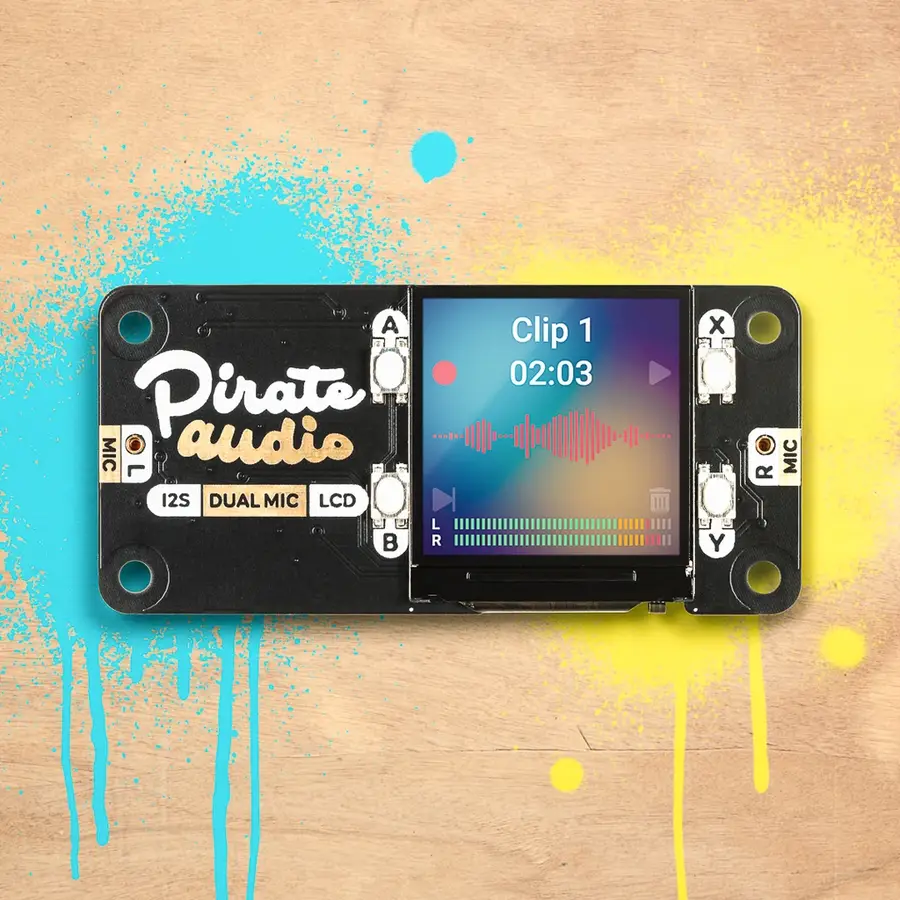
Pimoroni Pirate Audio Mini Speaker

One of these would look great on your desk! Comes with a full-color LCD screen and built-in Pirate audio software to turn your Raspberry Pi into a mini speaker.

We used an older version of this HAT in the Amazon Echo Furby known as Furlexa:

3 – iQaudio Pi

IQaudio Pi Modules Relaunched Under Raspberry Pi Umbrella
Add some audio support to your next Pi project.

Now owned by Raspberry Pi, these are official!

2 – Best GPS HAT for the Raspberry Pi

Adafruit Ultimate GPS HAT

This GPS HAT is hands-down the best HAT for locating your Raspberry Pi, even when using it outdoors on a cloudy day. Adafruit has a built-in antenna to help with finding your location even in the worst of weather.

The Adafruit GPS HAT includes a real-time clock and a backup battery for 7 + years of timekeeping even if the Raspberry Pi is off. It features 165 dBm sensitivity, 10 Hz updates, and 66 channels. It comes preassembled and ready to use!

Add location data and atomic-precision timekeeping by plugging this HAT into your Pi.

Compatible Raspberry Pi Models
Pi A + / B +

3 – Best PoE HAT for the Raspberry Pi

Official Raspberry Pi PoE HAT

If you’re looking to power your Raspberry Pi over a PoE (Power over Ethernet) enabled network and skirt the need for a power supply, then you’ll want a dependable PoE HAT. As we all know by now, the official Raspberry Pi Foundation hardware tends to set the gold standard by which other things aspire. So, yes, this is a more expensive PoE HAT, but it’s a piece of hardware on which it’s important not to skimp.

The official PoE HAT comes with a built-in fan and is compatible with an adapter for the Raspberry Pi 4.

Compatible Raspberry Pi Models
Pi 3 + / 4

Honorable Mention

PoE Texas Raspberry Pi PoE Hat

If you’re looking for a budget PoE Hat, then a great option is this one from PoE Texas. Because PoE Texas specialized in PoE’s, you can be relatively comfortable with the quality of this PoE HAT. Note that this one does not come with a fan, so it may not be the best option for a Raspberry Pi 4, which tends to run hot.

4 – Best TRIAC HAT

Waveshare 2-Channel TRIAC HAT

There aren’t many options when it comes to quality TRIAC HATs for the Raspberry Pi. If you need to switch voltages (up to 4400W max) across two devices without the traditional downfall of relays, then this is the HAT you’ll want to get for your Raspberry Pi.

Other features include:

  • Onboard STM32F0 microcontroller which supports direct command control
  • Optocoupler isolation preventing interference from the circuit
  • RC snubber circuit to protect it from power fluctuations
  • A reserved UART and I2C interface for working with other host control boards

What is a TRIAC HAT and what is it used for?

TRIAC stands for “triode for alternating current.” If we break down again, that is a three-electrode semiconductor device that will conduct in either direction when triggered by a positive or negative signal at the gate electrode. Let’s break it down again. It’s a relay that allows a current to flow in both directions.

The most common application for a TRIAC is in a light-dimmer or adjustable speed electric fan. The TRIAC allows the current to be adjusted in both directions to allow the light to dim or brighten.

Be careful! Do not touch the high voltage section with bare hands!

PiHut
Compatible Raspberry Pi Models
All

5 – Best HAT for kids and learning

Official Raspberry Pi Sense HAT

I’m going to say it. Every kid should have a Raspberry Pi and Sense HAT. With the Sense HAT from the Raspberry Pi, kids can easily see the results of their programming in addition to a host of other cool features. It was constructed specifically for the AstroPi mission for kids to see their programs on the International Space Station, which we reported on.

The Raspberry Pi Sense HAT includes an 8×8 RGB LED matrix, a five-button joystick, and the following sensors:

  • Gyroscope
  • Accelerometer
  • Magnetometer
  • Temperature
  • Barometric pressure
  • Humidity

Python module

Here’s a great Python module for controlling the Sense HAT.

Compatible Raspberry Pi Models
Pi 2, 3, 4

6 – Best case for a Raspberry Pis with HATs

Official Raspberry Pi HAT Enclosure

The perfect case for the Sense HAT mentioned above.

Now, you should probably realize that when you put certain HATs on your Raspberry Pi that the Pi may not fit in a standard case. So be sure to get a case that states it will Raspberry Pis with a HAT installed, like this official HAT case from the Raspberry Pi Foundation.

We love that this case has a pop-up clear top, so you can access and interact with your Raspberry Pi HAT. This should make it usable for most HATs that you’ll get for your Pi. Note: you’ll still need to make sure your HAT does not have plugs that this case will not support.

7 – Other cool HATs for the Raspberry Pi

JuiceBox Zero

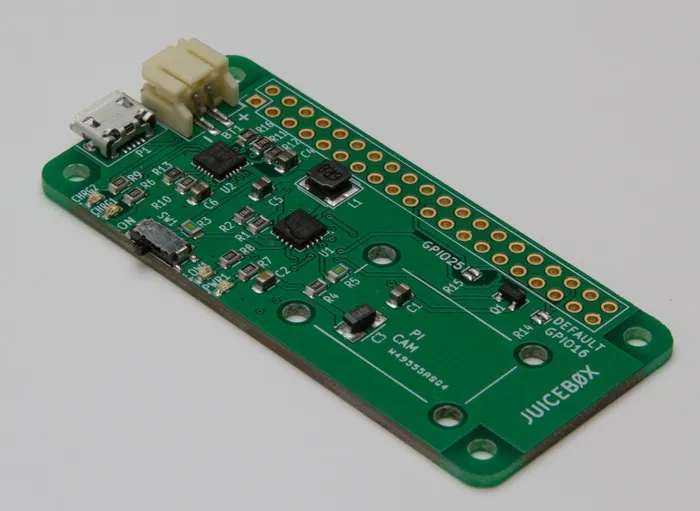
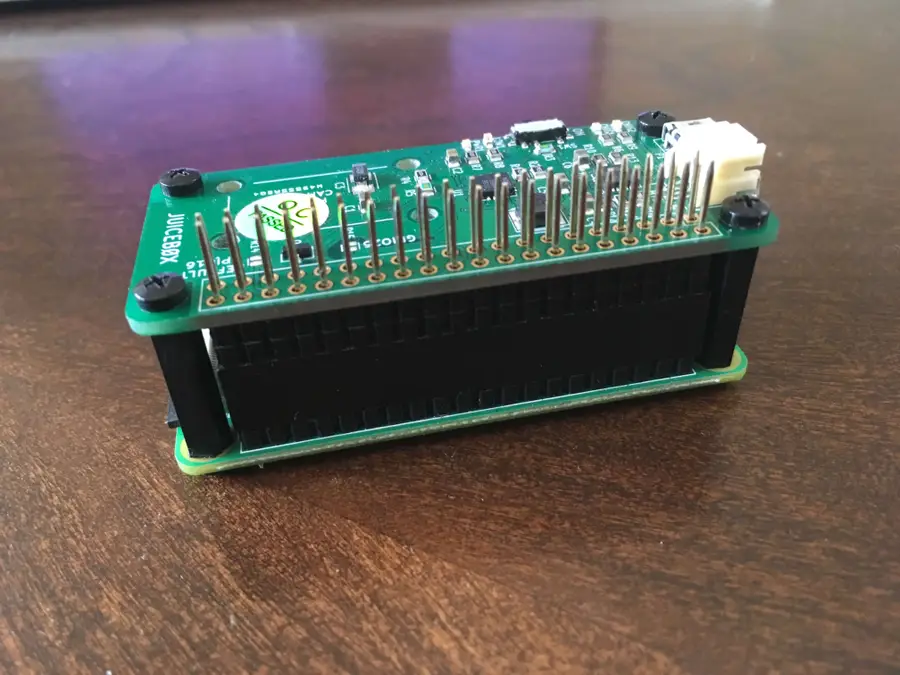
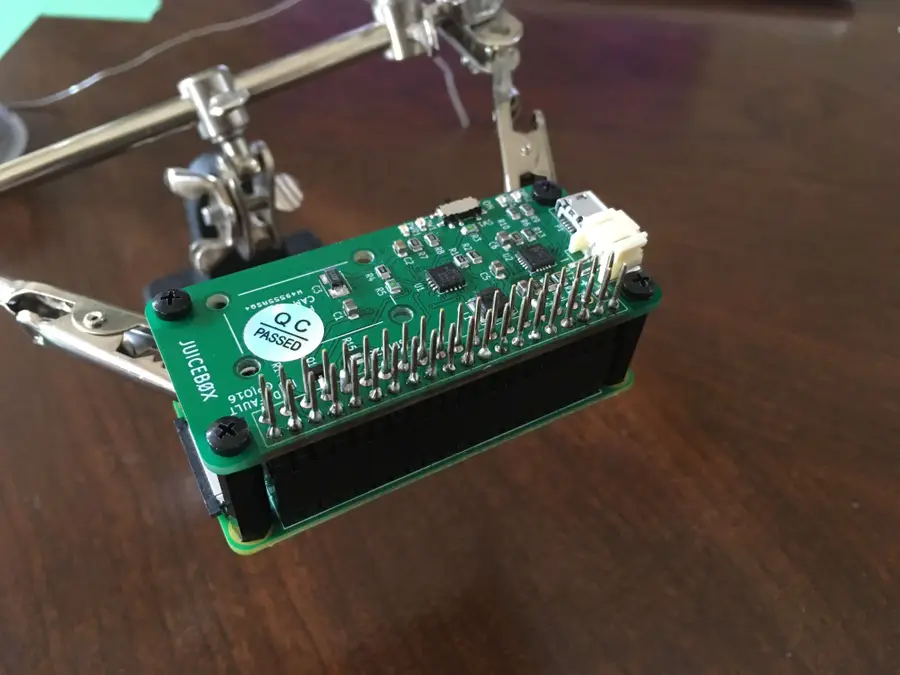
The JuiceBox Zero HAT for the Raspberry Pi Zero lets you power it from a battery! What makes this even cooler is that even works and charges your battery via a micro USB cable built-in. It has status indicator lights indicating low-battery, on/off, charging, and charge completely. It has a built-in camera mount if you want to use this as a truly mobile security camera. Best of all, it requires absolutely no code to use! We featured this HAT in our solar-powered Raspberry Pi build guide.

Here’s a video that shows you how it works:

PUD (Pull Up/Down) HAT

With this nifty little HAT from ModMyPi, you can forget about the wiring when adding a pull up / down resistor to a circuit. Wire up the sensor output to the pin on the PUD HAT, add a shunt jumper to either pull up or down. When you apply a signal voltage from your sensor or switch, the Raspberry Pi can sense into which logic state the pin has been pulled! So cool!

The PiHut has made a great guide showing you how to use the PUD HAT.

Pimoroni Grow Kit

Perfect for any gardener and Pi fanatic! This a complete compact grow system featuring the Grow HAT from Pimoroni that helps you monitor and take the best care of your plants and herbs. There are built-in moisture sensors to let you know when your plants need some watering. You can even custom tailor the specifications for different plants’ water and food needs.

Adafruit RGB Matrix Bonnet

Another HAT we’ve used in our projects is the Adafruit RGB Matrix Bonnet, which allows you to program full color LED displays and light shows. Works with 16×32, 32×32, 32×64 or 64×64 RGB LED Matrices to create a great display. For more details on how to use this, see our guide on building an LED Matrix with a Raspberry Pi.

And for more inspiration, see how the RGB Matrix Bonnet helped us make an LED NHL scoreboard!

Build Your Own Live NHL Scoreboard with Raspberry Pi and LEDs!
Get real-time game scores and more for your favorite hockey team.

NEXT UP

How to Run a Minecraft Server on the Raspberry Pi

A whole world trapped inside your Pi.
howchoo   (467)
December 7, 2023

There are several ways to go about running a Minecraft server on the Raspberry Pi. In this guide, I’ll cover how to install Nukkit—a cross-platform Minecraft server that’s super easy to set up on the Raspberry Pi. This server should work with PCs, consoles, and tablets running Minecraft 1.14. I’ll be using a Raspberry Pi

Continue Reading

howchoo

 467 guides

Introducing Howchoo, an enigmatic author whose unique pen name reflects their boundless curiosity and limitless creativity. Mysterious and multifaceted, Howchoo has emerged as a captivating storyteller, leaving readers mesmerized by the uncharted realms they craft with their words. With an insatiable appetite for knowledge and a love for exploration, Howchoo’s writing transcends conventional genres, blurring the lines between fantasy, science fiction, and the surreal. Their narratives are a kaleidoscope of ideas, weaving together intricate plots, unforgettable characters, and thought-provoking themes that challenge the boundaries of imagination.

Home Interests Woodworking

DIY Danish Oil: How to Make Homemade Own Danish Oil

Get the easiest and safest wood finish with homemade Danish Oil.
howchoo   (467)
September 29, 2023
7 minutes

Share

You’ll Need 3

What you’ll need
Interests
Howchoo is reader-supported. As an Amazon Associate, we may earn a small affiliate commission at no cost to you when you buy through our links.
Posted in these interests:
woodworking • 4 guides

Danish oil is a general purpose natural finish for wood. It adds depth and richness to any wood species and protects and seals at the same time. It is extremely easy to apply or reapply with a rag, and it is not sticky or toxic like most off the shelf stains and finishes.

There is no one definition of danish oil but generally, it refers to a mixture of oil, some type of varnish or polyurethane, and a thinner. A couple of brands make their own “Danish oil” and don’t disclose the exact recipe, but it is accepted that it is some combination of these three ingredients.

I’m going to show you my very basic recipe that you can then tweak as you get more experienced with it.

1 – Oil

The most common oil to use is boiled linseed oil. Commonly shortened to the acronym BLO, this oil has likely been used to protect wood for a couple hundred years. It is produced by extracting oil from the flax plant and concentrating it. It soaks into the wood, preventing other things like moisture and bugs from getting in, and it darkens the wood almost as if it were wet.

Make sure you buy something that is just boiled linseed oil as there are many products on the market that are not 100% BLO. This one from amazon does the job. You can experiment with other oils, but this one has served me and many other woodworkers extremely well.

I use BLO as 1/3 of my danish oil recipe.

2 – Varnish (or poly)

Using the term “varnish” as an umbrella term for polyurethane, shellac, and actual varnish is a bit of a misnomer, but it’s quite common. In this case, we are referring to any finish whose purpose is for sealing and protecting wood.

When making your own danish oil, you need a “varnish”. I typically reach for a satin polyurethane like this one from Minwax.

I also use about 1/3 in my recipe however, if you’re going to tweak the recipe for your specific project, I would start here. Both with the type of varnish you use and the quantity. A great example would be if you wanted something a bit more water resistant, I would recommend using more varnish. If you like a more shiny finish, use a high gloss poly like this one.

3 – Thinner

In order to go on evenly, the mixture needs a thinner like mineral spirits or paint thinner. Some people believe that only mineral spirits will work, but I’ve used both and cannot tell a difference (besides the price).

I would stick to 1/3 for this one.

4 – Apply the finish

Application is very easy. It generally follows this pattern:

  1. Apply the oil with a rag until the wood no longer soaks up the oil
  2. Wait 20 minutes
  3. Wipe off excess
  4. Let it dry for 24-48 hours
  5. Sand with high grit sandpaper (320 or higher)
  6. Repeat as needed
NEXT UP

How to Make the Perfect Dovetail Joint Using Traditional Woodworking Tools

Learn how to make the perfect dovetail joint every time!
howchoo   (467)
September 29, 2023

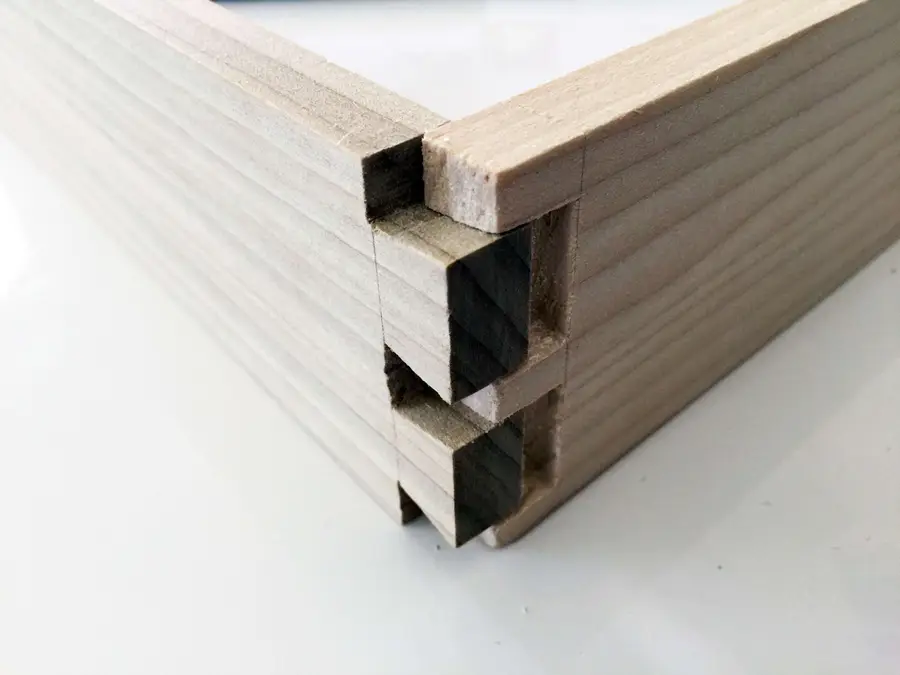
There are plenty of helpful videos on this subject, but I find guides with pictures to be useful with a project like this. I’ve added a lot of close ups for each step so the pictures should help guide you. 1 – Determine which piece of wood will be the tail board and which will

Continue Reading

howchoo

 467 guides

Introducing Howchoo, an enigmatic author whose unique pen name reflects their boundless curiosity and limitless creativity. Mysterious and multifaceted, Howchoo has emerged as a captivating storyteller, leaving readers mesmerized by the uncharted realms they craft with their words. With an insatiable appetite for knowledge and a love for exploration, Howchoo’s writing transcends conventional genres, blurring the lines between fantasy, science fiction, and the surreal. Their narratives are a kaleidoscope of ideas, weaving together intricate plots, unforgettable characters, and thought-provoking themes that challenge the boundaries of imagination.

Home Interests RetroPie

RetroPie scrapers: what they are and how to use them

Wait, which game is this?
howchoo   (467)
September 29, 2023
8 minutes

Share

You’ll Need 1

What you’ll need
Interests
Series
Howchoo is reader-supported. As an Amazon Associate, we may earn a small affiliate commission at no cost to you when you buy through our links.
Posted in these interests:
pi • 92 guides
retrogaming • 29 guides
retropie • 17 guides

You’ve put so much work into setting up RetroPie or EmulationStation. You load it up with legally obtained ROMs only to find that custom theme you installed—you remember, the one from my RetroPie themes guide—has a big blank spot for box art!

The Best RetroPie Themes (And How to Install Them)
You deserve some personal flair!

build your own raspberry pi retro gaming rig

RetroPie: Build Your Own Raspberry Pi Retro Gaming Rig
How to install (and use) RetroPie!

How can we fill in this information for all of those ROMs?

That’s where a process known as scraping comes in. To tackle this problem, you’ll need something referred to as a scraper.

1 – What is scraping?

While playing games may be the ultimate goal of running RetroPie or Emulation Station, there’s still something to be said about a well made user interface. When you select your ROMs, seeing the box art and game information adds a clean, professional touch.

The additional box art and info is referred to as metadata. The process of putting this metadata onto your Pi is called scraping. In this guide, we’ll take a closer look at a scraper and how to use it to put metadata on your RetroPie.

2 – How it works

Scraping pulls metadata for your ROMS from the internet and integrates it with your list automatically. As long as you have a connection to the database, updating your collection is as easy as pressing a button.

One of the easiest scrapers to use with RetroPie is already built in to the system. The RetroPie scraper can be accessed from the main menu under the option labeled “Scraper”.

3 – How to use the built in Scraper

By default, the ROMs will be synchronized with metadata from TheGamesDB.net. To synchronize your ROM list, choose “Scrape Now”. There are several options you can adjust throughout the syncing process. For example, you can synchronize specific systems or choose to include ratings.

The amount of time this process takes depends on several factors including your list of ROMs, its size, your internet connection speed, and abstract forces in the universe that occasionally act at random against electronics when you want to do something fun.

If it seems to take a while, leave your Pi overnight to finish synchronizing the information.

4 – Third party scrapers

Some users prefer to use third party scrapers to pull their information. These scrapers need to be manually installed. Here are a few common scrapers with installation instructions.

Sselph’s Scraper

[Official Installation Instructions] – Steven Selph’s Scraper is an easy to use third party scraper. It’s not hard to setup and can be a fast way to scrape metadata to your RetroPie.

Skyscraper

[Official Installation Instructions] – Skyscraper is a highly customizable option with an interesting level of depth in the kind of information it scrapes. It was created by Lars Muldjord. This scraper is one the most versatile and regularly maintained scrapers available for the RetroPie.

5 – Troubleshooting common scraper issues

Slow Synchronization Time

If you’re using the default scraper, this is a commonly heard of side effect. The database has been known to experience intermittent downtime. However, you may want to investigate additional factors that may be affecting your internet connection speed.

No Database Connection

The first thing you need to check is your internet connection. Verify your Raspberry Pi is connected to your network. Ensure the Pi is able to reach the internet. If it can’t, make sure other devices on the network aren’t having a similar problem.

If you’re using the default scraper, you may just need to try again later.

Low Res Artwork

The database you pull metadata from is responsible for the quality of artwork. If you’re not happy with the results, you may want to experiment with a different scraper.

NEXT UP

How to Run a Minecraft Server on the Raspberry Pi

A whole world trapped inside your Pi.
howchoo   (467)
December 7, 2023

There are several ways to go about running a Minecraft server on the Raspberry Pi. In this guide, I’ll cover how to install Nukkit—a cross-platform Minecraft server that’s super easy to set up on the Raspberry Pi. This server should work with PCs, consoles, and tablets running Minecraft 1.14. I’ll be using a Raspberry Pi

Continue Reading

howchoo

 467 guides

Introducing Howchoo, an enigmatic author whose unique pen name reflects their boundless curiosity and limitless creativity. Mysterious and multifaceted, Howchoo has emerged as a captivating storyteller, leaving readers mesmerized by the uncharted realms they craft with their words. With an insatiable appetite for knowledge and a love for exploration, Howchoo’s writing transcends conventional genres, blurring the lines between fantasy, science fiction, and the surreal. Their narratives are a kaleidoscope of ideas, weaving together intricate plots, unforgettable characters, and thought-provoking themes that challenge the boundaries of imagination.

Home Interests Supernote

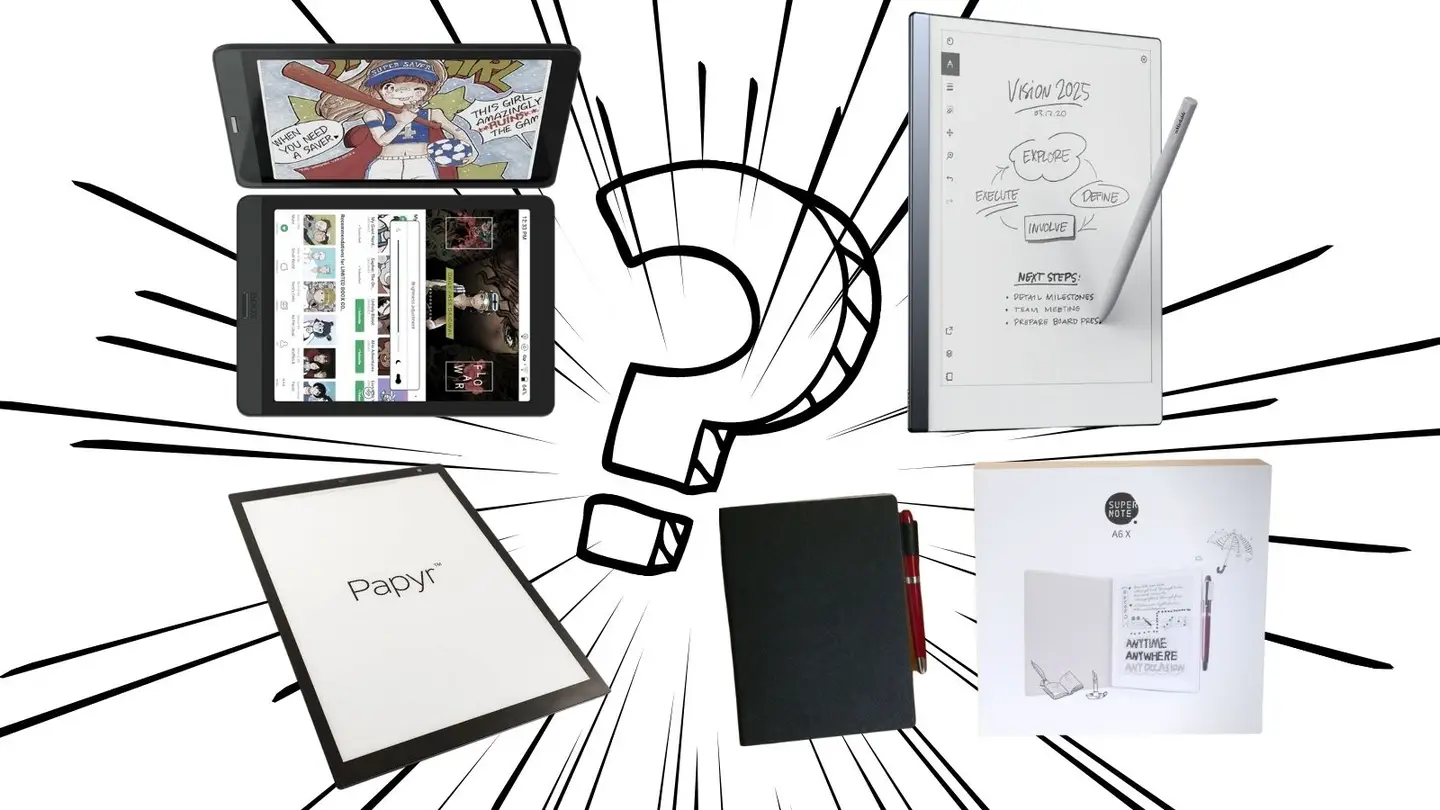
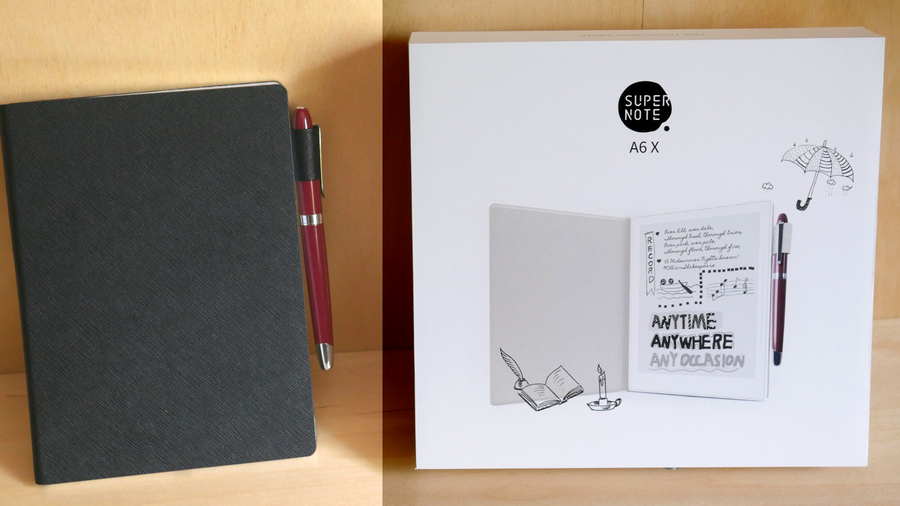
Ratta Supernote A6X and A5X: A Comprehensive E-ink Device Overview

The Supernote is the best e-ink device around, this guide explains why.
howchoo   (467)
September 29, 2023
44 minutes

Share

You’ll Need 2

What you’ll need
Interests
Howchoo is reader-supported. As an Amazon Associate, we may earn a small affiliate commission at no cost to you when you buy through our links.
Posted in these interests:
e-ink • 5 guides
supernote • 5 guides
technology • 20 guides
writing • 3 guides

⭐⭐⭐⭐⭐
OUR RATING: 5/5

In the 1970s, Nick Sheridon made a breakthrough while working at Xerox’s Palo Alto laboratory. By suspending special spheres, mere micrometers in size, within an oil bubble inside a sheet of silicon, electrical voltage could then be applied to decide whether the black side of the sphere or the white side faced up. This allowed the spheres to create a black or a white pixel and, from this, a new revolution in electronic paper technology was born.

Electronic paper (Side view of Electrophoretic display). By FREEscanRIP

Well, not quite. Electronic paper remained a relative specialty item due to the fast evolution of LCD and other screen technology. As demand for those technologies rose, the price for consumers dropped, and it never seemed worth it for companies to dive deeply into the world of electronic paper. Still, the technology did continue to evolve.

An example of old-school electronic paper technology.

In the 1990s, researchers at MIT made a breakthrough that allowed for higher resolution images through a new suspension technique. This led to the creation of the E Ink Corporation and the rise of the technology that’s now ubiquitous with devices like Amazon’s Kindle. E-Ink is a household name even for those who don’t own an E-Ink device, and as its popularity grows the technology behind it evolves at ever-increasing speeds.

Health and E-Ink

In a traditional computer, screen light is emitted out of the screen into the viewer’s eyes. With E-Ink, ambient light is reflected off the screen in much the same way that it would be with a piece of paper.

There’s some evidence that suggests that reading on bright light-emitting screens causes problems for concentration and increases eye-strain, a problem solved by electronic-ink devices. In a world increasingly beset by screens, any improvements that could lead to healthier screen technology are welcome.

The Evolution of the notebook

Amazon’s Kindle has become a common device, promoted by the retail and media giant as the central nexus from which to access the whole range of Amazon services. There are other excellent contenders, such as the Kobo or Onyx brands of e-readers, both of which are arguably superior to Kindle in terms of design. But, until recently, e-ink devices capable of doing more than displaying text (with some very crude note-taking) have been in short supply.

A market is quickly growing, however, for e-ink journal replacements, devices capable of handling your pen-on-paper workflow but with all the added benefits of an electronic device baked in. Early devices produced crude pixelated perversions of handwriting, suitable for only the most elementary note-taking. But the potential existed, if untapped, for so much more. And that’s where we discover that spunky up-and-comer, Ratta, a Chinese company making big waves in the e-ink market through its Supernote series of e-ink devices.

Note
Supernote was kind enough to send me a free A5X for review. However, I was a fan long before that, and my reviews of their products are completely my own opinions.

1 – Enter the Ratta Supernote

Ratta’s Supernote has some super features.

There are several great e-ink devices now on the market, a few of which have taken the capabilities of the hardware to exciting new dimensions. Limitless paper, team integration, and a paper-like writing experience are only some of the advances being made — color displays are now on the market, an explosive event for the e-ink community which has largely operated only in black and white.

What to look for in an e-ink device

When I went looking for an e-ink device, I spent months researching the contenders on the market. I knew that a few things mattered to me:

  • I wanted a paper-like, not a glassy, writing feel. I love writing by hand so if it felt the same as writing on the surface of my iPad, I might as well just stick with the paper journal.
  • It should be able to tackle some basic tasks beyond note-taking. I’m an active academic and student, and I need to be able to read .pdf files and e-books for my various projects.
  • It needed to be able to handle typing as well as handwriting. Ideally, the device could become my go-to travel companion and, alongside my phone, would fulfill all my technology needs.

I figured that finding a device capable of handling all of these would be impossible, and had nearly settled on an entirely different device when the Supernote A6X drifted into my attention sphere.

An e-ink device that does it all… with a great service team?

Ratta is a small e-ink company just getting off the ground. Without the same sort of pre-existing infrastructure as some of the bigger companies, or the clever marketing of devices like the ReMarkable, the Supernote lived in the background of my searches, never quite making it into the top line-up. And then I happened to look closer.

  • A screen with a “textured writing feel”?
  • Can handle .PDF files, Microsoft Word, and e-books?
  • Support for layers when drawing?
  • Pressure sensitivity?
  • Customer support that responded within hours to most support needs, bug reports, and even feature requests — a company that honored feature requests within a reasonable monthly time-frame?

The more I learned, the more I felt flabbergasted that Ratta hadn’t dominated the market. But, of course, their new line of “X” brand devices had just become realized. These devices deviated from their previous reliance on Linux architecture and were built on a customized Android suite to provide a greater range of integration possibilities.

To byte or not to byte?

Ratta’s warranty and extremely limited return options stymied me for a time. I had no way of testing the device before I made a final call. If I opened the box, that would be it. I’d either have to resell on my own or stick with my purchase. Finally, a review by MyDeepGuide swayed me—it was for an earlier model, but the positive points were extremely compelling. I bit the line.

Month by month, the improvements climb!

I first received my Ratta Supernote A6X just after release, and it felt a little like a device participating in a public beta. Some of the features I felt most excited by, like the Microsoft Word integration, were “in development” and the Supernote could not yet hook up to a Bluetooth keyboard for typing. But, as of 2022, Ratta has transformed its product into one of the most powerful E-ink devices on the market.

It’s vital to look for only recent reviews for the Supernote, since older reviews are going to be wildly out of date. The Supernote team delivers monthly updates that dramatically improve existing performance, fine-tune features, and add entirely new features as well.

And yet, even in its earliest release state, my new Supernote proved competent when it came to its most basic function: note-taking by hand. The build quality, plain and wonderfully solid, captured my attention as well, and pretty soon the Supernote became a daily part of my workflow. As did a steady back and forth communication with the Supernote customer service and engineering team via the Supernote Reddit forum. I constantly updated them on bugs and the features I most wanted, and they kept me and the community in the know regarding their development process.

These days, connecting with a company’s customer service arm feels like some sort of bizarre psi-ops exercise, a prelude to a Cold War-era interrogation. But with Ratta, it felt like being an extended part of the team. The folks in charge wanted to know what worked for us and continually sought to communicate all their decisions and processes to us as they went.

When they took a week off for holidays, users in the forums cheered and sent them wishes for a happy vacation. It felt less like being part of a capitalist mechanism and more like being part of a cooperative project in something that mattered. Sure, they were producing something we valued, but we were also invited to take part in that process of creation, afforded the choice to make ourselves honestly heard.

Now, after owning the Supernote A6X for some time, I find myself using it for everything. It’s become invaluable for my job, my scheduling, even my weekly Dungeons&Dragons game. And, even well after its initial release, the team is still hard at work improving the software even further. That’s the sort of pride in workmanship that gets my attention. With the arrival of my review copy of the A5X, I can safely say that Supernote remains a vital part of my daily scaffolding and Deep Work productivity system.

2 – Ratta Supernote hardware

Comparing the Supernote A5X and A6X – the best e-ink devices.

The X-series of Supernote comes in two sizes, the 7.8-inch A6X or the 10.3-inch A5X. There is an important difference between them in terms of technology, however, not just size.

Supernote A6X

Screen technology

The older A6X uses a glass HD Carta screen to keep the costs down, which is more prone to breakage. That said, the cushioning of the soft film technology overlaying the A6X makes accidental damage far less likely than it would be for a device with a glass front exposed to the world. I own an A6X and use it regularly without feeling any concern for its safety, but there’s no doubt that the newer Mobius technology is a surefire way to ensure the longevity of your device.

Battery

The A6X uses a 2900 mAH battery which provides around 4 days of battery life, at around two hours of use per day (always on). Note that Supernote continues to optimize their devices, and battery life displays regular improvements. Battery life will go down significantly if the device is being used for extended daily note-taking. Under these circumstances, a “top-up” every day or two will be needed. Luckily, the device charges to 80+% in about a half-hour.

Connectivity

Bluetooth 5.0, Wi-Fi 5Ghz, and USB-C.

Stylus

The stylus is another place where things get exciting for Supernote owners. There are two main options for stylus technology when it comes to the Supernote, either the LAMY pen (which Ratta has partnered to provide) or Ratta’s ceramic pen nib. The writing-feel for both is excellent, but the ceramic nib has the benefit of never wearing down and the LAMY pen has a clever “erase” button built into the shaft, making it incredibly intuitive to erase mistakes while working.

Case

The outer design of the Supernote is clean and simple, even a bit blocky, but I find it refreshing in a world of tech aesthetics that too-frequently slides into the garish or unwieldy. There are a couple of powerful aspects of the deceptively simple design that allow for great functionality, however. The first is the slide-and-lock mechanism that connects the Supernote’s outer folio cover to the device itself. The folios that Supernote offers are sleek and classy and provide a nice layer of additional protection for the main body of the device. It also allows the Supernote’s auto-sleep function to work; whenever the folio is closed, the screen automatically turns off and the device is placed into standby mode.

Finally, there’s the control bar on the Supernote’s face. This is a powerful tactile innovation whereby the user can control some of the basic elements of the Supernote simply by sliding their thumb up or down the groove. By sliding up, the screen quickly refreshes, eliminating any ghosting effect (a condition with e-ink screens where weak afterimages from old screens can remain behind a new screen. In other e-ink devices, the process of refreshing to avoid this can be clunky, but the Supernote makes it a breeze). By sliding down, the main context menu of the Supernote is accessed, allowing the user to quickly switch notes as needed, navigate to folders, or open programs like email or Kindle.

Supernote A5X

Screen technology

The newer and larger A5X uses a relatively new type of electronic paper display (EPD) called Mobius. Mobius is a flexible display technology with a couple of large benefits over hard glass counterparts, the first and foremost being its extreme resistance to damage via impact. Where a glass screen might crack with an impact, a Mobius screen will only flex. This type of screen is also much lighter than other designs, thereby creating a much lighter device overall. Like the A6X, the A5X feature’s Ratta’s signature “soft film technology” which creates resistance while writing.

Battery

The A5X uses a 3800 mAH battery, which should provide a battery life of 4+ days, given the estimates experienced from the A6X.

Connectivity

Bluetooth 5.0, Wi-Fi 5Ghz, and USB-C.

Stylus

WACOM G14 with 4096 levels of pressure sensitivity. The stylus is another place where things get exciting for Supernote owners. There are two main options for stylus technology when it comes to the Supernote, either the LAMY pen (which Ratta has partnered to provide) or Ratta’s ceramic pen nib. The writing-feel for both is excellent, but the ceramic nib has the benefit of never wearing down and the LAMY pen has a clever “erase” button built into the shaft, making it incredibly intuitive to erase mistakes while working.

Case

The case design and technology for the A5X is undeviated from the A6X. Aside from size and the type of screen technology itself, the bodies of the two devices are nearly identical.

3 – Software and firmware of the Ratta Supernote A6X and A5X

Supernote offers two devices sized packing the same great software.

I’ve already mentioned some of the things that the Ratta Supernote can handle, but there’s so much more detail to explore.

Operating system

The old Supernote devices ran on a Linux-base that provided powerful functionality at a low overhead in terms of hardware needs. The X-series changed that with a shift to a custom OS that Ratta has named Chauvet.

What is Chauvet?

Chauvet is based on Android and therefore allows for easier integration to the already-existing host of Android programs, like Kindle and Microsoft Word. This necessitated an increase in hardware for the X-series and a corresponding jump in cost, but the added functionality more than makes up for that. Within a few years, there may be only one name in the worldwide e-ink device market: Ratta’s Supernote. Read on for a comprehensive overview of the various main software functions that the X-series Supernote provides.

Microsoft Word

It’s exciting enough to be able to access Microsoft Word on a device like the Supernote, an area where comparable devices like the ReMarkable have failed to apply any attention. But the software functionality extends beyond simply being able to type into a Word Document. In a Word document, the user can manipulate the text directly using their stylus to execute traditional proofreading marks!

For example: striking through text with the pen creates a strike-through in the Word file. This is a major focus for Ratta’s design ideology, which seems to be all about redefining how technology functions—doing away with many of the traditional file structure and access systems in favor of creating new interfaces that improve intuitive user access.

Dropbox Integration

Supernote offers two primary forms of software backup and cloud integration: their own Supernote cloud service with servers based in Japan, or through Dropbox integration. The latter is inspired, not only because it makes users comfortable to use a known system for their data, but because Dropbox so easily integrates with the vast majority of common software currently in use elsewhere. That said, Ratta’s own cloud offers a massive amount of storage space for users’ notes.

It’s wonderfully easy to transfer Word files and PDFs back and forth between the Supernote and my laptop, making it possible to secure the safety of my work easily and access whatever I need, no matter where I am (if I have a Wi-Fi connection).

PDF Reading

Speaking of PDFs, the Supernote handles them swimmingly, especially since the February 2021 update that allows for pinch-to-zoom functionality. With my Supernote A6X, the small screen size makes reading PDF files in their native size difficult, but with the new zoom functionality, I can handle reading and annotating full-size PDFs easily.

Note-taking

Note-taking is one of the fundamental points for buying this device. It works great as an e-reader, too, but there are cheaper options on the market if reading is all you care about. Not only do I feel that the writing experience is extremely favorable when compared to writing on a device like the iPad, but I’m also impressed with the range of tools and software capabilities that the Supernote offers.

Everything from different pens and markers to a lasso-select tool, to supporting multiple layers within a note file (great for artists). The one downside I will note is that the handwriting, when exported to PDF and printed out on full-size paper, tends to look pixelated and chunky. This is something that the Supernote team is aware of, however, and has promised to investigate. With another company, this promise might feel suspect, but Ratta has consistently shown itself to be dedicated to improving the capabilities of its devices, making me feel sure that somewhere down the road the notes I print from my Supernote will look clean and sharp. For now, it still looks great on my Supernote’s screen.

Supernote’s Kindle Integration

I’ve mentioned the Supernote as an e-reader already, and this is an important aspect of the device to consider. While there are other dedicated e-readers out there that offer some features specific to reading on an e-ink screen (such as a backlight), the Supernote handles reading eBooks well, even in just its native e-reader application.

A library of books

The thing about having an e-reader, though, is the ease of accessing a vast library of content. If it’s difficult to add books to your e-reader, it removes some of the usefulness of the device. The Supernote comes with full Kindle integration, and that changes everything. Not only is Kindle a known and excellent e-reading application, but it also provides access to the whole wealth of the Kindle store infrastructure. You can purchase books and have them sent directly to the Supernote, or even connect your local library through Overdrive or Libby’s Amazon integration (allowing you to borrow available e-books and read them on your Supernote at your leisure).

Future software and support

Okay, but what else can the Supernote do? For the price, is it worth it? Well, considering the dual superb capabilities of e-reader and pleasing writing experience, I’d already say “yes.” Supernote, however, is all about continued design and evolution. They even stress this directly in their promotional materials. If you purchase one of their devices, you’re not just getting the device itself, you’re getting monthly firmware updates and continued compatibility updates.

To date, the Supernote team has been working on several advanced integrations including Google Drive, different productivity and calendar applications, note-taking software such as Obsidian, and e-reading software that completely bypasses the Amazon Marketplace (such as native Overdrive and Libby support rather than as passed-through Kindle).

4 – Final thoughts

Supernote has a great Reddit community space.

Ultimately, this is what has impressed me most about Ratta and the Supernote team: their ideology and methodology seem entirely different from almost any other technology company I’ve encountered. Their engineers frequently communicate with the wider community through the Supernote Reddit, and they take the feedback they get very seriously — they even go out of their way to elicit that feedback for major design changes.

Every other company I considered when looking into an e-ink device proved to have somewhat substandard customer support. Supernote did away with “customer support” altogether and dove straight into the creation of a “user community” within which the Supernote engineers and marketing staff are constantly involved. Through this community, Supernote not only provides support but actively helps users engage with each other, the team behind the device, and the features of the device itself. Am I impressed? You bet I am. I also bet that Supernote is poised to dominate the e-reader and e-ink-note-taker environment if they continue to maintain this level of commitment to design improvement and user-base interaction.

Also, for those of you desperately wishing for a writing experience like the ReMarkable, which boasts a true “paper-like” writing experience… Ratta has plans in that direction as well, so hold on to your hats. At some point in the future, all your e-ink needs could be handled by Ratta and Ratta alone.

If you’ve been on the fence so-far, I highly recommend you give the Supernote A5X or Supernote A6X a try!

NEXT UP

How to Set Up Quick Connect on a Synology NAS

Get Synology’s powerful Quickconnect running in minutes on your NAS!
howchoo   (467)
November 24, 2023

Synology is one of the most popular creators of Network Attached Storage devices on the market today, and for great reason — they’re really good at what they do. They consistently make devices that stand the test of time and feature top-notch software that makes the process of running a home server as easy as

Continue Reading

howchoo

 467 guides

Introducing Howchoo, an enigmatic author whose unique pen name reflects their boundless curiosity and limitless creativity. Mysterious and multifaceted, Howchoo has emerged as a captivating storyteller, leaving readers mesmerized by the uncharted realms they craft with their words. With an insatiable appetite for knowledge and a love for exploration, Howchoo’s writing transcends conventional genres, blurring the lines between fantasy, science fiction, and the surreal. Their narratives are a kaleidoscope of ideas, weaving together intricate plots, unforgettable characters, and thought-provoking themes that challenge the boundaries of imagination.

Home Interests Node

How to Increase the File Watcher System Limit in Node

howchoo
howchoo   (467)
September 29, 2023
5 minutes

Share

Interests
Posted in these interests:
node • 1 guides
sysadmin • 1 guides

This short guide will show you how to increase the system limit for file watchers in NodeJS.

1 – Why do I see this ENOSPC file watch limit error?

When using node to watch a project with something like nodemon, there will usually be an error like ENOSPC: System limit for number of file watchers reached...

This is due to system defaults and this limit can easily be increased with a few simple commands.

This can occur when trying to start up any kind of project that watches files for things like hot reloading as well as any piece of software that would want to keep watch on files to detect changes and take actions based on those changes such as Visual Studio Code.

2 – Increase the limit

“Visual Studio Code is unable to watch for file changes in this large workspace” (error ENOSPC)

When you see this notification, it indicates that the VS Code file watcher is running out of handles because the workspace is large and contains many files.

The current limit can be viewed by running cat or, even better, bat which as they say themselves, [bat] A cat(1) clone with wings which just means it has auto syntax highlighting, better output formatting in general, is available on Docker, Mac OSX and basically all flavors of Linux.

$ cat /proc/sys/fs/inotify/max_user_watches
# returned value:  8192

The limit can be increased to its maximum (524288) by editing /etc/sysctl.conf and appending this line to the file.

fs.inotify.max_user_watches=524288

You can do by opening up your favorite text editor and adding the line or by running:

$ echo 'fs.inotify.max_user_watches=524288' | sudo tee -a /etc/sysctl.conf

The value appended will be printed to the console if the append worked.

The new value can then be loaded/sourced by running:

$ sudo sysctl -p

This should be the only time you have to do this until you have to set up a new system again.

3 – Bonus: Sync VS Code Settings

We’re going to save you some time here. Definitely sync your VS Code settings across your computers to save you big time in the end!

How to Sync VS Code Settings Across Your Machines
It’s your setup, wherever you are…

howchoo

 467 guides

Introducing Howchoo, an enigmatic author whose unique pen name reflects their boundless curiosity and limitless creativity. Mysterious and multifaceted, Howchoo has emerged as a captivating storyteller, leaving readers mesmerized by the uncharted realms they craft with their words. With an insatiable appetite for knowledge and a love for exploration, Howchoo’s writing transcends conventional genres, blurring the lines between fantasy, science fiction, and the surreal. Their narratives are a kaleidoscope of ideas, weaving together intricate plots, unforgettable characters, and thought-provoking themes that challenge the boundaries of imagination.

Home Interests Minecraft

Best Quality of Life Mods for Minecraft (Fabric)

Fabric mods that improve Minecraft’s gaming experience!
howchoo   (467)
September 29, 2023
17 minutes

Share

Interests
Posted in these interests:
READY PLAYER 1
gaming • 85 guides
Minecraft is an epic sandbox video game developed by Swedish game developer Mojang Studios.
minecraft • 66 guides
minecraftfabric • 8 guides

Chances are, if you’re reading this, then you’ve played Minecraft long enough to realize that there are some features that are lacking from the vanilla game. This guide will go through quality of life fabric mods available for Minecraft that either improve or add new features and tweaks. They each will make gameplay smoother and more enjoyable! So whether you’re hosting a survival multiplayer server or you’re playing alone, you’ll find something below for any type of Minecraft player!

If you’re interested in more mods for Minecraft, check out the Minecraft Forge interest!

Note that the game versions available may change since the time of publishing. Most photos were taken using BSL Shaders and Optifine in 1.16.5.

1 – Enchantment Descriptions

By DarkhaxDev

Game Versions: 1.12, 1.14, 1.15, 1.16, 1.17

This mod is perfect for those of us who aren’t familiar with enchantments. The Enchantment Description mod enables players to see a description of an enchanted book. Pair it with REI to enable players to see any enchantment description they want!

2 – WTHIT

By badasintended

Game Versions: 1.16, 1.17

This incredibly useful mod shows in game tooltips with information on the block or fluid the player is looking at! WTHIT also has an API for other mods to add information about blocks.

3 – CleanCut

By Rongmario

Game Versions: 1.15, 1.16, 1.17

This mod does exactly what the name sounds like. CleanCut allows you to hit mobs that are behind grass, flowers, saplings, and other obstructions! Bonus: It works for Forge too!

4 – Mod Menu

By ProspectorDev

Game Versions: 1.14, 1.15, 1.16, 1.17

This is a mod for mods. It installs a searchable menu for installed mods that can also be sorted. Mod Menu shows links to a mod’s homepage and issues, as well as its description!

5 – Better Biome Blend

By FionaTheMortal

Game Versions: 1.12, 1.16, 1.17

This mod does just as the name implies. It blends together the biome blocks to make the world seem more connected, rather than chunks just put together. It has little effect on game performance, so don’t be afraid to add it to a server’s modpack!

6 – Controlling for Fabric

By Jaredlll08

Game Versions: 1.14, 1.15, 1.16, 1.17

The downside to having mods on a server is the key binds. Save yourself and your players the time and use Controlling which adds a search bar for key binds and allows you to find conflicting keys.

7 – RandomPatches

By TheRandomLabs

Game Versions: 1.15, 1.16

This mod is very non-intrusive compared to others. It doesn’t change anything visible to players, but it does make changes for things otherwise hard-coded into Minecraft. Patches include higher connection read timeout, changing the maximum player speeds, boat buoyancy, and allows mobs to cross rails.

8 – Roughly Enough Items

By sheaniel

Game Versions: 1.14, 1.15, 1.16, 1.17

The quintessential tool for a modded server. Not only does Roughly Enough Items (REI) display a directory of items in the world, it also shows how to craft those items. You can search by item or mod name (or both together), plus you can exclude search terms!

9 – Sit

By bl4ckscor3

Game Versions: 1.14, 1.15, 1.16, 1.17

This mod does exactly as the name entails. Sit allows players to sit on slabs and stairs as if they were chairs!

10 – Cosmetic Armor

By Apace100

Game Versions: 1.12, 1.14, 1.15, 1.16

The Cosmetic Armor mod enables players to have more than one set of armor on. One set is for function, while the other is purely cosmetic. It also allows you to hide your armor while still maintaining their effects.

11 – Trinkets

By EmilyPloszaj

Game Versions: 1.14, 1.15, 1.16, 1.17

This mod adds slots for various accessories and mods that add extra armor or tools. It’s neccesary if a server has mods with effect-causing items that the player can equip.

12 – Advancements Enlarger

By shedaniel

Game Versions: 1.15, 1.16, 1.17

Just as the name suggests, this mod increases the size of the advancement window. It also has a dark mode!

13 – Inventory Sorting

By Kryptonaught

Game Versions: 1.14, 1.15, 1.16, 1.17

A perfect mod to help keep chests and inventory organized. Using either a key-bind, the middle mouse button, or the UI button, everything will pop right into an organized state!

14 – Diggus Maximus

By Kryptonaut

Game Versions: 1.14, 1.15, 1.16, 1.17

This is a vein mining mod which allows players to mine identical blocks near each other. It’s easy to use and configure for server admins who want to specify which blocks this mod can be used on!

15 – Can I Mine This Block?

By shedaniel

Game Versions: 1.16, 1.17

This is a mod for those who love HWYLA (Here’s What You’re Looking At). It adds in information to the tooltip on the mining level and the effective tool for blocks.

16 – Couplings

By HeckinChloe

Game Versions: 1.14, 1.15, 1.16, 1.17

Couplings adds the simple, yet game changing, feature of doors, trapdoors, and fence gates opening and closing together!

17 – Better F3

By cominixo

Game Versions: 1.16, 1.17

This mod makes the original Minecraft HUD more readable and customizable. Players can change coloring, position, spacing and more!

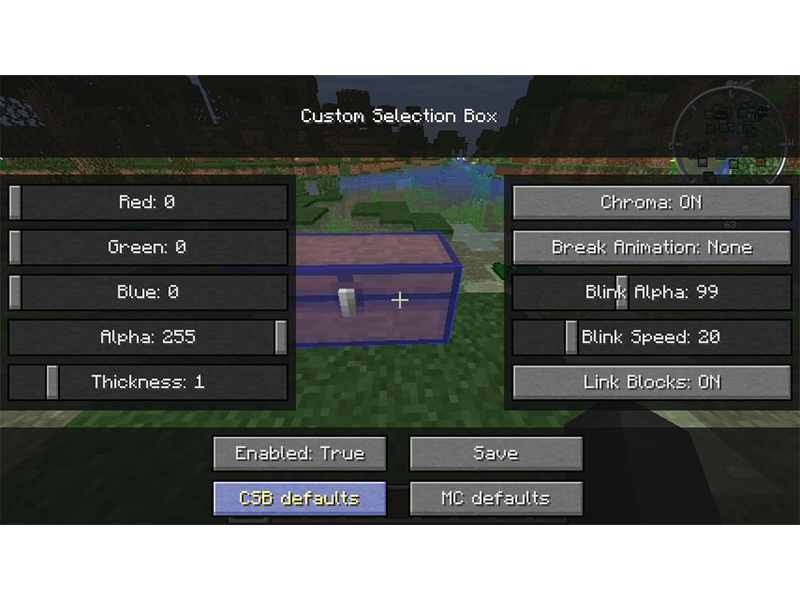
18 – Custom Selection Box

By shedaniel

Game Versions: 1.12, 1.14, 1.15, 1.16

While Minecraft has accessibility settings, they don’t let you customize the selection boxes around blocks. Whether you need or want to, Custom Selection Box lets you choose a variety of settings to make things easier to place, destroy, or edit.

19 – Tool Stats

By DarkhaxDev

Game Versions: 1.15, 1.16, 1.17

This mod adds information about a tool to the tooltip when you hover over them inside the inventory. Tool Stats very helpful when trying to compare different tools or weapons within the game for harvest level, mining efficiency, and enchantability.

20 – Elytra Trinket

CurseForge

By TheIllusiveC4

Game Versions: 1.16, 1.17

The annoying part about having elytra in the vanilla game is that it takes up your chestplate slot. With this mod, however, that problem disappears! This adds a back slot to the player inventory just for the elytra to be placed!

21 – Dark Loading Screen

By Neecko5b84

Game Versions: 1.14, 1.15, 1.16, 1.17

This is a must-have mod no matter if it’s for a server pack or single player game. It turns the loading screen dark and the colors can even be configured through Mod Menu if installed as well!

22 – MAmbience

By andre111_

Game Versions: 1.14, 1.15, 1.16

Much like Dynamic Surroundings for Forge, MAmbience adds ambient sound and visuals that depend on the player’s surroundings. Wood creaks, water sloshes, and animal sounds vary based on the time of day.

23 – Antique Atlas

By Hunternif

Game Versions: 1.12, 1.14, 1.15, 1.16, 1.17

There are plenty of other map mods available, but Antique Atlas is so unique I needed to include it. This map is themed for fantasy or medieval worlds with its hand-drawn style. It even has marker capabilities and lets players export the map to an image file.

24 – Advanced Rotten Flesh to Leather

By ThatAlexanderA

Game Versions: 1.12, 1.14, 1.15, 1.16

One of the most annoying resources gathered in Minecraft is rotten flesh. You can’t do anything useful with it, but instead of tossing it out or letting it take up storage, add this handy mod! Using a furnace convert that rotten flesh into useful leather. It also comes with multiple mods, so server admins can decide how easy or hard they want gameplay to be!

25 – Better Dropped Items

By Drylar1

Game Versions: 1.14, 1.15, 1.16, 1.17

This is merely a cosmetic fix, but it’s a cool mod that I felt it needed to be mentioned. Better Dropped Items does as the name says. It adds physics to items thrown or dropped by having them land flat on the ground rather than hovering above it.

NEXT UP

Top 10 Enchantments in Minecraft

howchoo   (467)
March 25, 2024

The longer you play Minecraft, the more you realize that early-game tools just won’t cut it. Exploring the enchantment feature of Minecraft can be exciting, but also intimidating. Rather than worry about researching enchantments, below are the best enchantments in Minecraft! To learn how to enchant items, check out this guide! In this guide, you’ll see

Continue Reading

howchoo

 467 guides

Introducing Howchoo, an enigmatic author whose unique pen name reflects their boundless curiosity and limitless creativity. Mysterious and multifaceted, Howchoo has emerged as a captivating storyteller, leaving readers mesmerized by the uncharted realms they craft with their words. With an insatiable appetite for knowledge and a love for exploration, Howchoo’s writing transcends conventional genres, blurring the lines between fantasy, science fiction, and the surreal. Their narratives are a kaleidoscope of ideas, weaving together intricate plots, unforgettable characters, and thought-provoking themes that challenge the boundaries of imagination.

Home Interests Amazon

Amazon Wedding Registry – Everything You Need To Know

Plan your registry entirely on Amazon!
howchoo   (467)
September 29, 2023
17 minutes

Share

You’ll Need 1

What you’ll need
Interests
Howchoo is reader-supported. As an Amazon Associate, we may earn a small affiliate commission at no cost to you when you buy through our links.
Posted in these interests:
 
amazon • 5 guides

Wedding planning can be stressful, but for many, creating the registry is actually fun. After all, it’s one of the only parts of the wedding where you get free stuff, rather than paying an arm and a leg. In this guide, we’re going to cover everything you need to know to create an Amazon Wedding Registry for your wedding.

In the days of old, you’d have to go to a physical store (like a caveman), register in person, and then take a scanner around and scan the products you want to add to the registry. I’m sure this is still possible, but in the days of Amazon, you can create and manage your registry from your couch. Laziness aside, there’s something like half a billion products listed on Amazon, so you can create a single registry with just about anything you could think of.

What is a registry?

In many cultures, it’s traditional for wedding guests to bring a gift for the bride and groom to the ceremony. And oftentimes, the gift is intended to be something useful for the couple as they’re starting their life together. The wedding registry has developed as a way to organize this process both for the couple and for the guests. A registry is a service provided, usually by a retailer, that allows couples to compile a list of products that can be easily distributed to their guests. This lets the guests know what items the couple need (or desire), and whether or not they have already been purchased by someone else.

Amazon, the world’s largest (by far) online retailer, provides a registry service with a lot of great features that we’ll explore throughout this guide.

How does an Amazon Registry work?

Once you’ve got a registry set up (which we’ll cover later), you can browse Amazon and add products to your registry directly from the product pages. If you happen to want a product that isn’t listed on Amazon, you can still add it using the Amazon Assistant extension.

Once your registry is created, your friends, family, and other wedding guests will be able to browse your registry to easily buy the products you requested. And if the guest purchases the product from Amazon using your registry, the registry is updated, marking the item as “Purchased”, thus avoiding duplicate purchases. So you don’t have to worry about getting 13 toasters!

Why use Amazon for your wedding registry?

Besides the benefits we’ve already mentioned, there are many great Amazon registry features that you can explore here. I’ll also highlight a few of my favorites:

  • You get a one-time discount of 20% off on anything left in your registry after your wedding. That’s kind of huge. You can add big-ticket items that you know your guests might not purchase just to get the 20% off discount.
  • With Amazon, you have everything “all in one place”. This can save a lot of time and effort.
  • Also, most people have a Prime account. So not only is it easier for you, it’s easier for your guests.
  • Oftentimes, guests can’t attend the wedding but still want to send a gift. Again, Amazon is probably the lowest-friction way to facilitate this.

If you’re ready to create your Amazon wedding registry, keep reading. The rest of this guide will show you how to create and manage your registry in only a few minutes.

1 – Sign up for an Amazon Account

Before creating a registry on Amazon, you need an account. While an Amazon Prime account isn’t required to create a wedding registry, if you don’t yet have it, you should see if you qualify for a free Amazon Prime account.

2 – Create a registry

  1. Go to the Amazon Wedding page, and click Create Your Registry.
  2. Sign in, if required
  3. At this point, you’ll be guided through a form to describe your wedding. I won’t list each step here because it’s fairly self-explanatory, and the form is likely to change subtly over time.
  4. Once you’ve completed all of the steps, click Create your registry. Now you’ve got a registry, and you can start adding products!

Tips

Public vs. private registry

During the creation process, you’ll be able to choose whether you want to create a public or private registry. Obviously, you’ll need to set the registry to public in order for guests to see it, but you might want to set it to private while you’re building it. Then when you’re satisfied, you can change privacy settings in the Settings page.

The Settings page offers three privacy options:

  • Anyone can see the registry (public)
  • Only people with the link can see it
  • Only registrants (you and your spouse-to-be)

Also, if you’re using The Knot for wedding planning, you can choose to make your registry searchable on The Knot’s website.

3 – Manage your registry

Add gifts to your registry

If there’s one thing Amazon is good at, it’s showing you products you’re likely to want. When you click Get started, you’re taken to a page with recommended products, and there’s even a Gift Advisor that will help you plan. You can easily add recommended products from this page.

However, you’ll likely want to search for specific products. You can also use the search bar to find products and add them from the product page. Go through the same steps that you would if you’re buying a product, but instead of clicking Add to Cart or Buy Now on the product page, click Add to Wedding Registry below.

View your registry

At any time, if you want to view all of the products in your registry, you can click on the Account dropdown and select Wedding Registry under the Your Lists section. This will take you back to the “Gift Advisor”, and you can click “Your Registry” to see the products in your registry.

Delete items in your registry

From the Your Registry page, find the product you want to remove and click Edit Item. Then click Remove Item.

4 – Share your registry with family and friends

From the “Gift Advisor “ or “Your Registry” page mentioned in the previous step, click “Share” in the top menu. This will take you to a page with sharing options.

Share the registry URL

On this page you’ll find your registry URL. This is a URL that can be sent to friends and family via email, text, or can be included on the invitation.

Change your registry URL

You might notice that the registry URL is long and unattractive. You’ll probably want to change your registry URL to something a little “cuter” 🙂 To do so, click “Change My Link” next to the URL. This will give you the opportunity to use something shorter, easier to read, and easier to share. This is especially important if you’re going to include the URL in a written invitation.

5 – Delete your registry

At some point, you’ll likely want to delete your registry. To do so, you can click “Settings” from the registry page. On this page, you’ll find a number of configurable registry settings, and at the bottom you’ll find a button that says “Delete Registry”.

Click the button, then confirm. Your registry is history!

NEXT UP

How to See If I’m Eligible for Amazon Prime Free Same-Day Delivery

howchoo
howchoo   (467)
November 24, 2023

So Amazon just announced free same-day delivery in 14 different metro areas. How do you know if you apply? 1 – Check your zip code Go to this page. Wait for the page to finish loading completely, scroll down, and enter your zip code. This will tell you if you live in an area that is

Continue Reading

howchoo

 467 guides

Introducing Howchoo, an enigmatic author whose unique pen name reflects their boundless curiosity and limitless creativity. Mysterious and multifaceted, Howchoo has emerged as a captivating storyteller, leaving readers mesmerized by the uncharted realms they craft with their words. With an insatiable appetite for knowledge and a love for exploration, Howchoo’s writing transcends conventional genres, blurring the lines between fantasy, science fiction, and the surreal. Their narratives are a kaleidoscope of ideas, weaving together intricate plots, unforgettable characters, and thought-provoking themes that challenge the boundaries of imagination.

Home Interests Raspberry Pi

Power Your Raspberry Pi Zero with a Battery Using the JuiceBox Zero

howchoo   (467)
September 29, 2023
8 minutes

Share

You’ll Need 8

What you’ll need
Interests
Solder x 1 tube
Howchoo is reader-supported. As an Amazon Associate, we may earn a small affiliate commission at no cost to you when you buy through our links.
Posted in these interests:

DIY

diy • 17 guides
pi • 92 guides

The Raspberry Pi Zero is an incredible tool for building a wide variety of IoT devices. And until lately, many projects I’ve worked on have been limited due to power supply constraints. Then I stumbled across the JuiceBox Zero, a battery management board for the Raspberry Pi Zero. This board provides portable power for your Pi Zero with a Li-Ion single cell battery, as well as charge the battery. In this guide, I’m going to show you how to assemble and use the JuiceBox Zero.

1 – Add GPIO header to your Pi Zero

You can find the full article on raspberrypi.org.

2 – Put the stacking header and standoffs on the Pi Zero

Start by placing the stacking header onto the Pi Zero, then place four standoffs. Make sure the standoffs you use are the same size as the stacking header.

3 – Place the JuiceBox Zero onto the header and secure with screws

Put the JuiceBox Zero in place, and fasten to the standoffs down with screws.

4 – Solder the header to the JuiceBox Zero

Again, refer to the raspberrypi.org video from Step 1 to learn how to solder.

🛈 If you don’t have much experience, practice. And do a better job than I did.

5 – Plug the battery into the JuiceBox Zero

Make sure you use a JST‑compatible, single‑cell lithium‑ion battery.

6 – Cover the Micro USB port on the Pi Zero

When you’re using a JuiceBox Zero with your Pi, you need to stop using the micro usb port on the Pi. Trying to power the Pi Zero directly could damage the Pi Zero or the JuiceBox Zero. So place a USB cover (or kapton) tape over the USB charging port on the Pi.

🛈 You can also use electrical tape.

7 – Turn the power switch on

Now you’re ready to test it out! The JuiceBox Zero comes with a slide switch to power the Pi on or off. Simply slide the switch into the ON position.

8 – Charge the battery

Connecting the JuiceBox Zero to a power supply will both power the Pi and charge the battery. This allows your project to run continuously.

9 – Perform a safe shutdown when the battery is low

The low battery LED will light up when the battery voltage reaches 3.2V. At this time, the GPIO16 pin will go HIGH. So in order to safely shutdown the Pi when the battery is low, we’ll run a script in the background that listens for a rising edge on pin 16, then shuts down the Pi.

So first, use your editor to create a new file called safeshutdown.py in the /home/pi directory. Add the following:

import os
import RPi.GPIO as GPIO

GPIO.setmode(GPIO.BCM)

shutdown_pin = 16 
GPIO.setup(shutdown_pin, GPIO.IN, pull_up_down=GPIO.PUD_DOWN)

def shutdown_callback_function( shutdown_pin ):
    os.system("shutdown -h now")

GPIO.add_event_detect(
    shutdown_pin, 
    GPIO.RISING,
    callback=shutdown_callback_function,
    )

Refer to the JuiceBox Zero Github Repository for more details.

Now, edit the crontab by typing the following in a shell:

sudo crontab -e

And add the following to the end of the file:

@reboot python /home/pi/safeshutdown.py &

This will cause the safeshutdown.py script to run in the background when the system boots. It will listen for a rising edge on pin 16, and then shutdown the Pi safely!

NEXT UP

How to Run a Minecraft Server on the Raspberry Pi

A whole world trapped inside your Pi.
howchoo   (467)
December 7, 2023

There are several ways to go about running a Minecraft server on the Raspberry Pi. In this guide, I’ll cover how to install Nukkit—a cross-platform Minecraft server that’s super easy to set up on the Raspberry Pi. This server should work with PCs, consoles, and tablets running Minecraft 1.14. I’ll be using a Raspberry Pi

Continue Reading

howchoo

 467 guides

Introducing Howchoo, an enigmatic author whose unique pen name reflects their boundless curiosity and limitless creativity. Mysterious and multifaceted, Howchoo has emerged as a captivating storyteller, leaving readers mesmerized by the uncharted realms they craft with their words. With an insatiable appetite for knowledge and a love for exploration, Howchoo’s writing transcends conventional genres, blurring the lines between fantasy, science fiction, and the surreal. Their narratives are a kaleidoscope of ideas, weaving together intricate plots, unforgettable characters, and thought-provoking themes that challenge the boundaries of imagination.

Home Interests Ender 3

How to Upgrade Your Ender 3 Power Supply to a MeanWell PSU

An inexpensive upgrade to make your Ender 3 quieter and safer
howchoo   (467)
September 29, 2023
10 minutes

Share

You’ll Need 4

What you’ll need
Interests
Howchoo is reader-supported. As an Amazon Associate, we may earn a small affiliate commission at no cost to you when you buy through our links.
Posted in these interests:
3dprinting • 36 guides
ender3 • 19 guides

Aside from upgrading your Ender 3 board, upgrading your stock PSU to a Mean Well PSU is one of the best upgrades to make your 3D printer quieter.

Creality Ender 3 Silent Mainboard Upgrade: Better Prints with Less Noise!
Make your Ender 3 quieter and improve your prints with this board upgrade.

In this guide, I’ll show you how to upgrade your Ender 3 to the MeanWell LRS-3500-25 PSU. This is the same power supply used on the Ender 3 Pro.

Why upgrade?

There are several reasons to upgrade your Ender 3’s PSU to a Mean Well:

  • Noise: The PSU fan only runs when needed (usually <20% of the time), meaning a much quieter printer.
  • Safety: MeanWell power supplies are more reliable and safer than the cheap stock unit. They use higher-quality components that provide consistent, clean power with fewer spikes and sags.
  • Reduce bed-leveling issues: By providing consistent power the MeanWell reduces issues with EZABL and other bed-leveling kits related to power ripples and grounding.
  • Compact form factor: The MeanWell PSU is noticeably thinner and more compact than the stock unit; this is especially handy if you’re using an enclosure and want to keep your setup as compact as possible.

1 – Set the correct input voltage

If you forget to do this, you’re going to have a bad time.

Use a flathead screwdriver to slide the input voltage switch to either 115V or 230V, depending on your country. I’m in the US so I switched it to 115V.

You probably know which mains voltage your country uses, but if for some reason you don’t, you can reference this “Mains electricity by country” Wikipedia article.

🛈 I put this step first because forgetting to do this could be catastrophic to both the PSU and your printer!

2 – Print a MeanWell PSU cover

Your MeanWell PSU probably didn’t come with a PSU cover, the bottom portion that holds the AC plug inlet and protects your terminal block from dangerous shorts (and fingers).

Since the MeanWell PSU is smaller than the stock one, the old cover won’t fit; therefore, you’ll need to print a new one. You can find tons of designs on Thingiverse, but I recommend this excellent model from TH3D Studio.

Download and print that model. I was able to print mine standing up without supports. My Ender 3 was more than capable of “bridging the gap” without stringing.

3 – Remove the old PSU

Unplug your printer’s power cable and disconnect the XT60 connector that connects the PSU to your printer.

Then, use an M3 hex key to remove the two front cap screws that secure the stock PSU to your printer’s right Z-axis vertical support.

Finally, set the old PSU aside.

4 – Transfer the AC inlet

Here you can really see how much slimmer the MeanWell PSU is!

We’ll need to disassemble the old PSU and transfer the AC inlet (plug) and wiring to the new MeanWell PSU.

Remove the two M3 screws from the bottom cover. Then, use a Phillips screwdriver to remove the two inlet screws.

Take a photo of the wiring (or reference my photo in the step below). Then, unscrew each screw to remove the 5 wires from the PSU terminal block.

Finally, insert the AC plug inlet into the new PSU bottom cover and secure it using the two Phillips screws.

🛈 I recommend letting the PSU sit unplugged for at least 30 minutes before taking it apart so that the capacitors have time to discharge.

5 – Wire up the new MeanWell PSU

Wire up the PSU the same as the old one. In addition to the photo I took, here’s a handy table I made to help you with your wiring:

MeanWell PSU wiring

FromColorTo
XT60 cableRed+V
XT60 cableBlack-V
AC inletYellowGND
AC inletBlackN
AC inletRedL

6 – Secure the new cover

On the left, my upgraded MeanWell PSU; on the right, the stock Ender 3 PSU.

Route the XT60 cable through the back opening of the MeanWell PSU cover. Slide the cover into place, and secure it using the two M3 screws you removed from the old cover.

7 – Mount the new MeanWell PSU assembly

Fits like a glove!

Mount your brand-new PSU to your Ender 3’s Z-axis support using the same screws that secured the old one.

Reconnect your cables and you’re good to go! Next, check out my Ender 3 mainboard upgrade guide—an upgraded mainboard gives you better prints while making your printer eerily silent.

Creality Ender 3 Silent Mainboard Upgrade: Better Prints with Less Noise!
Make your Ender 3 quieter and improve your prints with this board upgrade.

NEXT UP

How to Update Blender

Get the latest Blender has to offer.
howchoo   (467)
November 24, 2023

Blender is one of the most popular open-source 3D creation suites today. It doesn’t cost a dime to use and everything you create is yours to own for good. The community is robust and the dev team still releases new updates on the regular. If you want to get the latest version, you may have

Continue Reading

howchoo

 467 guides

Introducing Howchoo, an enigmatic author whose unique pen name reflects their boundless curiosity and limitless creativity. Mysterious and multifaceted, Howchoo has emerged as a captivating storyteller, leaving readers mesmerized by the uncharted realms they craft with their words. With an insatiable appetite for knowledge and a love for exploration, Howchoo’s writing transcends conventional genres, blurring the lines between fantasy, science fiction, and the surreal. Their narratives are a kaleidoscope of ideas, weaving together intricate plots, unforgettable characters, and thought-provoking themes that challenge the boundaries of imagination.